

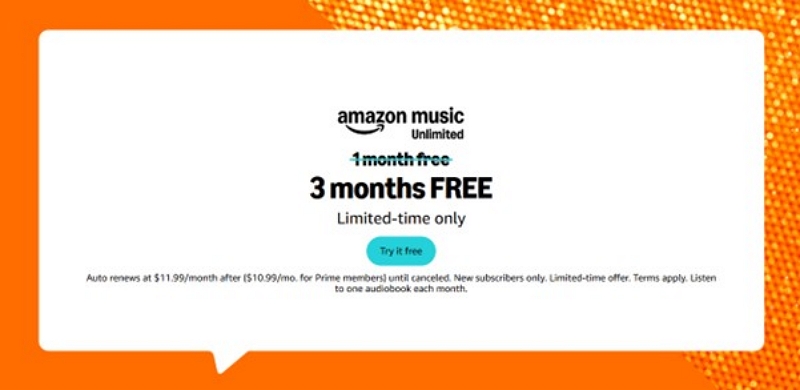
Amazon Music Unlimited offers a vast library of over 100 million songs, ad-free, and on demand. Whether you are a Prime member or just exploring streaming options, Amazon Music frequently promotes free trials that unlock premium features at no extra cost. This 2025 guide explains how to access Amazon Music Unlimited free trials, what benefits you get, and how to make the most of your listening experience - all without spending a single dollar. Finally, we discuss a unique tool that lets you download Amazon Music tracks in MP3 format without the app.
Part 1: What Is Amazon Music Unlimited?
Amazon Music Unlimited is Amazon’s top-tier streaming service, offering full on-demand access that goes far beyond Amazon Music Free and Prime Music.
Key Features
- 100M+ ad-free songs
- HD & Ultra HD lossless audio
- Spatial Audio / Dolby Atmos (select tracks)
- Offline downloads on multiple devices
- Unlimited skips & on-demand playback
- Seamless integration with Echo, Fire TV, and Alexa
Who Is It For?
Amazon Music Unlimited is ideal for users who want the highest audio quality, on-demand playback, and a complete music library—not restricted by the limitations found in Free or Prime tiers.
Difference between Amazon Music Free, Prime, and Unlimited
Before getting the free trial, it helps to understand the differences:
Prime Music offers “more songs” than Free, but still shuffle-only. Unlimited is the only tier with full control and offline downloads.
Part 2: Are You Eligible for the Amazon Music Unlimited Free Trial?
Not everyone will see the same trial length. Eligibility depends on:
✓ 1. Region
- US, UK, Canada, Germany, Japan:30–90 days
- Special promos (Prime Day / Black Friday):Up to 120 or 150 days
✓ 2. Account Status
- You typically qualify if:
- You have never subscribed to Music Unlimited before
- Your payment method (card/PayPal) is valid
- You are logged into the correct regional Amazon site
✓ 3. Device-Based Promos
Buying an Echo, Fire TV, or other select devices may unlock special 3–6-month trials.
Part 3: All Official Ways to Get the Amazon Music Unlimited Free Trial (5 Methods)
You can get Amazon Music Unlimited for free in four different ways.
Method 1: Standard 30-Day Free Trial (Most Users)
Eligibility: First-time Unlimited subscribers.

Steps:
Step 1. Go to the Amazon Music Unlimited page (your region homepage).
Step 2. Click Start Your Free Trial.
Step 3. Confirm your payment method.
Step 4. Trial begins instantly.
Method 2: Device-Based Trial (Echo / Fire TV / Smart Speakers)
Amazon often gives longer freebies (3–6 months) when activating Amazon devices.
Eligibility:
- Must be a new Music Unlimited subscriber
- The device must be activated within the promotion period
These offers appear automatically during setup or on product pages.

Method 3: Seasonal Events (Prime Day / Black Friday / Holiday Sales)
These are the longest trial offers—sometimes up to 120+ days.
Eligibility:
- Must be new to Unlimited
- Promotion available only during special sale periods
- Some offers are region-specific
Method 4. Amazon Music Student Plan Free Trial
Students get:
- 1-month free trial
- 50% off monthly pricing afterward
Eligibility:
- Must verify student status (SheerID)
- Must not have activated past trials

Method 5: Amazon Household / Family Access
With an Amazon Household, multiple profiles sometimes receive targeted trial invitations.
Eligibility:
- Invitation-only
- Only for profiles with no previous Unlimited subscription
Part 4: Step-by-Step: How to Sign Up for the Amazon Music Unlimited Free Trial
Let's see how to sign up for an Amazon Music Unlimited Free Trial.
Step 1. Go to the Amazon Music Unlimited Free Trial Page
Search “Amazon Music Unlimited free trial” in your region.
Step 2. Log In to Your Amazon Account
Ensure you are logged into the region where you want to start the trial.
Step 3. Choose Your Plan
- Individual
- Family
- Student
- Single Device Plan (for Echo only)
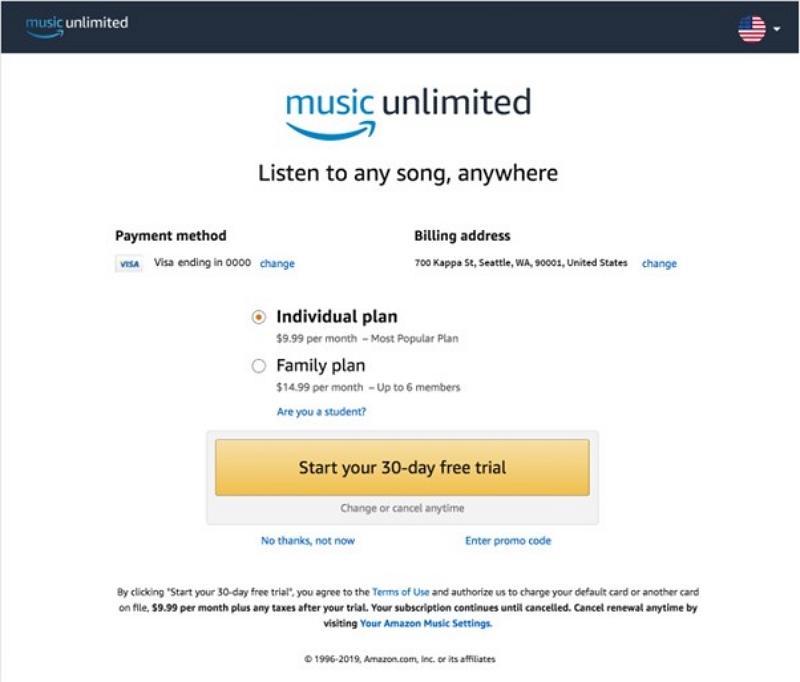
Step 4. Confirm Your Payment Method
Amazon requires a valid card, PayPal, or bank method—even during the free trial.
Step 5. Click Start Your Free Trial
You can start listening immediately.
Important: "You must enable auto-renew to activate the trial."
Part 5. How to Cancel Amazon Music Unlimited Before Your Free Trial Ends
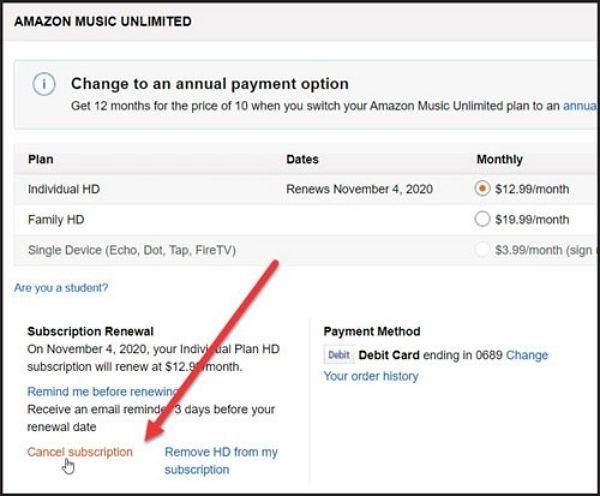
To avoid automatic billing, cancel before the last day of your trial.
Here’s the clear platform-by-platform guide:
What Happens After You Cancel
Here is what happens after you cancel your Amazon Music Unlimited free trial offer.
- You will not be billed for the subscription.
- You can access Unlimited features until the trial period expires.
- Your offline downloads are deleted after cancellation, but the playlists remain in your account.
- Songs remain in playlists but become unplayable.
- Songs purchased individually from Amazon remain available permanently for download and transfer.
- You keep your Amazon profile data
Part 6: How to Extend or Renew Amazon Music Unlimited for Free
Generally, trial offers are valid for a specific period. You cannot extend or renew the trial period. But you can work around the following options and extend your trial offer.
1. Join or split Family Plan with household members.
The Family Plan allows you to add up to 6 names to share a single subscription. Therefore. It does not technically free splitting costs, but makes it relatively free for each person. Besides, each person gets their own login, playlists, and recommendations.
2. Switch Amazon accounts (only if you’re a first-time trial user)
The Amazon Music Unlimited free trial is available only to first-time users. You can create a new Amazon account and subscribe to a fresh trial offer. However, we do not recommend this method because repeated abuse violates Amazon's terms of service.
3. Check Amazon’s promotional pages regularly.
Check Amazon's promotional pages for extended free trials (60 to 90 days) or bundled offers with devices. That can help you renew access without paying subscription fees.
4. Wait for Prime Day / Black Friday to get multi-month trials.
Amazon offers multi-month free trials during Prime Day, Black Friday, and other festive occasions. It is the best chance to extend free access legally.
5. Download Amazon Music Unlimited Tracks.
You can download Amazon Music tracks during the free trial period. Listen to these songs after the free trial ends. However, you must use the Amazon app because these downloads are DRM-protected. You will need to subscribe to Amazon's services, as downloads stop working after your trial period/subscription ends.
Also Read: Why Am I Being Charged for Amazon Music? Understand, Fix, and Prevent Amazon Music Charges
Bonus: Keep Music Offline Legally After Trial Ends
Amazon does not allow you to keep downloaded songs after the trial. However, you can save your playlists in standard audio formats (MP3/M4A) for personal offline use only using tools like Mediaio Audio Converter.
Part 7: FAQs
Depending on the plan you choose, Amazon Music Unlimited lets you play tracks across multiple devices, including smartphones, desktops, smart TVs, and Alexa-enabled devices.
Yes, the free trial includes access to podcasts and non-music content, everything that you would enjoy on an Amazon Music Unlimited subscription.
No. Offline downloads are tied to your specific account/active subscription. Once the trial ends, and you don't continue with a paid plan, the tracks become inaccessible. However, you can resubscribe at any time and continue enjoying the songs, as the playlists remain saved in your account.
Conclusion
Amazon Music Unlimited’s free trial is a great way to experience premium audio, massive song catalogs, offline listening, and spatial audio without paying upfront. By understanding the eligibility, choosing the right trial method, and canceling in time, you can enjoy the full service risk-free.
If you want to keep your favorite playlists after the trial ends, Mediaio Audio Converter offers a safe way to download tracks for personal offline listening anytime and anywhere.