

Whether you're traveling on a long flight, exploring the outdoors, or trying to save mobile data, knowing how to listen to Amazon Music offline lets you enjoy your favorite playlists anytime—no internet connection needed.
Amazon Music is available in multiple tiers, including Amazon Music Prime, Amazon Music Unlimited, and purchased MP3s. However, each option supports Amazon Music offline playback differently. In this updated 2025 guide, we’ll walk you through how to download, play, and even permanently save Amazon Music for true offline listening on various devices.
How Amazon Music Offline Mode Works
The offline mode in Amazon Music allows you to download songs, albums, or playlists for playback without streaming. However, there’s a catch: the downloaded songs are encrypted and playable only within the Amazon Music app itself.
- Amazon Music Prime: Limited offline access with shuffle-only playback.
- Amazon Music Unlimited: Full access to all songs and offline downloads.
- Purchased Music: MP3 format; playable on any device.
Amazon’s offline listening is supported on iOS, Android, Fire Tablet, and desktop apps.
Reddit insight (r/AmazonMusic):
While Amazon Music offers an official “Offline Mode,” many users on Reddit have reported that playback isn’t always smooth when no internet connection is available.
“I was out kayaking this weekend with no signal. Even though I’d downloaded my playlists, Amazon Music just spun and showed ‘no internet connection.’ It felt like the app still needed data to launch.”
—— u/[deleted], Reddit
“Same here on iPhone — downloaded songs wouldn’t start playing on a flight until I restarted the app.”
—— u/Smoothneess, Reddit
And others shared similar frustrations:
“Offline music should be available offline. It’s really basic stuff.”
—— u/TheInf1del, Reddit
“Sometimes it works, sometimes it doesn’t. I’m thinking about switching to another service because it defeats the purpose of downloading.”
—— u/Wimling, Reddit
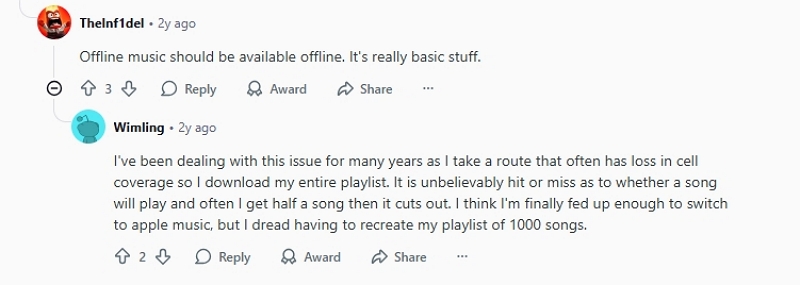
In fact, one user even confirmed with Amazon Support that a recent update may cause the app to check connectivity before launching, even in offline mode. So, before going truly offline (like on a plane or hiking trip), make sure you’ve logged in recently and tested your downloaded playlists.
Keep your Amazon Music app updated and switch to Offline Mode manually before losing connection. This helps prevent “no internet” errors when playing downloaded tracks.
Method 1: Listen to Amazon Music Offline Using the App (Mobile Devices)
Step 1. Open Amazon Music App
Log in with your Prime or Unlimited account.
Step 2. Find the Song / Album / Playlist
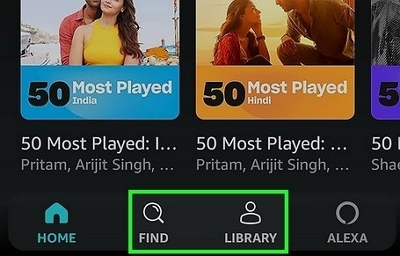
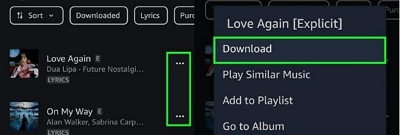
Tap the three dots (⋮) → choose Download.
Step 3. Enable “Play Downloads First”
Navigate to Settings → Playback → Play downloads first.
Step 4. Switch to Offline Mode
Toggle Offline Mode to play without internet connection.
Pro Tips:
- Turn on Stream only on Wi-Fi to save mobile data.
- Select Best Available quality under Download Audio Quality.
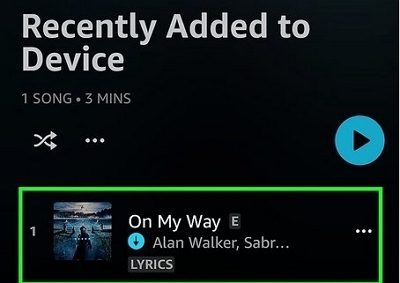
- Access your downloaded songs under Library → Recently Downloaded.
Comparison Table — Offline Access Levels
Method 2: Download Purchased Amazon Music for Offline Playback (Desktop)
If you’ve purchased songs from Amazon, you can download them as MP3 files and play them anywhere — no subscription required.
Steps:
Step 1. Visit music.amazon.com.
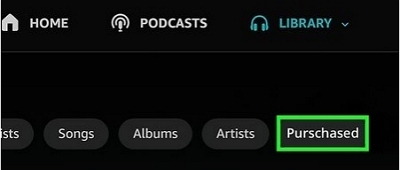
Step 2. Go to Library → Purchased.
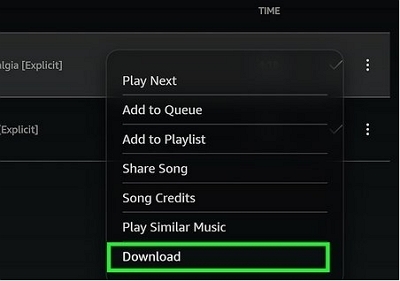
Step 3. Click the menu → Download.
Step 4. Files are saved as .mp3 and can be transferred to phones, SD cards, or car players.

Real Reddit user insight:
“Downloaded tracks from purchases still work even after my Prime expired. The subscription ones disappeared instantly.”
— u/echo_fan_2025
This method remains the most reliable way to achieve permanent offline playback of Amazon Music without depending on an active subscription.
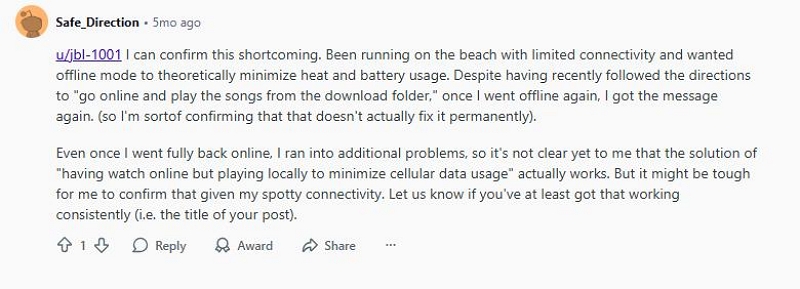
However, some users have reported — as recently as five months ago — that they were unable to play downloaded songs offline even after purchasing them through Amazon Music.
Method 3: Save Amazon Music Permanently for Offline Listening (Advanced Option)
If you want to keep Amazon Music offline beyond your subscription, you can use an Amazon Music Converter tool such as Mediaio Audio Converter.
These program allow users to:
- Download Amazon Music to MP3, AAC, or FLAC formats.
- Preserve original ID3 tags and metadata.
- Play offline music on non-Amazon devices (car, MP3 player, smartwatch, etc.).
These tools are intended for personal use and comparison purposes only. Respect copyright laws when downloading Amazon Music content.
Common Issues & Reddit Tips for Amazon Music Offline Mode
Here are some of the most frequent offline problems reported by users — and what Reddit communities recommend:
FAQs About Listening to Amazon Music Offline
Final Thoughts
Listening to Amazon Music offline is a convenient way to enjoy your favorite playlists without an internet connection, though the available features vary depending on your subscription plan. While Amazon Music Prime and Unlimited allow downloads, offline playback is still restricted to the Amazon Music app.
If you’re looking for greater flexibility, downloading purchased MP3s or using a reliable converter to download Amazon Music for offline playback can give you permanent access without device or app limitations.
Whichever method you choose, Amazon offline music lets you listen freely—whether you’re on a flight, hiking outdoors, or simply conserving mobile data.