

Quick Answer: How to Cancel Amazon Music Unlimited
Web (Amazon account)
- Go to Account & Lists → Memberships & Subscriptions
- Select Amazon Music Unlimited
- Click Cancel Subscription
- Confirm when prompted
iPhone (Apple-billed)
Settings → Your Name → Subscriptions → Amazon Music → Cancel Subscription
Android / Amazon App
Amazon Music app → Settings → Amazon Music Unlimited → Subscription Renewal → Cancel
Alexa
Say: “Alexa, cancel my Amazon Music Unlimited subscription.”
Works for Individual, Family, Student, and Single-Device plans.
Part 1. What Is Amazon Music Unlimited?
Amazon Music Unlimited is Amazon’s premium streaming service offering:
- 100+ million songs
- HD / Ultra HD audio (CD-quality + high-resolution formats)
- Spatial Audio (Dolby Atmos, 360 Reality Audio)
- Ad-free streaming
- Offline downloads
- Full on-demand playback
Supported devices
- iPhone / Android
- Windows / Mac / Web Player
- Fire TV
- Echo / Alexa
- Smart speakers & smarter TVs
Part 2. Why Do People Cancel Amazon Music Unlimited?
Common reasons users cancel:
- Switching to Spotify, Apple Music, or YouTube Music
- Avoiding auto-renewal after the free trial
- Not using HD/Ultra HD features
- Duplicate family plan billing
- Accidentally activated via Alexa voice command
- Cost concerns
Part 3. Amazon Music vs Amazon Music Unlimited
Part 4. Amazon Music Unlimited Plans & Pricing
✔ Amazon Music Unlimited – Individual (Prime Member): $10.99/mo or $109/year
✔ Amazon Music Unlimited – Individual (Non-Prime): $11.99/mo
✔ Amazon Music Unlimited – Family Plan (up to 6 accounts): $19.99/mo or $199/year
✔ Amazon Music Unlimited – Student Plan: $5.99/mo
✔ Amazon Music Unlimited – Single Device Plan (Echo or Fire TV only): $5.99/mo
Part 5. Amazon Music Unlimited Free Trial
Most users receive a 30-day free trial, with occasional 90-day promos.
How to Get Amazon Music Unlimited Free Trial
Step 1. Visit the Amazon Music Unlimited registration page and select the “Try it free” or “Start free trial” option.
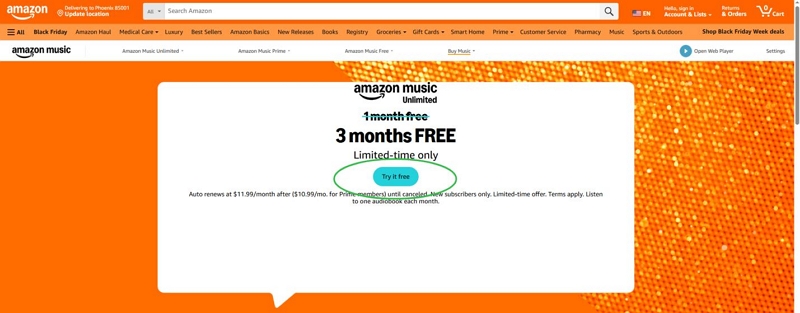
Step 2. You’ll have to provide your payment details, but you won't be billed immediately.
Step 3. For certain promotional trials (such as 90 days), it may be necessary to purchase an eligible Amazon device and subsequently sign up for Music Unlimited within a specific timeframe.
How to avoid charges
- Disable auto-renew immediately
- Set reminder before billing date
- Avoid accidental Alexa activations (“Try Amazon Music Unlimited free”)
What happens when trial ends
- If not canceled, it becomes paid
- If canceled, you keep access until the trial expires
- Downloaded tracks become inaccessible after expiration
Part 6. How to Cancel Amazon Music Unlimited (All Methods)
Follow these steps to subscribe to Amazon Music Unlimited –
6.1 Cancel on Web (Fastest method)
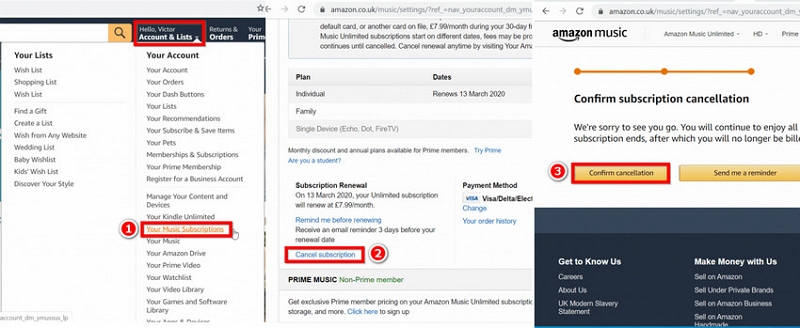
Step 1. Go to Amazon.com and sign in. Hover Account & Lists
Step 2. Select Memberships & Subscriptions
Step 3. Find Amazon Music Unlimited
Step 4. Click Cancel Subscription → Confirm cancellation
6.2 Cancel on Android
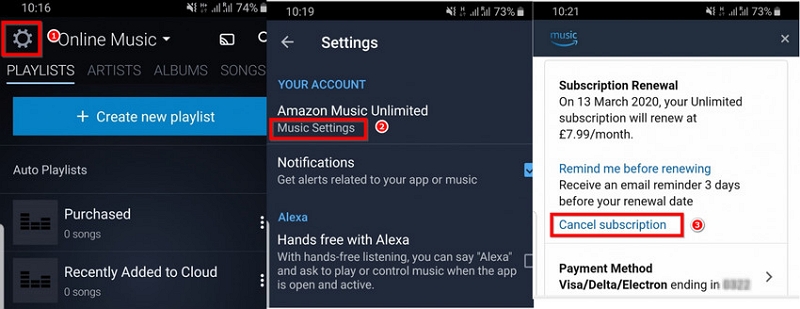
Step 1. Open Amazon Music app
Step 2. Tap Settings
Step 3. Select Amazon Music Unlimited
Step 4. Tap Subscription Renewal → Cancel Subscription
Step 5. Confirm cancellation
6.3 Cancel on iPhone / iPad (Apple-billed users)
If subscribed via Apple: Settings → Your Name → Subscriptions → Amazon Music → Cancel Subscription
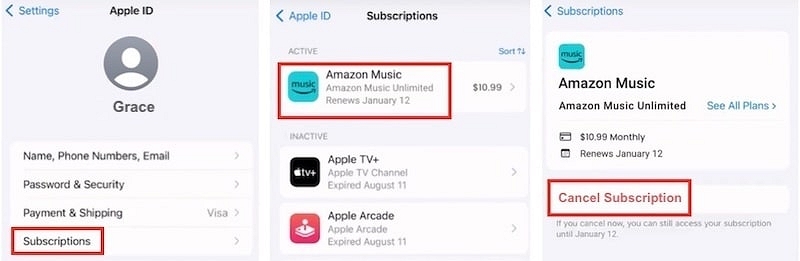
If subscribed via Amazon: Use the Web cancellation method instead.
6.4 Cancel with Alexa
Say: “Alexa, cancel my Amazon Music Unlimited subscription.”
Alexa will confirm your identity and process the cancellation.
6.5 Cancel on Fire TV
Settings → Accounts & Settings → Amazon Music → Cancel Subscription
Part 7. Amazon Music Cancellation Refund Rules
Contact Amazon Support → “Digital Subscriptions Refund Request”
What Happens After You Cancel
You will keep Amazon Music Unlimited until the current billing period ends.
After expiration:
- HD/Ultra HD playback → stops
- Downloaded songs → greyed out
- Offline music → unplayable
- Playlists stay but only show tracks available on Free/Prime Music
- You revert to either Prime Music or Amazon Music Free
Part 8. How to Download Amazon Music for Offline Use
Method 1. Download inside Amazon Music app
Standard offline saving (subscription required):
Step 1: Open Amazon Music app. Visit My Library and locate the song, album, or playlist you're searching for.
Step 2: Select the three-dot menu (⋮) adjacent to the item and pick Download.
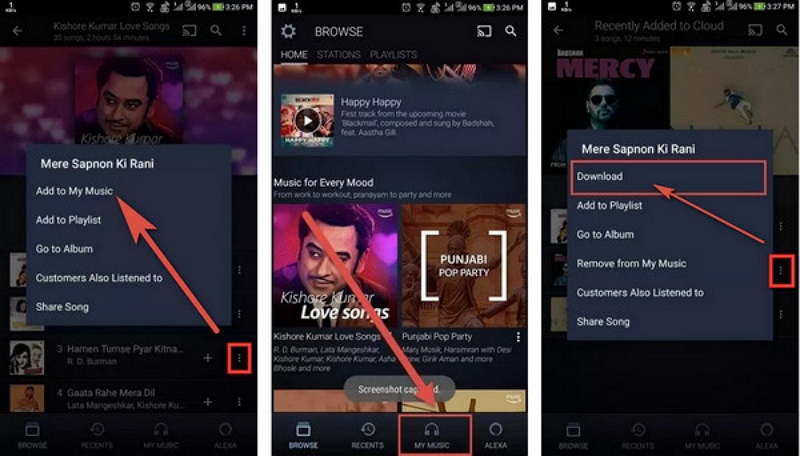
Step 3: Hold on until the download completes — it relies on the file size and your internet speed.
Step 4: To view just your downloaded music, access Settings and enable Offline Mode.
Step 5: Currently, in My Library, go to the Downloaded section — here, you'll see only the songs you have saved.
Method 2. Download Amazon Music Unlimited to MP3
To listen to Amazon Music Unlimited tracks offline or save them as MP3 files, a dependable tool for music conversion is essential. One such tool is Mediaio Audio Converter.
Mediaio Audio Converter enables you to download and transform Amazon Music songs, playlists, and albums into high-quality local files. It accommodates various output formats such as MP3, FLAC, WAV, and M4A. It’s secure, easy to use, and ideal for storing your favorite songs for offline playback.
Follow these steps to download Amazon Music Unlimited to MP3
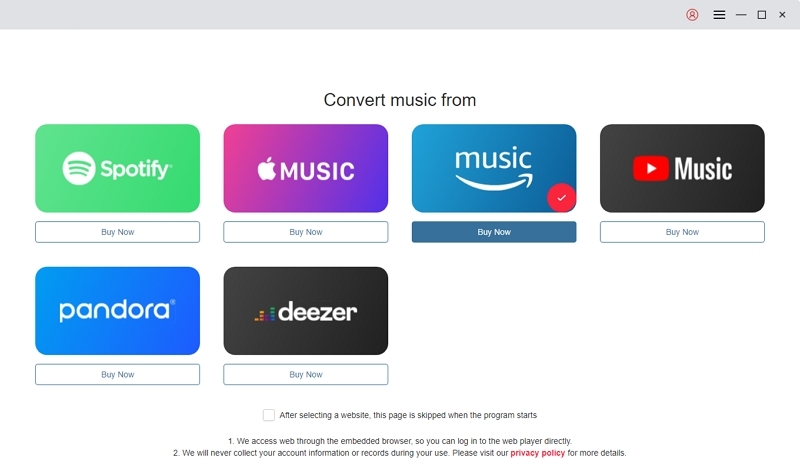
Choose Amazon Music from the available platforms.
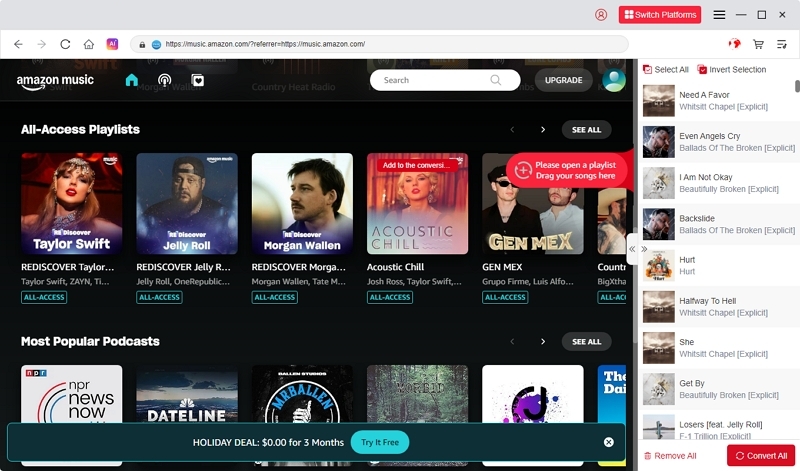
Look for or search for the songs you wish to download. Pull them onto the “+” icon to include them in the conversion list.
Select MP3 (or an alternative format such as M4A, WAV, FLAC) as the output format. Also, select the directory where you wish to save the converted files.
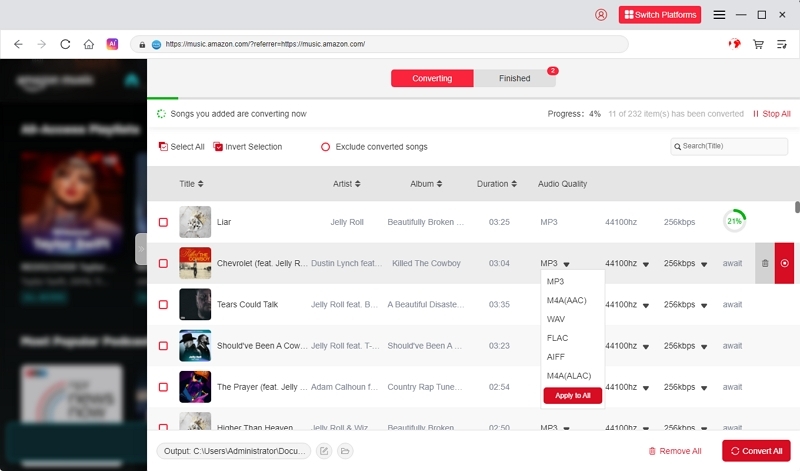
Press Convert All to begin transforming your chosen songs into MP3 format.
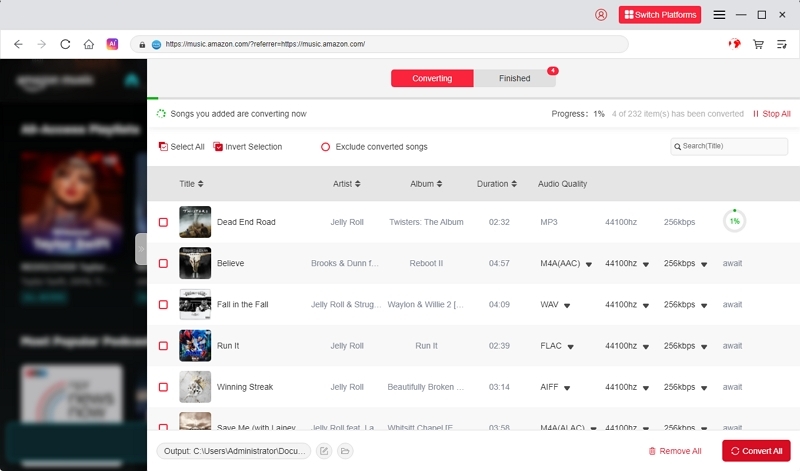
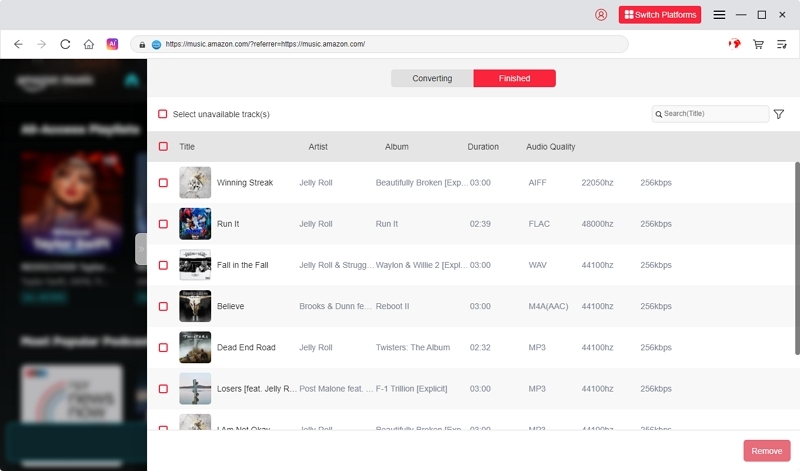
Once the conversion is complete, navigate to the Finished section to locate and access your downloaded MP3 tracks.
Part 9. FAQs
No. Prime Music is included, but Amazon Music Unlimited is a separate paid subscription.
Yes. You must manually disable auto-renew to avoid charges.
Yes. Offline tracks become unplayable once your subscription ends.
No. You can cancel anytime.
Yes — change plans under Amazon Music Settings.
Conclusion
Canceling Amazon Music Unlimited is quick once you know where to find the options—whether on the web, mobile apps, Apple billing, or Alexa. After canceling, your HD/Ultra HD features and offline downloads expire, but your playlists remain.
If you want to keep your favorite tracks offline for personal use, a safe tool like Mediaio Audio Converterlets you convert songs to MP3 and store them locally.