

If you download songs from Amazon Music but can’t find where they go, you are not alone. This definitive 2025 guide shows the exact download path on every device — Windows, Mac, iPhone, and Android — plus the difference between purchased MP3s vs Prime/Unlimited encrypted offline cache.
Here’s The Quick Answer (TL;DR)
Depending on your device, here's the path to Amazon Music downloads storage.
- PC (Windows): C:\Users\[Name]\AppData\Local\Amazon Music\Data\Offline
- Mac: /Users/[Name]/Library/Application Support/Amazon Music/Data
- Android: /storage/emulated/0/Android/data/com.amazon.mp3/files/music
- iPhone: Only stored inside the Amazon Music app (sandboxed, not user-accessible)
✔ Purchased MP3s = DRM-free, visible, transferable
✔ Prime/Unlimited downloads = encrypted cache, hidden, app-only
✔ iPhone storage cannot be viewed in Files app
How Amazon Music Stores Downloads (Explained in 30s)
Amazon Music stores downloads differently depending on whether they are:
✔ Purchased MP3s (DRM-free)
- Saved as standard MP3 files
- Fully transferable
- Visible in Music/Amazon Music folders
- Work on any device
- Never expire
✔ Prime / Unlimited / HD Downloads (DRM-encrypted)
- Stored as hidden encrypted cache
- Cannot be copied or played outside the app
- Expire when your subscription ends
- Different folder on each device
Why iPhone users cannot access the folder
iOS sandboxing blocks apps from exposing internal app folders.
→ Amazon Music files remain inside the app container and cannot be extracted.
Why files disappear after your subscription expires
Because DRM licenses deactivate → Amazon app deletes offline cache.
How to Confirm Your Music Is Actually Downloaded
When you download songs from Amazon Music onto your devices, it shows “Download is in progress.” Once it is over, it says, "Download complete." But how do you check where your tracks are actually downloaded?
On Mobile (iPhone/Android)
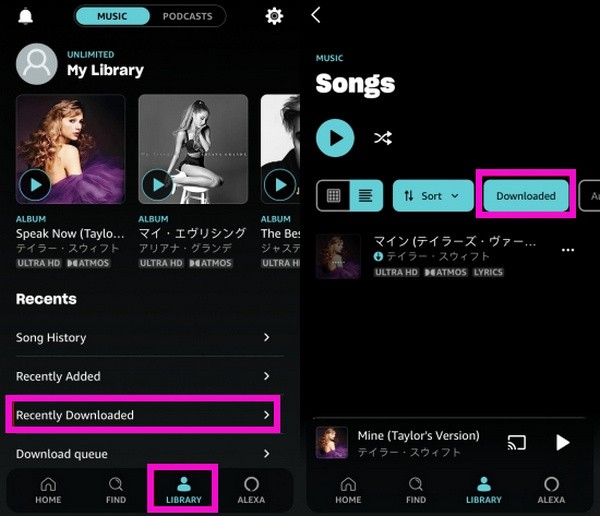
Step 1: Go to Library → Songs → Filter → Downloaded
Step 2: Tap Recently Downloaded
Step 3: Refresh My Music / Sync Problems
On Windows/Mac
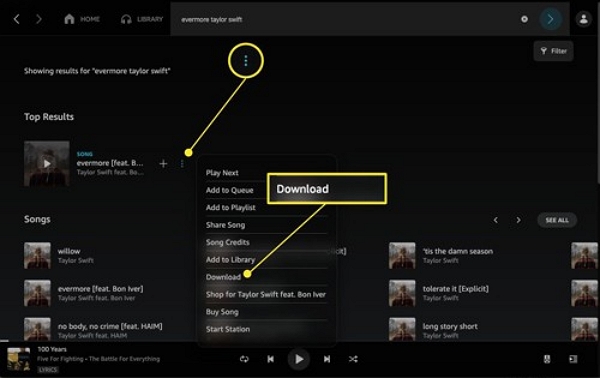
Step 1: Open the Amazon Music app. Go to Settings → Offline Downloads
Step 2: Check Download Queue
To verify folder storage
- PC/Mac: Settings → Preferences → Download Location
- Android: Settings → Storage Location (Internal Storage / SD Card)
- iPhone: No folder access — only “Offline Music Mode”
Exact Storage Locations on Each Device
Windows PC
Path:
C:\Users\[YourUser]\AppData\Local\Amazon Music\Data\Offline
Notes:
- Folder is hidden → enable Hidden Items
- Files appear as encrypted cache, not usable outside the app
- Purchased MP3s appear in This PC > Music > Amazon Music
Mac (Prime / Unlimited / HD / Free)
Path:
/Users/[YourUser]/Library/Application Support/Amazon Music/Data
Notes:
- Use Finder → Go → Go to Folder
- DRM tracks remain encrypted
- Purchased MP3s appear in Music > Amazon Music
Android
Internal storage (default):
/storage/emulated/0/Android/data/com.amazon.mp3/files/music
SD card (if enabled):
/mnt/extSdCard/Android/data/com.amazon.mp3/files/Music
• Requires “Show Hidden Files”
• Subscription downloads = encrypted
• Purchased MP3s = visible
iPhone / iPad
- No file path accessible
- Files stored inside Amazon Music sandbox
- Only visible inside the app:
Library → Recently Downloaded
Where Purchased MP3 Downloads Are Stored (Fully Transferable)
Purchased Amazon MP3s are standard MP3 files. They are transferable and, hence, easily located.
Windows: Music > Amazon Music
Mac:Music > Amazon Music
Android: /Android/data/com.amazon.mp3/files/Music/Purchased
iPhone: Downloaded to Amazon Cloud, then synced via iTunes/Apple Music (not exposed as raw files)
Why You Can’t Find Amazon Music Downloads (Common Reasons)
Most users can’t find downloads because:
- Content is DRM-protected
- Files are hidden in system folders
- iPhone restricts access via sandboxing
- Subscription ended → offline cache removed
- Storage switched between Internal ↔ SD card
- Not using the Downloaded filter
Can You Move Amazon Music Downloads to Another Device?
Prime/Unlimited downloads:
❌ No. They are encrypted DRM cache.
- Cannot be copied
- Cannot be transferred
- Break if you log out or reinstall the app
Purchased MP3s:
✔ Yes. 100% transferable
- Can be moved to external drives
- Can be played on any device
How to Keep Amazon Music Downloads Forever (DRM-Free)
If you want Amazon Music Unlimited/Prime tracks as permanent MP3 files, use a professional converter like Mediaio Audio Converter.
Step-by-step process
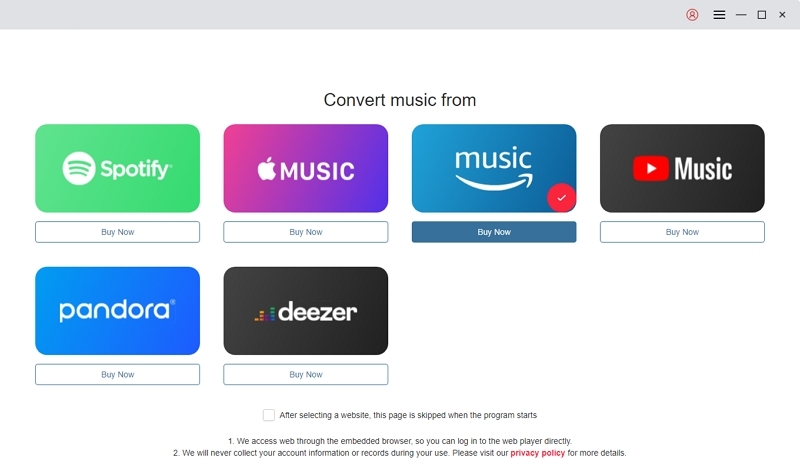
On the main interface, choose Amazon Music as the source platform. Click Sign In and enter your Amazon account credentials.
Browse your library and select the tracks, albums, or playlists you want to download. Drag the selections into the “+” icon or add them using the app’s interface.
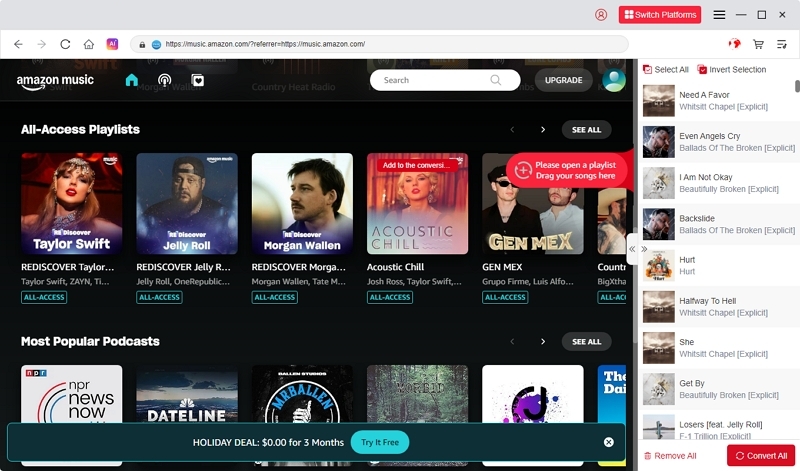
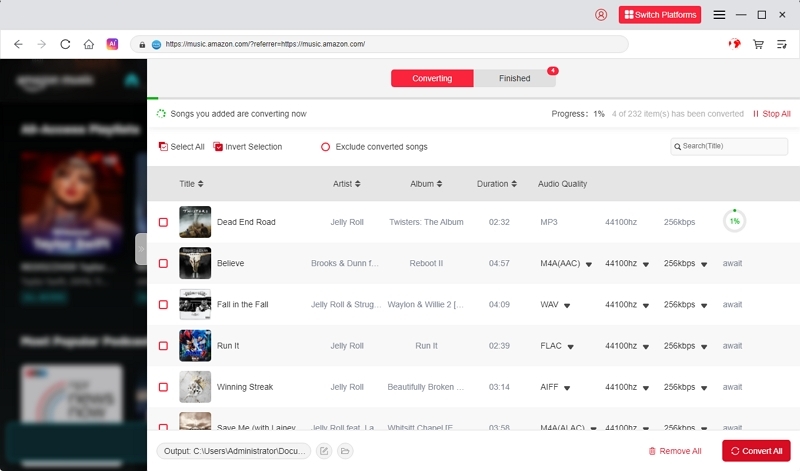
Pick your preferred output format, such as MP3 or M4A. Optionally adjust quality settings (e.g., 320 kbps for high-quality audio).
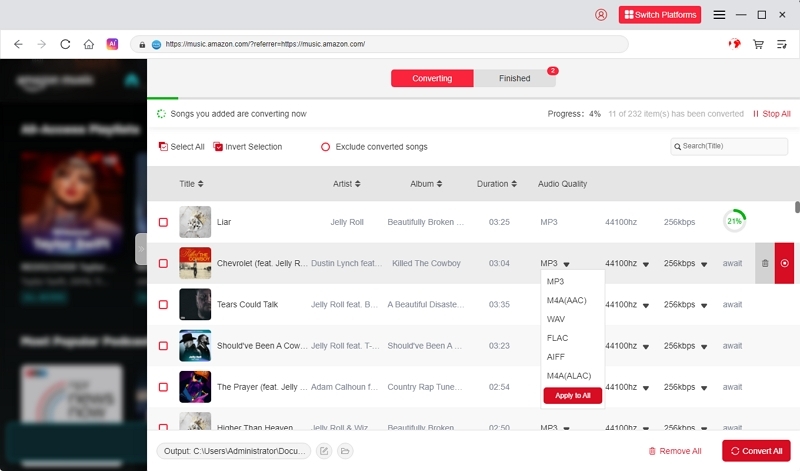
Click Convert All to begin downloading and converting your tracks. Wait until the process finishes; progress and estimated time are shown in the app.
Why use Mediaio Audio Converter
Mediaio is a safe and reliable tool for downloading and converting Amazon Music tracks into MP3 files. Users must use this tool because of its benefits.
- Universal compatibility
- Offline freedom
- High-quality output
- Batch conversion
FAQs
- On Mobile (Android) – Open the Amazon Music app. Go to Settings > Storage Location. Choose “Internal Storage” or “SD Card” (if available).
- On iPhone – Not possible.
- On Desktop – In the Amazon Music app, go to Settings > Preferences > Download Location.
- Purchased MP3s can be redirected to any visible folder.
- Purchased MP3s do not expire. They are permanent, DRM-free, transferable files.
- Prime/Unlimited downloads expire when your subscription ends or if the license is revoked.
- In Android – Yes. Go to Settings > Storage Location. Select an SD card for the offline cache.
- In iPhone – No.
- In PC/Mac – Purchased MP3s can be moved manually. Subscription downloads remain locked in the hidden cache.
Conclusion
Amazon Music downloads behave differently depending on what you download:
Purchased MP3s → visible, transferable, permanent
Prime/Unlimited tracks → encrypted, hidden, app-only
Storage varies across Windows, Mac, Android, and iPhone
If you need DRM-free, permanent Amazon Music files, Mediaio Audio Converter offers the most reliable solution.