

Whenever you start building a music collection, one question always comes up: MP3 or FLAC? In fact, format isn't just about storage space. There are plenty of other questions worth asking. For example, how much better does FLAC actually sound? Will you even notice the difference between MP3 and FLAC on your headphones?
This guide answers all of that. We'll break down the real sound quality difference in the FLAC vs MP3 debate, how much space each one actually eats up, and what you'll really notice once you start listening. We'll also show you how to pull genuine FLAC files or high-bitrate MP3s from Spotify, Apple Music, or Amazon Music without buying a single track.
MP3 vs FLAC: Compression and Audio Processing
Before we get into sound quality or file size, it's worth knowing how these two formats work, because once you understand that, it will become clear which format will suit your needs. So let's look at them one by one.
How Does MP3 Work
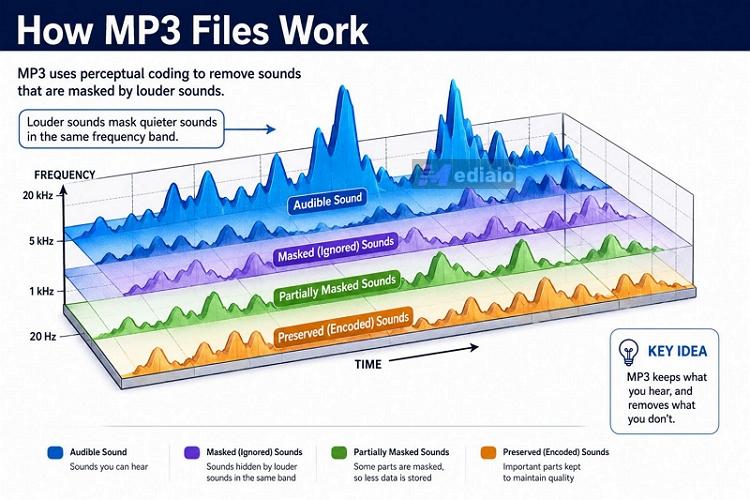
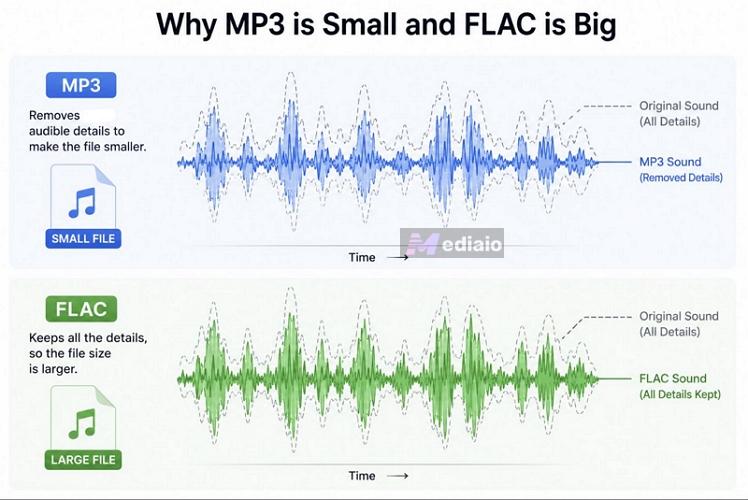
MP3, officially MPEG Audio Layer 3, was designed with one goal in mind: shrink audio files. So they can be easily shared and downloaded over dial-up internet. And MP3 compression algorithms do this aggressively using a psychoacoustic model that reduces the file sizes by up to 70%-90%, compared to the original recording.
In simple terms, it removes the parts of a recording that are usually less noticeable to human hearing. For instance, here’s what usually ends up getting removed:
- Extremely high frequencies
- Subtle ambience and room reverberation
- Fine texture in cymbals and acoustic instruments
- Tiny details hidden beneath louder sounds
And once that data is removed, it will be gone for good. You can't bring it back by later converting it to a lossless format like FLAC. However, these are small details, and honestly, if you're not using higher-end gear, you probably won't even notice them missing.
How Does FLAC work
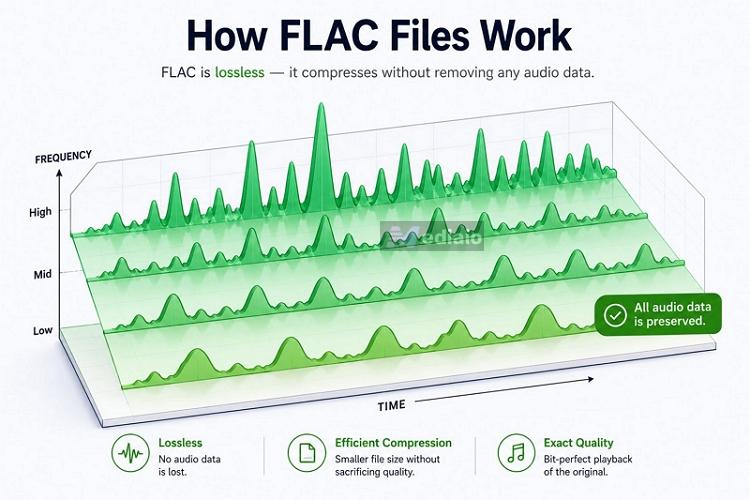
FLAC, or Free Lossless Audio Codec, doesn't remove or alter any part of the song. It keeps every bit of audio information from the source recording intact.
What its algorithm does instead is look for repetitive patterns and silent gaps in the audio wave and pack them into a more efficient code. So the file size does shrink compared to the original studio recording while the sound itself is never touched. That's why the same song in FLAC ends up much bigger than the MP3 version.
But here's the thing: FLAC can never exceed the quality of its source. FLAC will retain true lossless quality and can be considered FLAC in the real sense.
However, converting a YouTube video or a 256 kbps AAC file to FLAC doesn't magically restore lost audio data. It only creates a larger file with the same underlying sound quality.
MP3 vs FLAC: Audio Quality
You really can't compare MP3 and FLAC head-to-head in terms of sound quality. A simple takeaway is: MP3 will sound like MP3 and FLAC will sound better.
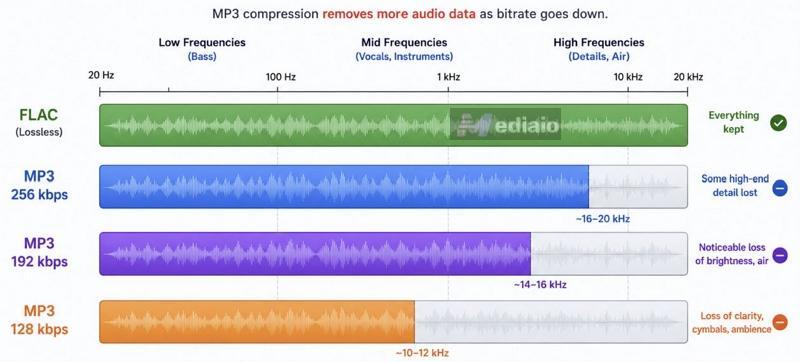
Plenty of users may tell you that MP3 sounds equivalent to FLAC, which is not entirely wrong. It depends on which quality levels you're actually comparing. MP3 has several bitrates and each one gives you a different result:
- Lower bitrates — 128 kbps, 192 kbps, even 256 kbps, tend to sound muddier on complex passages even at their best and they're just not in the same league as FLAC.
- 320 kbps MP3 — the best MP3 quality, preserves most of the detail. And honestly, you won't be able to tell it apart from FLAC unless you're listening on good headphones.
FLAC has its own set of quality tiers too, such as CD Quality (16-bit/44.1 kHz), High Resolution Audio (24-bit/48 kHz), Studio Master (24-bit/96 kHz), and Very High Resolution (24-bit/192 kHz). All of them are lossless, so you won't hear a dramatic jump going from one to the next. Each tier does hold onto a little more detail than the last, like headroom, room ambiance, finer textures, etc. However, you'll really need higher-end equipment to feel any of that.
So there you have it — you can't really compare MP3 and FLAC.
FLAC is the master copy and MP3 is the compressed version of it. Still, a higher-bitrate MP3 (320 kbps) will sound close enough to FLAC as long as you’re hearing from decent equipment. When you use high-end headphones or IEMs, FLAC will sound better.
FAQ:
A lot of people carry doubts about MP3 versus FLAC. So let's clear up the most common questions we get asked.
Can Humans Hear the Difference Between FLAC and MP3?
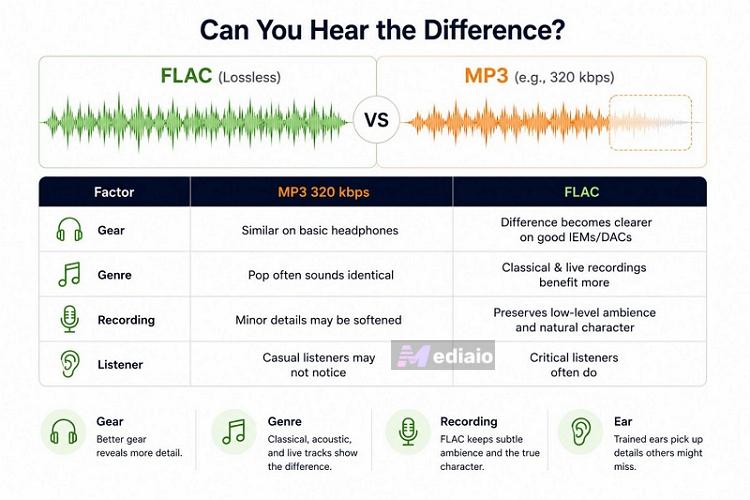
Short answer — it depends. Some listeners admit they can't tell a 320 kbps MP3 or even a 256 kbps one apart from FLAC. Others say they can clearly hear the instrument separation and the nuance in the vocals. The reason for these two different experiences comes down to a few things:
- The gear you're using. In general, with better listening equipment like IEMs or dedicated DACs to clean up the signal, you can actually spot the difference.
- The genre. A heavily processed modern pop track will often sound identical at 320 kbps and in FLAC. But put on something classical, orchestral, or a live concert recording, you'll hear exactly where MP3 starts to fall apart, especially with good gear to compare on. Without good gears, though, you'd probably never notice on your own.
- The recording itself. Older analog tape recordings and vintage remasters usually carry low-level room noise. MP3 tends to treat that as junk and smooths it into mud. FLAC keeps it all intact, preserving the true character of the original performance. With newer recordings, this matters less. Still, some users prefer FLAC to catch the subtle nuances and other details.
- Your ear. Honestly, this is the most critical factor. People who listen critically to music often notice small details that casual listeners overlook, such as instrument separation, layered vocals, or subtle echoes that remain after certain sounds fade away. Of course, none of that comes naturally — you’ll learn how to experience these things with practice. So if you're getting into mixing, DJing, choosing FLAC matters.
Is FLAC 100% Lossless?
Yes, completely. The FLAC file does end up smaller than the original studio recording. That’s purely down to how FLAC’s compression works but not because anything gets thrown away. Unlike MP3, FLAC never discards a single frequency or subtle detail to save space, which is exactly why it’s remained the format of choice for anyone who wants their music exactly as it was recorded.
Why Do Audiophiles Prefer FLAC?
Honestly, it comes down to personal preference more than any hard rule, as plenty of self-described audiophiles are perfectly happy with a well-encoded 320 kbps MP3.
But if you’ve invested in better listening equipment, sufficient storage space, and a proper setup, dedicated speakers, a studio-style room or real DACs, FLAC will be the natural choice, since it gives you a bit-perfect copy of the original recording. Plus, it will also future-proof your library: even when your gear gets better down the line, a FLAC file has nothing left to reveal that wasn’t already there.
MP3 vs FLAC: File Size
Now, this is where the real comparison starts.
FLAC sounds better, but it also takes up a lot of storage. That's exactly why it's never become the default audio format choice of most users or even the standard one, the way MP3 has.
For instance, here's how dramatically file sizes can change for the same 3-minute song, depending on the format and audio resolution.
FAQ: How Many FLAC Songs Can Fit on 128GB?
It depends entirely on the song length and which FLAC quality you're storing. Based on the file sizes above, for an average three-minute track:
- CD Quality FLAC: around 7,000 songs
- FLAC 24-bit/96 kHz: around 2,300 songs
- FLAC 24-bit/192kHz: around 1,150 songs
So even with CD Quality FLAC, which is already plenty for most listeners, you can comfortably fit a real music library on 128GB without constantly clearing space.
MP3 vs FLAC: Device Compatibility
MP3 is still the most universally supported audio format ever created. Nearly every smartphone, car stereo, smart speaker, streaming device, game console, or portable music player — old, new, DAPs, can play MP3 without any additional software.
FLAC isn't far off anymore either. Support for it has improved dramatically over the past decade, at least now you don't need to flash custom firmware onto a device just to get it playing. Most Android phones, dedicated audio players like Shanling and Moondrop, Sony's Walkman line, and even media servers all support FLAC natively today. Where it still comes up short is on older MP3 players and legacy car infotainment systems that just weren't built with FLAC in mind.
FAQ: Can My MP3 Player Play FLAC?
This is the most common doubt users have, without realizing that the answer comes down to which MP3 player they own. Early-generation iPods, older legacy media players, or even non-premium ones like older SanDisk models will lack FLAC support, they simply don't have the hardware needed to decode and read lossless files. Modern DAPs, though, including Sony, Astell&Kern, and newer budget players, are built for high-fidelity audio and play FLAC without issues.
How to Convert FLAC to MP3 or Vice Verse
If your FLAC library has gotten too big for your drive, converting it down to MP3, even at 320 kbps, will free up real space without losing much. To make that conversion efficiently, you should use a capable converter, such as Eassiy Video Converter Ultimate.
Eassiy can convert large music FLAC collections to MP3 with ease. Simply add your FLAC folders and it will convert every file without dropping a single song along the way. Plus, Eassiy doesn’t leave conversion quality up to chance. It gives you full control over the bitrate and other parameters, so you can pick 320 kbps, a lower preset, or set your own custom value.
During the format conversion, all the original metadata will keep intact, such as title, artist name and cover art. So you don’t have to re-tag or manually organize the songs afterward. And Eassiy is not limited to just FLAC and MP3 (or MP3 to FLAC). It supports 1,000+ formats and provides video-to-audio conversion either.
Steps to Convert FLAC to MP3
Step 1. Download and install Eassiy Video Converter Ultimate on your computer.
Step 2. Click Add Files or just drag and drop your FLAC files into the interface. Eassiy will automatically detect the format.
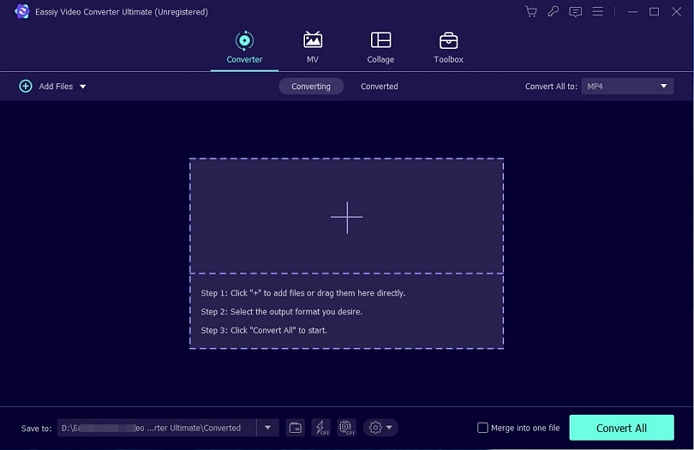
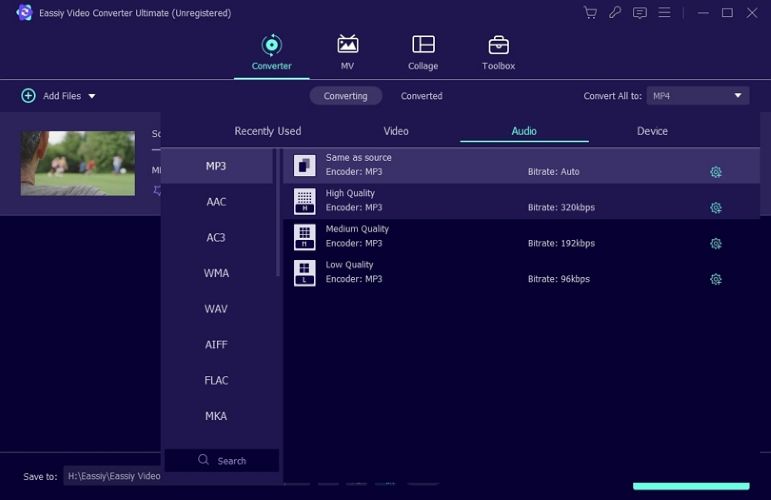
Step 3. Click Output Format next to the FLAC file. Switch to the Audio tab and select MP3 from the sub-menu.
Step 4. Pick a quality preset. Or you can click the gear icon to set a custom bitrate and adjust other encoder settings.
If you need, you can click the metadata icon to edit any tags before converting.
Step 5. Click Convert All. Your MP3 files land in the selected output folder with fully tagged and fully organized.
How to Convert Streaming Music to MP3 or FLAC
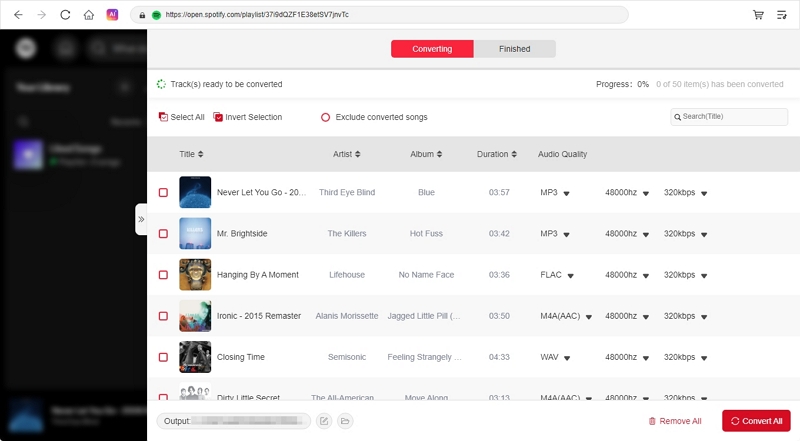
If you want to pull songs from Spotify or Apple Music and convert them to MP3 or FLAC, you’ll need a dedicated music converter like MedVioo Audio Converter.
MedVioo comes with built-in support for all 9 music platforms, including Spotify, Apple Music, Amazon Music, YouTube Music, etc. Just log in to your favorite platform using your own account right inside MedVioo, choose your favorite songs and export them in FLAC or MP3.
Once converted, the FLAC or MP3 files will be saved to your computer’s folder with its original metadata intact. From there, you can listen to them with any media player of your choice. You can even download the songs onto an old-school MP3 player or a USB drive for your car stereo and play them with no internet, no data, and no subscription needed.
One thing worth knowing: not every "FLAC" download out there is genuinely lossless — plenty are just an MP3 repackaged in a FLAC container. That's why it matters where your files come from. MedVioo pulls true lossless files straight from sources like Apple Music, Amazon, and Spotify Lossless, so what you get is true FLAC but not something dressed up to look like it.
Final Words
There's really no debate between FLAC and MP3 once you understand how each one works. One is lossless while the other is lossy, which is the whole difference. If you've got high-end gear like IEMs, a proper DAC, the kind of setup where every detail matters, go with FLAC. If storage space matters more to you and you don't mind losing a little detail, MP3 is the better fit.
Whichever way you go, make sure your music files are coming from a credible source. That's exactly why MedVioo Audio Converter exists. It will let you get real, honest FLAC or MP3 files from your favorite music platform.