

Choosing between YouTube Music and Apple Music isn’t really about who’s cheaper — it’s about how you listen to music day to day.
Do you spend a lot of time on YouTube, jumping between remixes, live performances, and tracks that never get an official release? Or are you more into clean albums, lossless audio, Apple Watch controls, and a smooth CarPlay experience when you’re driving?
If you’re thinking about switching — or just want to make sure you’re on the right platform already — this guide should help you figure it out quickly.
Quick Summary:YouTube Music vs Apple Music
Here is a comparison table to help you quickly look at the differences between the two platforms at a glance.
1-month free trial for new subscribers; 6-month free trial with eligible devices
Annual plan $109/year (saves ~2 months) —
Quick takeaway:
- Choose Apple Music if you’re deep in the Apple ecosystem
- Choose YouTube Music if you value discovery, remixes, and video content
Is YouTube Music Better Than Apple Music?
It is natural to wonder whether Apple Music is better than YouTube Music when you have to choose between the two. In this section, we will take an in-depth look at the two based on a number of different factors.
1. Music Library & Content Types
Apple Music focuses on official releases only
YouTube Music includes:
- Official albums
- Live performances
- Covers & remixes
- Fan uploads you won’t find anywhere else
✅ Winner for variety: YouTube Music
✅ Winner for clean catalog: Apple Music
2. Sound Quality
Apple Music supports:
- Lossless
- Hi-Res Lossless
- Spatial Audio (Dolby Atmos)
YouTube Music maxes out at 256kbps AAC
Audiophile pick: Apple Music
Casual listeners won’t notice much difference
3. Personalized Recommendations
YouTube Music uses:
- Watch history
- Search behavior
- Google AI context
Apple Music relies more on:
- Manual likes
- Library-based learning
Discovery-focused users: YouTube Music
Library-first users: Apple Music
4. YouTube Music vs Apple Music for Use with YouTube
If you already:
- Watch music videos on YouTube
- Follow live sessions & unofficial uploads
YouTube Music feels like a natural extension
Apple Music does not integrate with YouTube content at all.
5. Pricing & Subscriptions
Better bundle value: YouTube Premium
Where Can You Use YouTube Music or Apple Music?
In this section, we will discuss where you can use YouTube Music and Apple Music and how convenient they are to use on other devices.
YouTube Music on Apple Watch
❌ No full standalone streaming
❌ Offline downloads not supported
Works mainly as a remote controller
How to install:
Step 1: Go to the home screen on your Apple Watch and then tap the App Store.
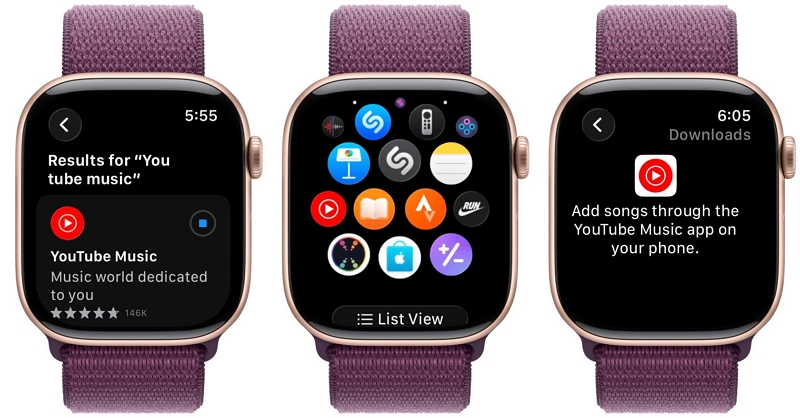
Step 2: Search for YouTube Music and select the app.
Step 3: Tap Get on your Apple Watch and wait for it to be installed.
Apple Music on CarPlay vs. YouTube Music on CarPlay
Apple Music
- Native CarPlay support
- Works without extra subscriptions
YouTube Music
- Requires YouTube Premium
- Limited functionality without it
CarPlay winner: Apple Music
How to Transfer Playlists Between YouTube Music and Apple Music
Transferring playlists between the two streaming platforms is not as difficult as it might seem. There are three very easy methods that we will discuss in this section that you could try.
Method 1:Use an Online Playlist Transfer Tool
The first method you could try is to use an online playlist transfer tool such as Soundiiz, TuneMyMusic, FreeYourMusic, or SongShift.
Here is a step-by-step guide to using a playlist transfer tool to move your playlists to Apple Music:
Step 1: Open Soundiiz and log in using your YouTube Music credentials.
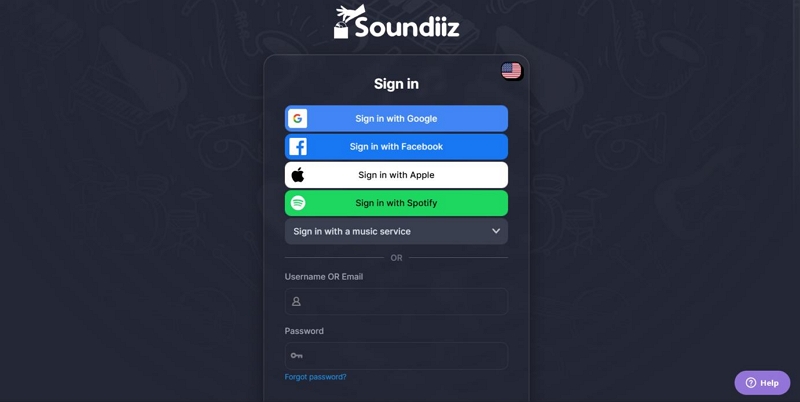
Step 2: Select the playlist you want to transfer to Apple Music.
Step 3: Select Apple Music as your destination and log in to your Apple Music account.
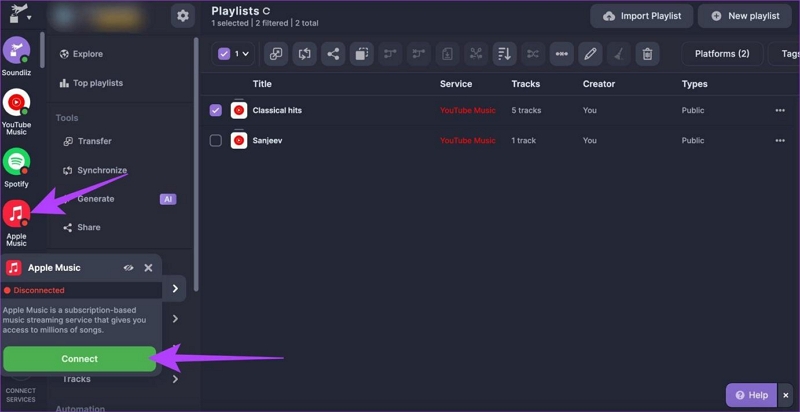
Step 4: Hit Transfer and wait till your playlists are transferred to your Apple Music account.
With a unique matching system, YouTube Music can ensure that your playlists are accurately moved to Apple Music. You need to have an account for both platforms, although you could get by with a free account for YouTube Music.
However, the conversion might fail if there is a song on your YouTube Music playlist that doesn’t have an equivalent on Apple Music. It could be that the song is only available on YouTube, or never had an official release, or is particularly not available in your region.
Method 2:Download Music from YouTube and Add to Apple Music
The second method to move your playlist from YouTube Music to Apple Music involves using a third-party converter. Of all the options on the market, Mediaio Audio Converter offers the highest quality audio and the best experience.
Here are some of its key features to help you see what it is capable of:
Method 3:Transfer Apple Music → YouTube Music
Please note that Apple Music tracks are DRM-protected and therefore cannot be uploaded.
✅ What is possible:
- Transfer playlist structure
- Match songs with YouTube Music’s official catalog
Apple Music vs Spotify vs YouTube Music
YouTube Music vs Apple Music:Which Should You Choose in 2026
- Apple users / CarPlay / Apple Watch: Apple Music
- Discovery lovers / YouTube power users: YouTube Music
- Social playlists & sharing: Spotify
FAQs
Yes, you can transfer your Apple Music playlist to YouTube Music. You can do so via an online playlist transferring tool or by using Mediaio Audio Converter.
If you are unable to transfer your YouTube playlist to Apple Music, check whether all the songs are available on both streaming services. Transfers often fail when your playlist includes YouTube-only exclusives that are not supported by Apple Music.
Both services cost the same for individual plans in the US. However, family plan pricing may vary, and subscription fees can differ slightly depending on your region.
Yes, YouTube Music is available on Apple Watch. You can install the app directly from the App Store and follow the on-screen instructions to set it up.
Yes, you can convert YouTube Music playlists to Apple Music, as long as the songs you are transferring are available on Apple Music in your region.
Conclusion
Both Apple and YouTube Music have their own distinct benefits. It all depends on what your priorities are as a listener, if you’re trying to choose between the two.