

Want to listen to Pandora music on your Echo device? This guide will show you how to add Pandora to Alexa and enjoy immersive sound. We’ll walk you through all the steps, from connecting Pandora to Alexa on your phone and controlling playback on your Echo or Echo Show, to unlinking Pandora if needed. You’ll also learn how to fix common issues if Pandora won’t link to Alexa.
Popular Article
Prep: Add Pandora to Alexa on Echo/Echo Show
Both the Alexa app and the Pandora app give you a built-in option to connect the two services. So just pick whichever route feels quicker.
Way 1. Link Pandora to Alexa on iPhone/Android with Alexa App
Connecting Pandora to Alexa directly from inside the Alexa app works the same whether you’re on iPhone or Android.
Here’s how to connect Alexa to phone with Alexa app:
Step 1. Open the Alexa app on your iPhone or Android.
Step 2. Tap the More tab.
- On the iPhone, it’s at the bottom right.
- On Android, it sits under the top-left menu.
Step 3. Select Settings.
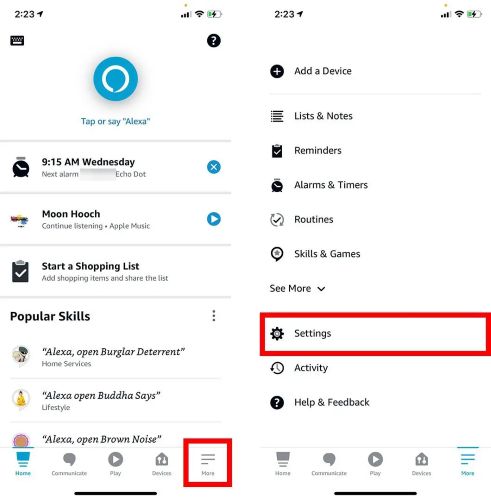
Step 4. Scroll down and tap Music & Podcasts.
Step 5. Tap Link New Service or the + button.
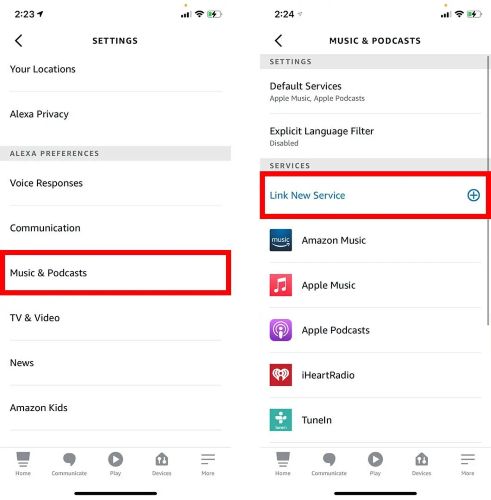
Step 6. Choose Pandora from the list.
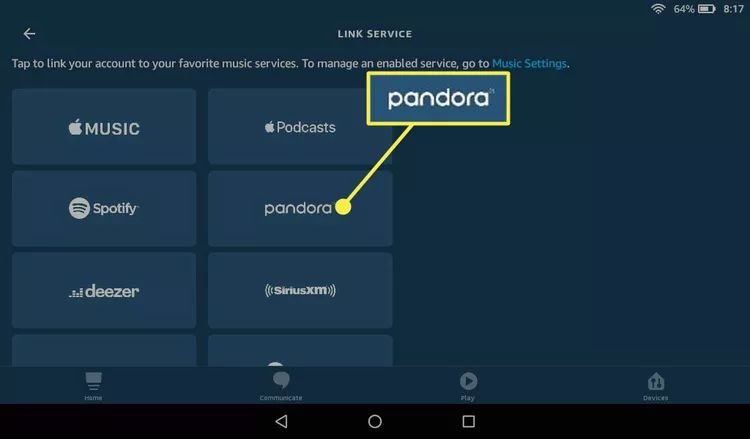
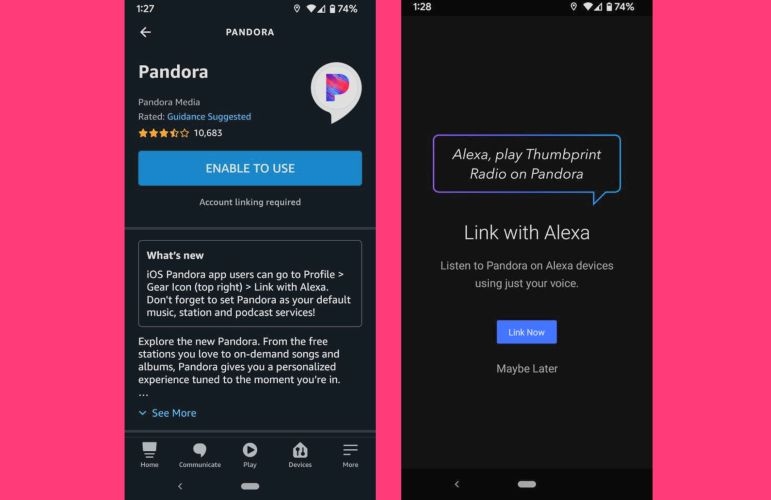
Step 7. Tap Enable to Use. Then select Link Now when the prompt appears.
Step 8. Sign in with your Pandora account and allow permissions.
Set Pandora as Default Music App on Alexa
Pandora is now linked, but let’s make sure Alexa actually uses it when you say things like “Alexa, play music.” For that, make Pandora the default music service:
Step 1. Stay inside the Music & Podcasts settings page.
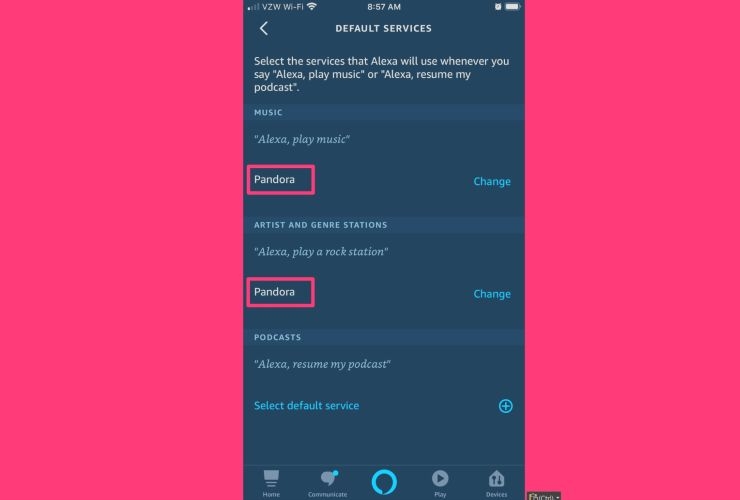
Step 2. Tap Default Services.
Step 3. Under MUSIC, tap Change and select Pandora.
Step 4. Under ARTISTS AND GENRE STATIONS, tap Change and pick Pandora again.
Alexa will automatically route your voice commands to Pandora with no need to specify the service every time.
Way 2. Connect Pandora to Alexa on iPhone/Android via Pandora app
Pandora also gives you a direct Link with Alexa option inside the app itself. If you're already logged in and listening, this route feels faster and more natural.
Both iPhone and Android follow the same flow with a slight difference in option names. We’ll separate them just to keep it clear.
On iPhone
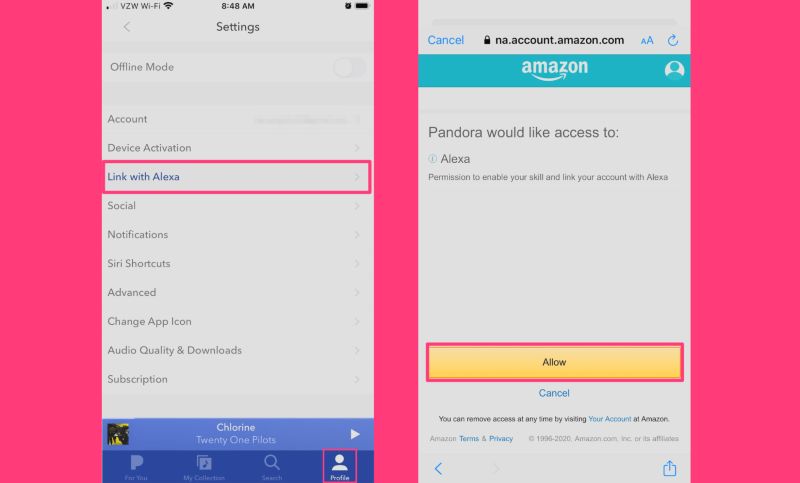
Step 1. Head into the Pandora app and move to profile at the bottom bar.
Step 2. Enter the Settings panel using the small gear icon at the top corner.
Step 3. Scroll until you spot Link with Alexa and choose it.
Step 4. An Amazon permission screen will appear. Confirm with Allow.
Once that’s done, Pandora becomes an active Alexa skill and can respond on your Echo or Echo Show immediately.
On Android
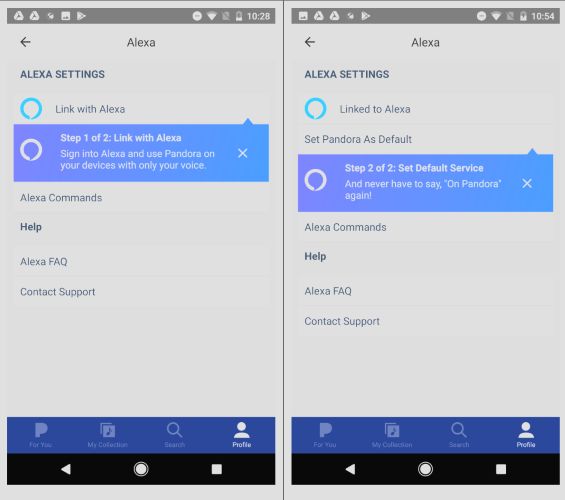
Step 1. Go inside your Pandora profile area.
Step 2. Tap Settings icon and choose Alexa from the list.
Step 3. Select Link with Alexa and approve access by choosing Allow.
After authorization, your Echo devices will recognize Pandora and you can start using voice requests without repeating the linking process.
Can't Link Pandora to Alexa?
A lot of users on Pandora and Amazon forums report linking issues. Here are the ones that show up the most:
- Problem 1: The skill refuses to link (login loop).
- Problem 2: Pandora links, but Alexa refuses to play it.
- Problem 3: Pandora was working earlier, then stops without reason.
- Problem 4: Pandora doesn’t appear as an option in the Music Service list.
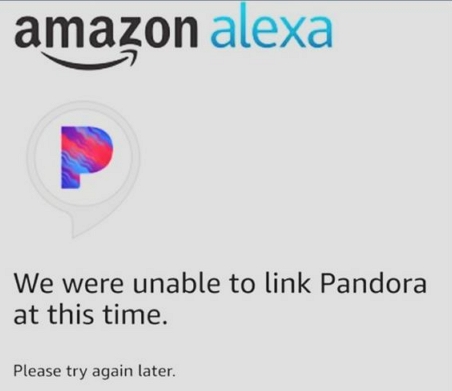
So here are a few quick fixes.
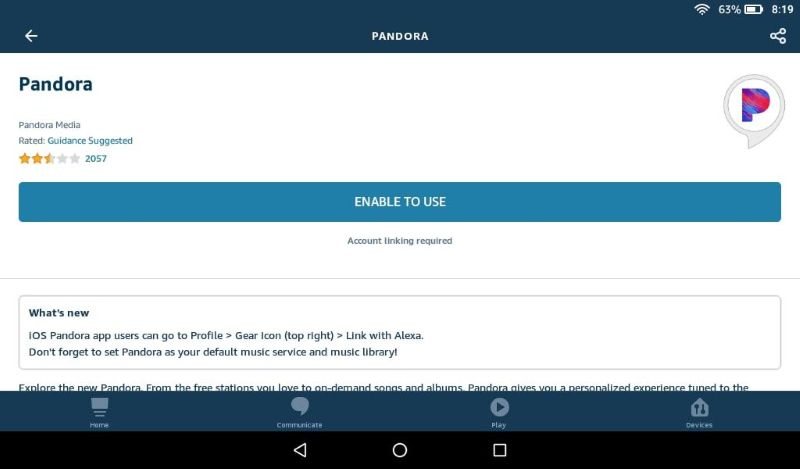
Fix 1: Relink the Pandora Skill
This usually solves looping login attempts.
Steps to fix:
- Disable Pandora as skill via the Alexa app (unlink).
- Link it again.
This will refresh the authentication token and clear stale pairing data.
Fix 2: Refresh Alexa and the Echo Connection
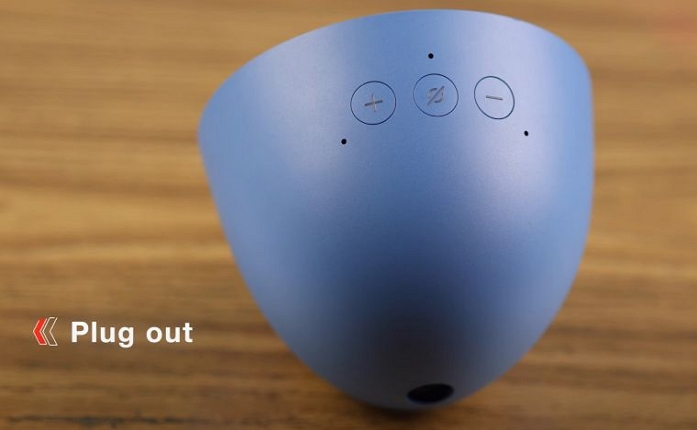
If Alexa plays music via another service even after linking Pandora, set Pandora as the default. If it still doesn’t change the behavior, clear the device's cache.
The fastest way to do that:
- Unplug the Echo.
- Wait roughly 30 seconds.
- Plug it back in.
- Try a Pandora voice command again.
The device will use the new preference instead of old cached behavior.
Fix 3: Check Region and Account Restrictions
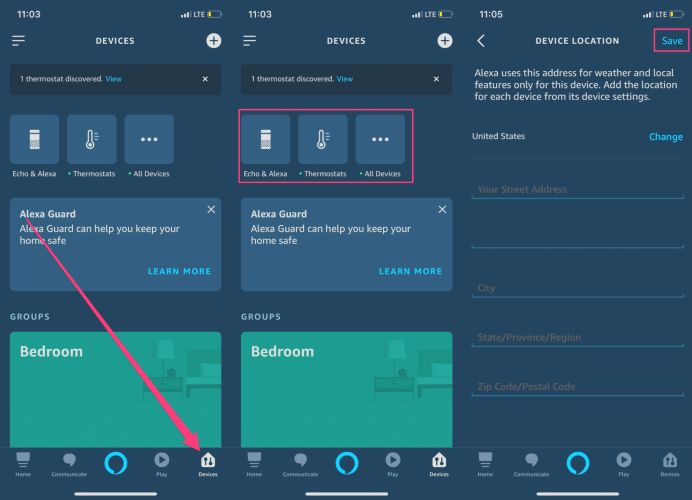
Pandora won’t appear as an option if your Alexa account isn’t set to the US (Pandora’s supported region).
To verify:
- Open the Alexa app.
- Go to Devices.
- Choose your Echo.
- Select Device Location.
- Make sure the region is set to the United States.
How to Play Pandora on Alexa with Echo/Echo Show [Online]
There isn’t just one way to make Pandora play through your Echo speaker — there are three. The method you pick depends on how you prefer controlling music.
Way 1. Use Alexa Voice Commands
This is the simplest approach and works on every Echo model — screen or no screen. Once Pandora is linked, just speak naturally.
Examples feel like this:
- “Alexa, play Thumbprint Radio on Pandora.”
- “Alexa, play the latest episode of the Sleep Well podcast on Pandora.”
- “Alexa, skip.” (skip ability depends on your plan)
- “Alexa, pause.”/“Alexa, resume.”
Nothing complicated here. Just speak and let Alexa handle the rest.
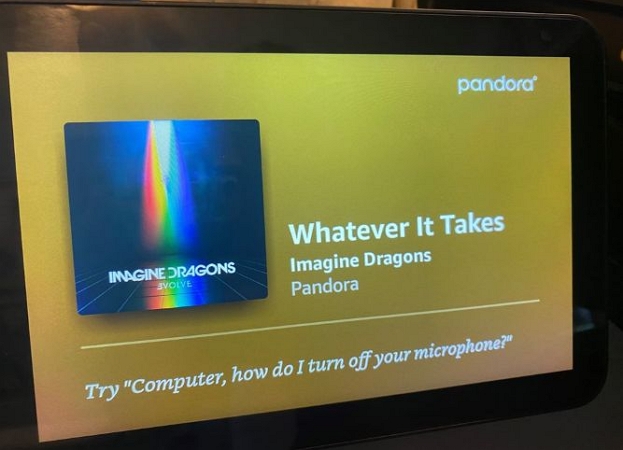
Way 2. Use the Echo Show Screen
The touchscreen on Echo Show models gives you an extra layer of control. The flow feels familiar, like using any music app:
- Move to the Music & Podcasts section.
- Choose Pandora.
- Pick a playlist, station, or recently played item.
- Use on-screen buttons such as Play, Pause, Skip, Thumbs Upand Thumbs Down.
And yes, voice still works while the screen is active: “Alexa, play something else on Pandora.”
So you get the best of both on Echo Show: touch + voice.
Way 3. Use the Alexa App as a Remote
The Alexa app can also act as a remote, especially useful when:
- You’re far from the speaker.
- Voice commands are inconvenient (late night).
- The Echo didn’t hear you the first time.
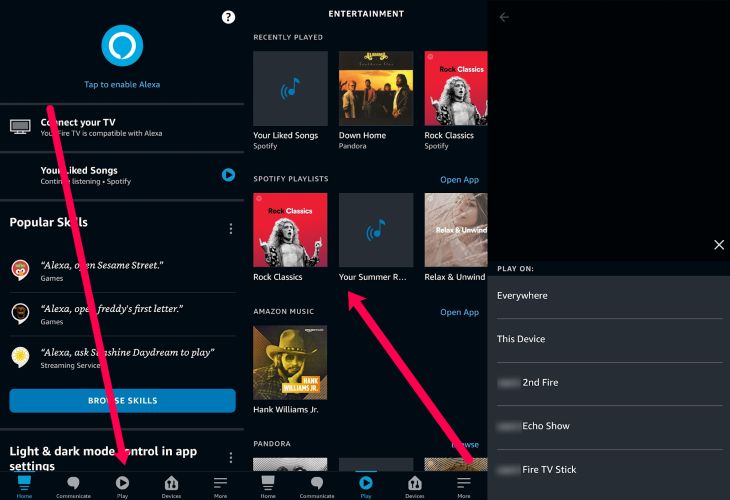
Inside the Alexa app, control Pandora playback stays simple:
- Move to the Play tab or Music & Podcasts.
- Choose Pandora.
- Pick a station or podcast.
- Select Play On and choose which Echo device or group should play it.
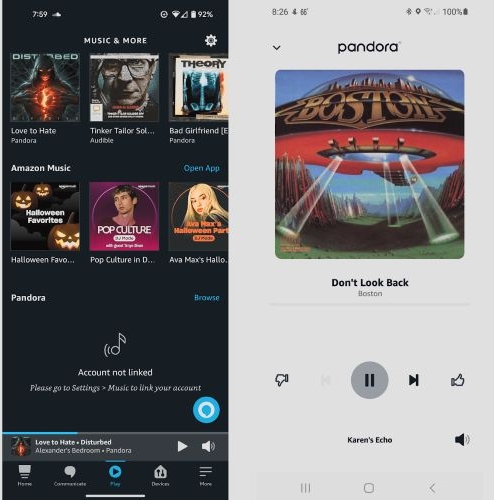
- You can then use the app to handle the music controls, like play, pause, skip and volume while the Echo does the output.
Fixed: Alexa Stop Plays Pandora
- Upgrade to Pandora Plus or Premium to listen to music without ads that interrupt playback.
- Disable any network ad blockers, as they may prevent Pandora and Alexa from connecting to Amazon servers.
- Update both your Alexa and Pandora apps on your phone to resolve glitches affecting music playback.
- Reboot your Alexa device by unplugging the power source and plugging it back in.
- Reconnect your Pandora account by unlinking it from the Alexa app and then linking it again.
How to Play Pandora on Alexa with Echo/Echo Show [Offline]
Alexa can only play Pandora music offline when you treat your Echo like a regular Bluetooth speaker. And for that to work, you also need Pandora songs offline first. There are two ways to get that done:
- One is by subscribing to Pandora Premium and downloading music inside the app.
- The other is using Mediao Audio Downloader to save Pandora tracks as regular files like MP3 without a subscription.
So let’s look at both paths.
Way 1. Listen to Pandora Offline on Alexa via Android Without Premium
This method works across devices, but we’re using Android here as an example.
The core idea is simple: download Pandora music as regular MP3 files using Mediaio Audio Converter, save them to your phone or even keep them on your computer and then stream them to your Echo over Bluetooth. Here’s how the process works.
Step 1: Save Pandora Music to Local Android
Mediaio Audio Converter lets you download your favorite Pandora stations, playlists, collected songs, and even podcast episodes and save them to your computer in regular formats like MP3, M4A, FLAC, WAV, and more. Once converted, you can move them anywhere and play them on device, including your Echo through Bluetooth.
Mediaio exports Pandora songs at 256kbps or 320kbps, giving you audio quality higher than the native 192kbps. It is also simple to use, enabling you to save music offline in its inbuilt Pandora browser within 3 steps.
Steps to Use Mediaio for Pandora Music Download
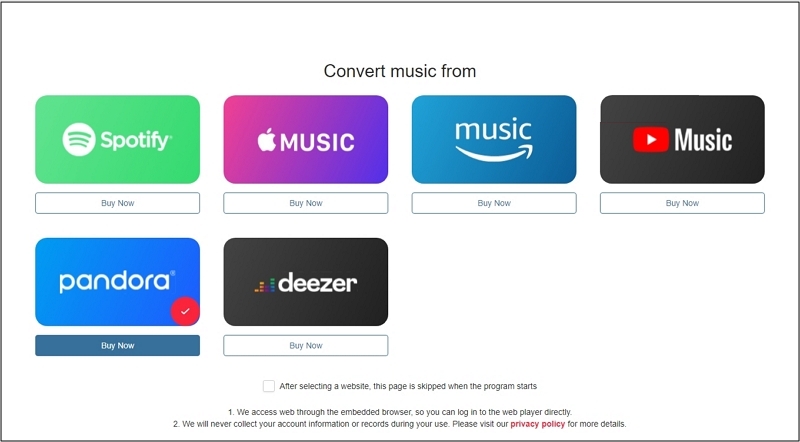
Launch Mediaio Audio Converter on your Windows or Mac. Pick Pandora from the home screen and sign in.
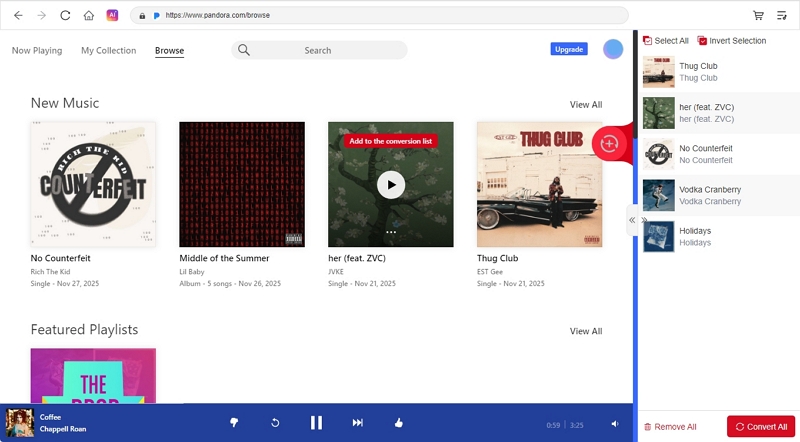
Drag the stations, playlists, or songs you want into the queue (the + icon) or directly click Add to the conversion list to add the desired tracks.
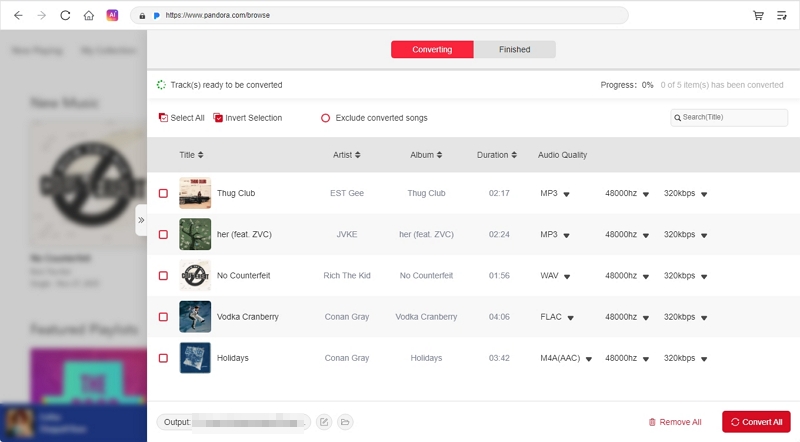
Connect your Android device to the computer and head back to Mediaio. Then, access the full conversion list, choose the output location and switch it to your phone’s storage. This way, the downloaded Pandora music will save directly into your device. Also, set the bitrate, sample rate and format for the downloaded songs. Finally, hit Convert All and the files will save to your computer with everything intact.
Step 2: Pair Android to Alexa with Bluebooth
Turn on Bluetooth on your Echo first:
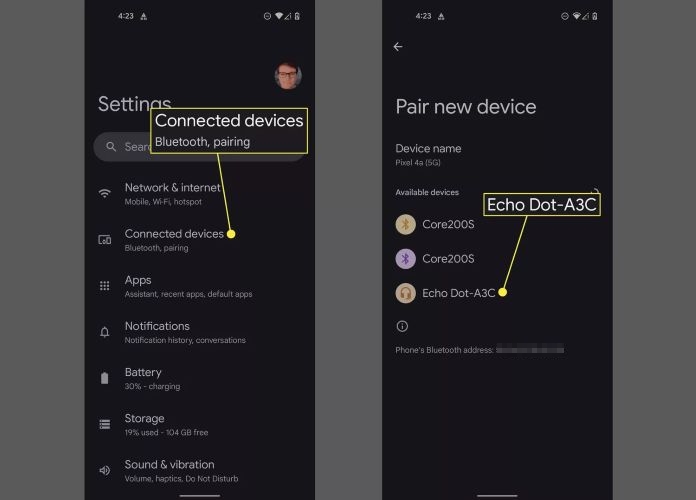
For this, say: “Alexa, pair Bluetooth.” Alexa will switch to pairing mode and wait for a connection.
- Now move back to your phone:
- Open Settings.
- Go to Bluetooth or Connected devices, depending on the model.
- Select your Echo/Echo Dot/Echo Show from the list.
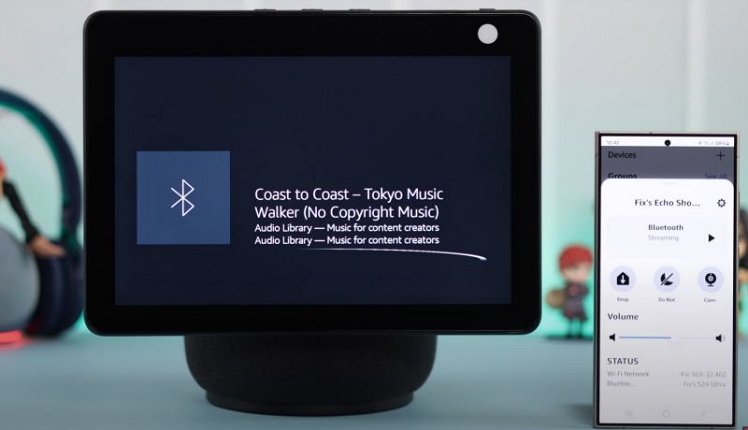
- Alexa will confirm the connection with something like:“Now connected to [Your Phone] name.”Once you hear that, the link is active and ready.
Step 3: Start Playing Pandora on Alexa
Now just play the Mediaio downloaded Pandora songs on your Android via any player and the audio will route to the Echo automatically.
Way 2. Enjoy Pandora on Alexa via iPhone with Premium
If you already use Pandora Plus or Premium, the downloaded songs work with Alexa just like the online ones. Here’s how to download music from Pandora with the app and play it offline through Alexa.
If you are a new Pandora user, you can follow this guide to start Pandora Premium free trial: Official Ways Get Pandora Premium for Free
Step 1. Download Pandora Music on iPhone with App
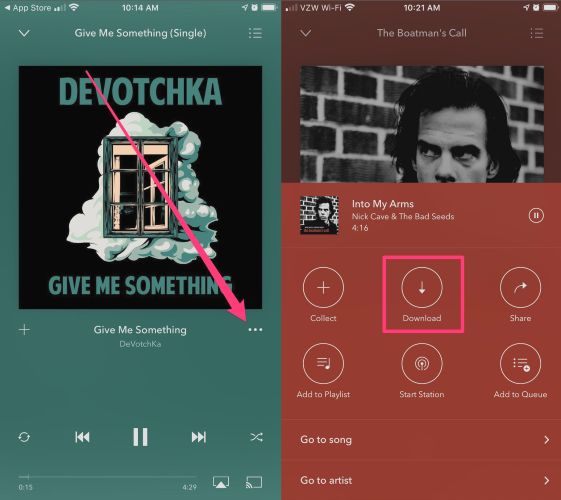
Pandora Plus automatically downloads your top-most listened stations offline. When you have to Premium, follow these steps:
- Browse any playlist or album you want offline.
- Tap the three-dot menu next to the track or playlist.
- Choose Download.
- Wait a few seconds until you see the download indicator change.
- Then, switch to Offline Mode inside the Pandora app.
Step 2: Connect iPhone to Alexa and Play Pandora
Now that the Pandora music is downloaded, use these steps whenever you want to play it offline on your Echo speaker.
- Say: “Alexa, pair Bluetooth.” Alexa will enter pairing mode.
- On your iPhone:
- Go to Settingsand turn on Bluetooth.
- Choose your Echo from the list.
- Wait for Alexa to confirm the connection.
- After the device connects:
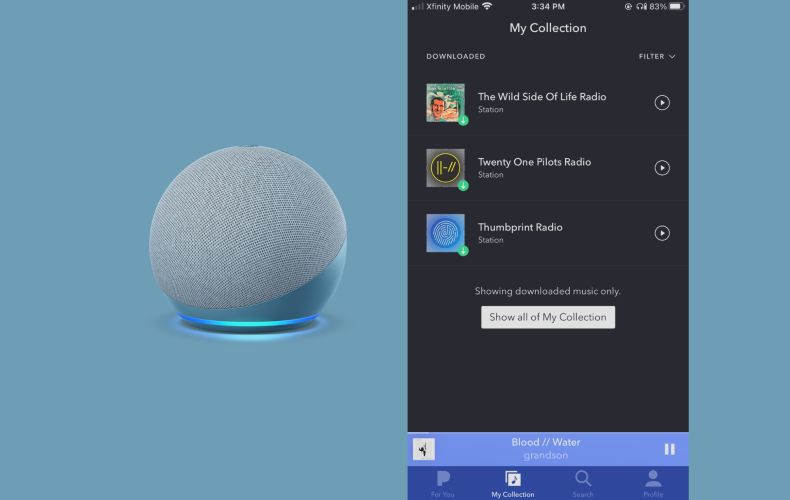
- Open Pandora in Offline Mode.
- Play any downloaded station or playlist from My Collection.
How to Unlink Pandora from Alexa
Disconnecting Pandora from Alexa is simple. Just do the following:
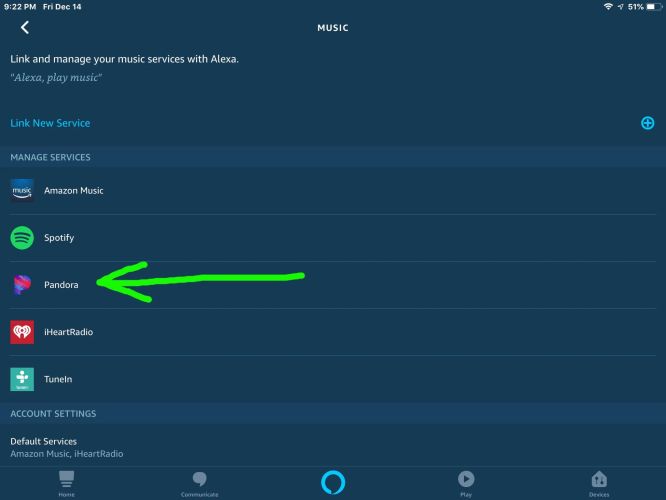
- Go back to the Music & Podcasts section.
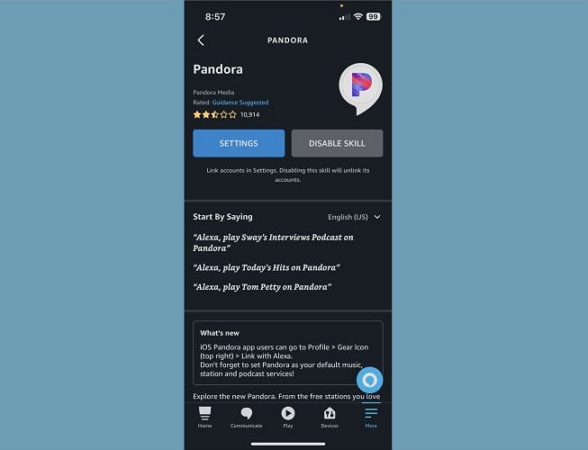
- Select Pandora.
- Tap Disable Skill.
Pandora will disconnect instantly and Alexa will switch to another music service as the default.
To Sum Up
This guide gives you the full picture. You now know how to play Pandora on Alexa, no matter which Echo model you're using. Linking it, making it default, or fixing the common issues — everything is already covered.
Mediaio Audio Converter steps in helpful when you want to listen to Pandora music on Alexa offline. It doesn’t require you to have a Pandora subscription to download the songs in local formats. You can move them to your Android phone or iPhone and stream them to your Echo through Bluetooth whenever you want.