

If you are trying to download Pandora music in the desktop app, you will find that there isn’t a download button. Yes, Pandora doesn’t support saving music offline with its desktop app or web player, even with Premium. However, don’t be sad, as you can still download your favorite songs from Pandora on your computer and we will show you how in this post. From this post, you will learn how to download music from Pandora on your iPhone, Android, PC, or Mac, including the steps to download Pandora songs as MP3.
How to Download Music from Pandora to PC/Mac
Pandora has one major limitation that its PC and Mac apps don’t offer an offline saving option, even if you already pay for Plus or Premium.
Here are two ways to handle that limitation. One lets you pull hundreds of tracks in one sweep. The other one is suitable for saving one or two songs. Choose whichever fits the moment.
Way 1. Download Music from Pandora to MP3 with Mediaio
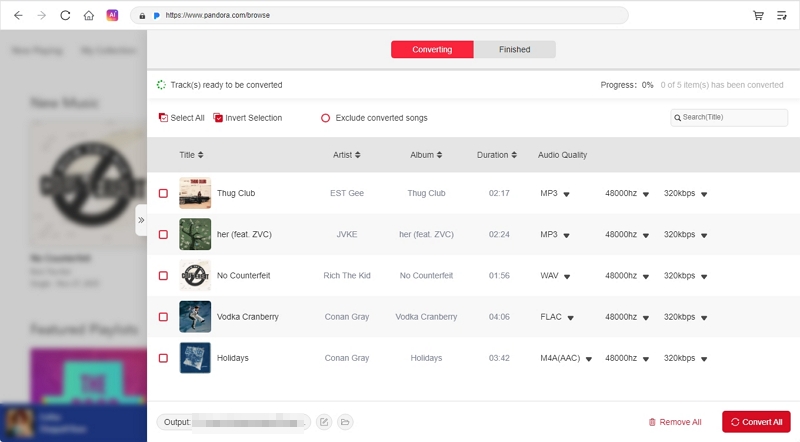
Mediaio Audio Converter stands as the best way to save Pandora music on your computer. It can download any audio from Pandora — stations, playlists, albums, collections, and even individual tracks and save them as local files to your Windows or Mac’s Download folder directly. You can also choose from multiple output formats, such as MP3, M4A, WAV, AAC, or any other.
Another advantage lies in its batch-downloads feature. You can gather multiple tracks at once or pull your entire playlist, station or album in a single sweep.
The part that makes Mediaio even more convenient is its embedded Pandora player. You sign into your own free account inside the app, see all your familiar stations and playlists, and drag whatever you want for offline saving. You do not need a Pandora subscription to download through Mediaio, but get downloaded songs in high quality(320kbps).
Steps to Download Pandora Music to Computer as Local MP3
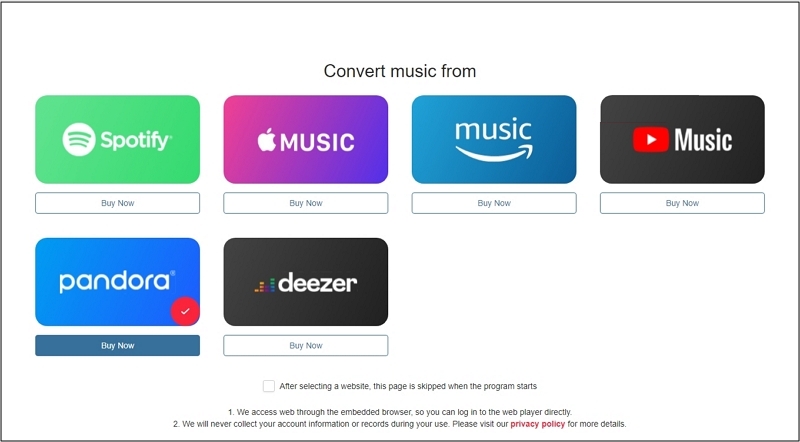
Start Mediaio Audio Converter on your Windows or Mac and choose Pandora from supported music platforms.
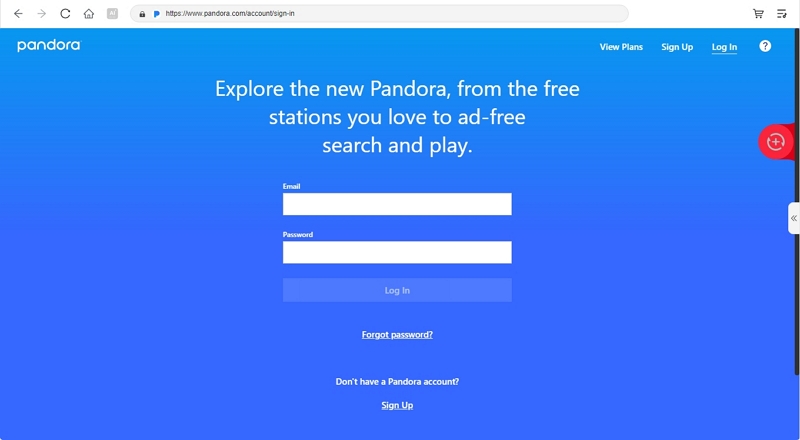
Sign in to your Pandora account in the embedded player panel.
Pick the songs you want and then drag them toward the + area in the top-right. You can also click Add to the conversion list to add wanted tracks to download queue.
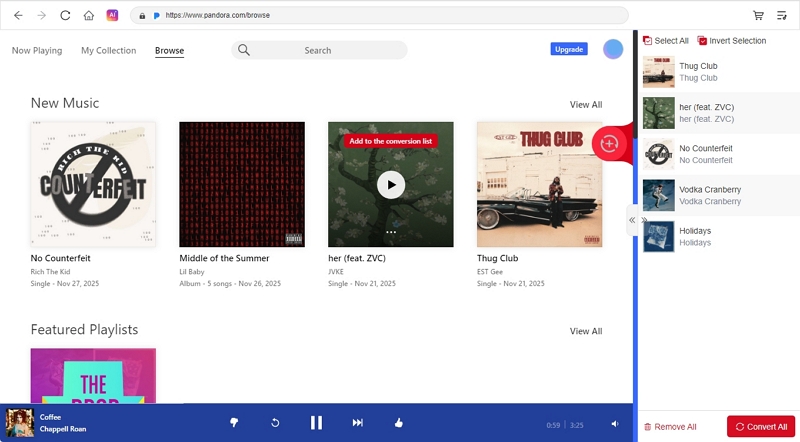
Check the Converting tab, open Browse to set the folder where your MP3 files should land. Besides, click Format to choose a desired format for you local music and hit Bitrate or Sample Rate to adjust the output quality. Finally, press Convert All to begin saving everything you add.
Way 2. Download Music from Pandora for Free via CocoCut
CocoCut is an all-in-one audio catcher. What it does is simple: it fetches whatever is playing on the webpage and download the audio in MP3, M4A or AAC.
It can detect the music playing on Pandora web player. The moment you start a track, CocoCut will make it available for download. If it fails to detect, which happens often on Pandora, you can switch to its recording mode to save the music.
In terms of browser compatibility, it works on:
- Chrome 70 or newer
- Brave 1.4+
- Vivaldi 3.0+
- Opera 60+
- Arc 1.0+
- All modern Edge builds.
Steps to Use CocoCut
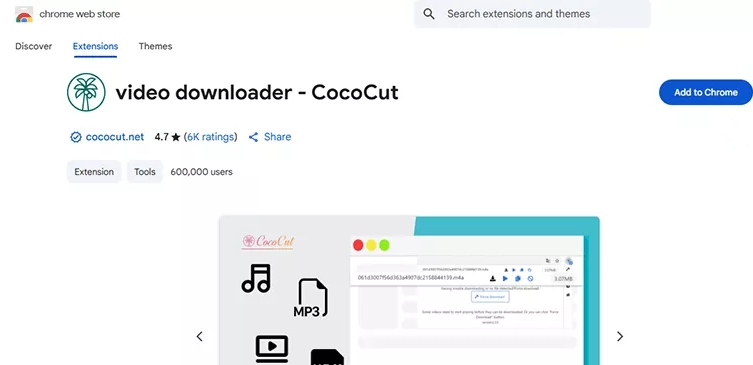
Step 1. Add CocoCut Extension via Chrome Web Store or Edge Add-ons page. You don’t need to create an account, but pin its icon to make it stay visible on your toolbar.
Step 2. Open Pandora in the same browser and play the song, station, or mix you want to capture.
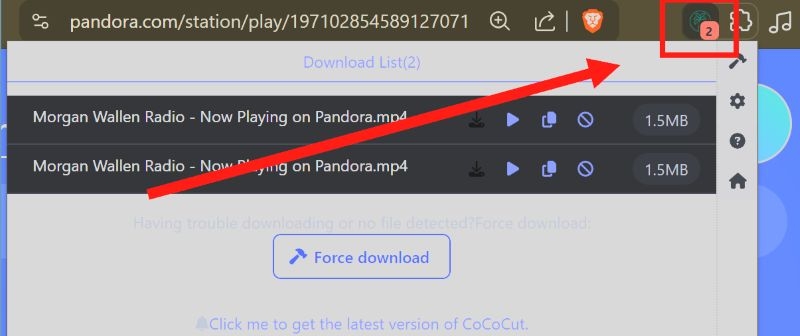
Step 3. The CocoCut icon will turn green when it detects active audio. Click it to view the list of captured items.
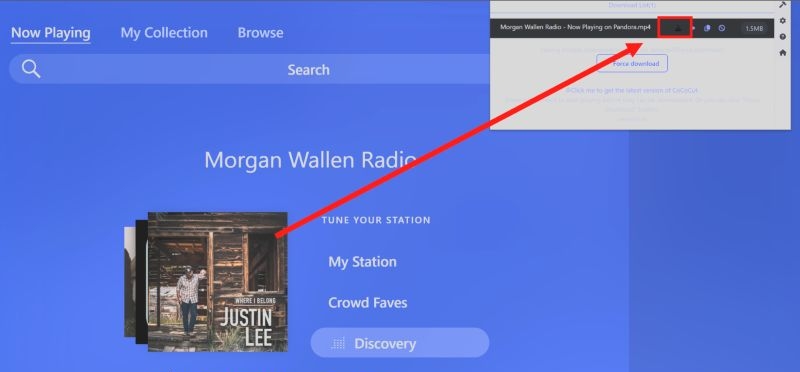
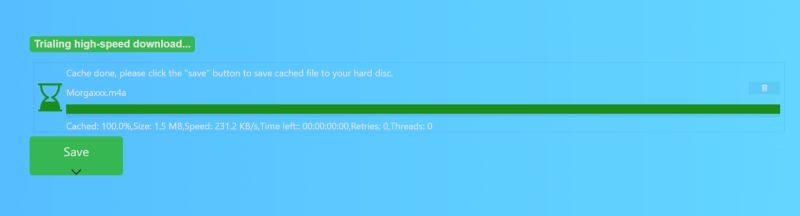
Step 4. Select the small download icon next to the track. CocoCut will switch to its downloader page and begin caching the file.
Step 5. Wait for the progress bar to reach 100%. Then press Save.
How to Download Music from Pandora to iPhone/Android
A Plus or Premium plan gives you offline download and playback inside Pandora's mobile app. The steps stay the same on iPhone and Android.
Anything you download stays inside the Pandora app itself. The files do not leave the app’s encrypted storage. So, you cannot move them to another device.
Way 1. Download Music from Pandora with Premium
Pandora Premium lets you decide exactly what you want to keep offline on mobile. You can save full playlists, albums, or stations and even store single tracks and episodes.
Your phone sets the real limit because Pandora will keep downloading until your storage runs low. The app stops new downloads once your device drops under 500 MB.
The download action changes a little between individual songs and bigger collections. Here is the flow:
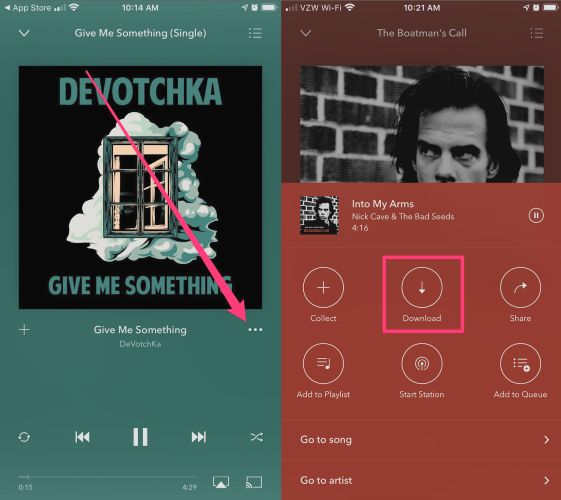
To Save Individual Songs or Episodes on Pandora Phone
- Move to the full Now Playing screen.
- Hit the three-dot menu beside the track.
- Choose the Download option from the panel that appears.
To Save Playlists, Albums, or Stations on Pandora Mobile
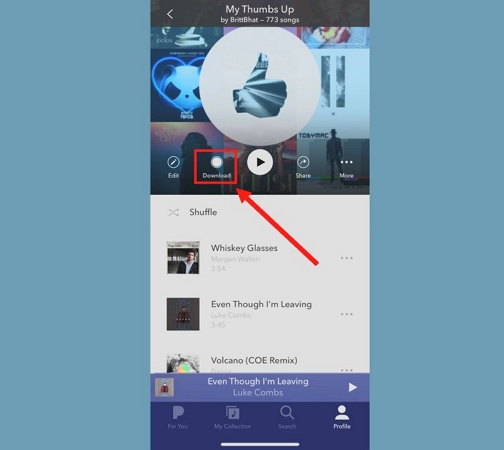
- Enter the page of that playlist or station.
- You will see the Download control on the main screen.
- Trigger it and the entire set will store itself on your device.
To Switch to Pandora Offline Mode
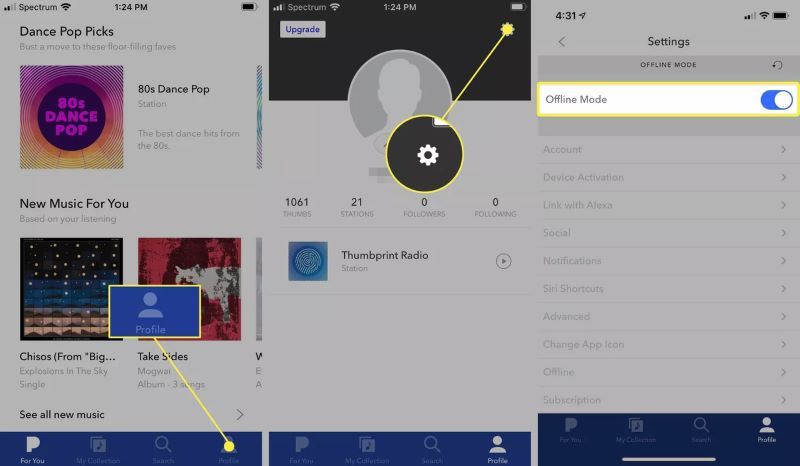
- Head to your Profile tab on the bottom bar.
- Press the gear symbol at the top corner.
- Find Offline Mode and turn it on.
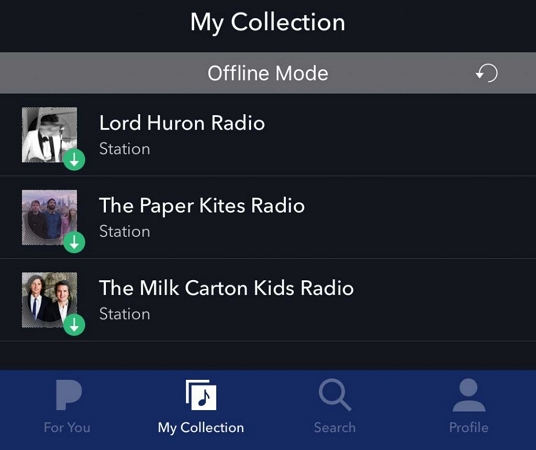
All your saved tracks sit inside the My Collection area. Go to My Collection and enjoy your Pandora songs offline now!
Is It Possible to Download Songs with Pandora Plus?
No, Pandora Plus does not let you choose songs and store them the way Premium does.
It works in a different style. Once you join Plus, the app builds a small offline pack for you. This pack includes your four most listened stations. You cannot expand this number or choose which tracks inside those stations get stored. Your Thumbprint Radio can show up here as well, but you must add it to your My Collection tab before it appears.
You only need to switch on the Offline Stations toggle once. After that, Pandora will refresh your offline pack every week. Follow these steps to turn it on:
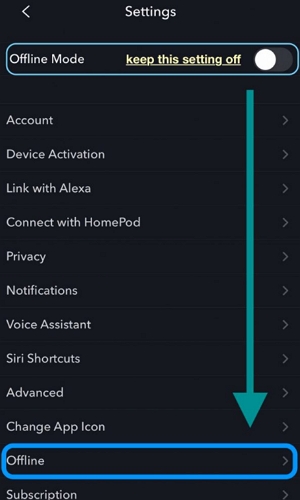
Step 1. Move to the Offline section
- Enter your Profile tab on the bottom bar.
- Press the gear symbol.
- Enter the Offline page.
Note: Don’t confuse this with the Offline Mode toggle.
Step 2. Activate Offline Stations
- Switch on Download Over Cellular if needed. Otherwise, the app waits for Wi-Fi.
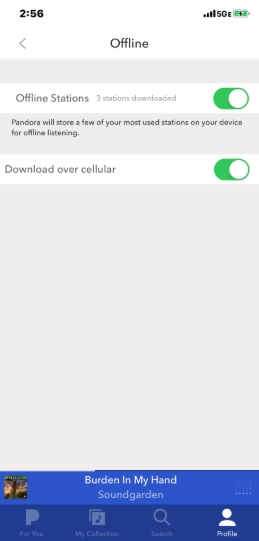
Step 3. The app will start gathering them in the background. Give it a moment to complete.
Step 4. Return to your Profile page.
- Open the gear symbol again.
- Now activate Offline Mode.
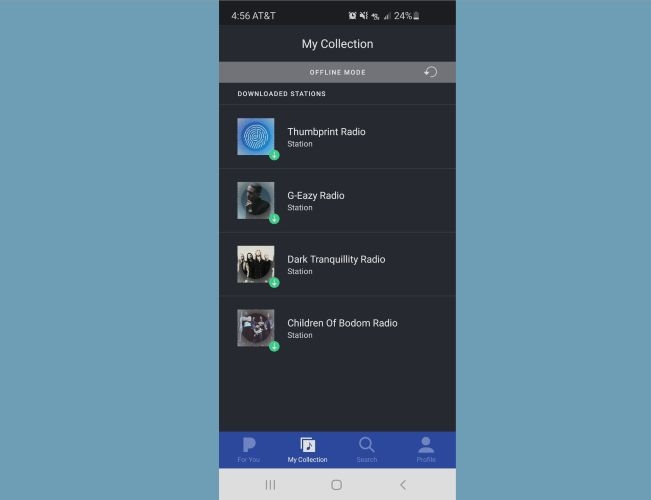
Your four saved stations will appear under My Collection.
Way 2. Download Music from Pandora Without Premium
Pandora app doesn’t allow you to save songs for offline use without a Plus or Premium account. That doesn’t mean you are stuck, though. Here’s an option you can reliably use.
Step 1: Save Pandora Songs as Local Files
The only practical way to create real offline files is to use Mediaio Audio Converter on your computer and then move those files to your phone manually.
Step 2: Transfer Local Pandora Songs to Phone
Mediaio runs on both Windows and Mac. So, depending on the device you’ve downloaded the songs on and whether you’re using an iPhone or an Android, here’s how to transfer them.
To Transfer Downloaded Pandora MP3 to Android
Step 1. Attach your Android phone to the computer using a reliable cable.
Step 2. Browse to your Mediaio download folder on the computer. Then open the phone’s internal storage in a separate window.
Step 3. Move the local tracks to your phone by dragging them from the Mediaio directory into any area of your phone storage. Most people drop songs into the Music folder, so stock players recognize the files immediately.
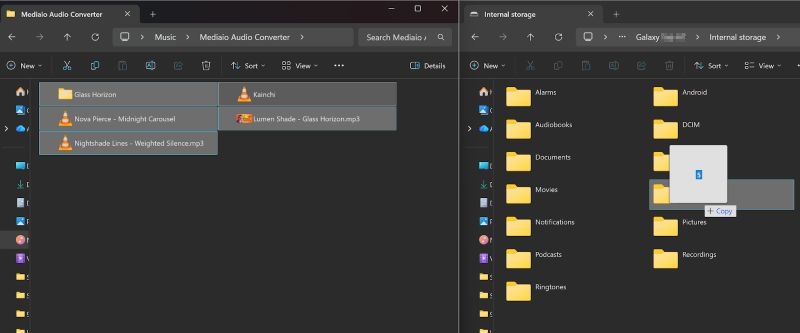
Step 4. Unplug the phone and launch your preferred player on the mobile device. The tracks show up instantly with their metadata intact.

To Transfer Downloaded Pandora MP3 to iPhone
For iPhone, the idea stays the same, although the path runs through app-specific folders.
Step 1. Use a certified Lightning cable to link the iPhone to your Mac.
Step 2. Open the Files section for your iPhone on Finder. You’ll see folders for apps like VLC,Documents, or any media-capable app you’ve installed on your mobile device.
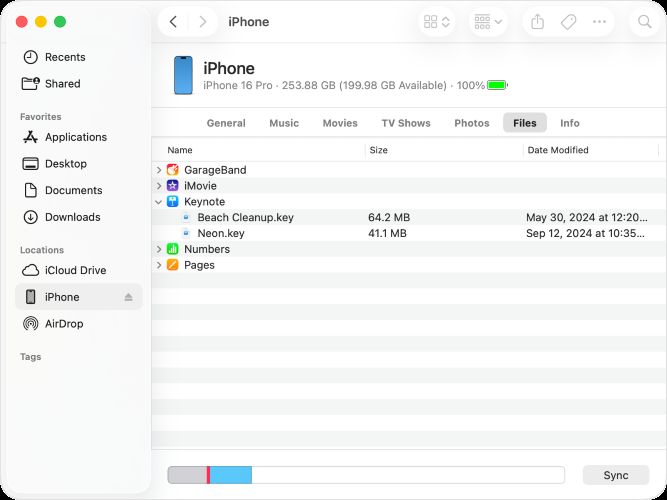
Step 3. Drag your MP3 files from the Mediaio folder into one of those apps.
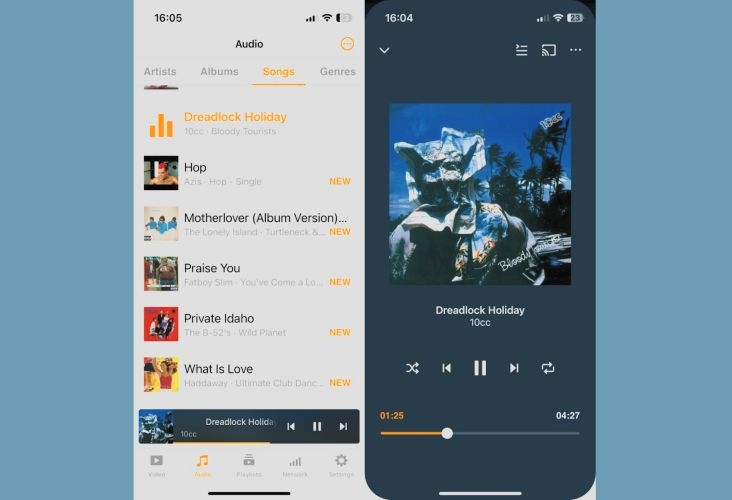
Step 4. After the transfer completes, open the chosen app on iPhone and play your songs from there.
FAQs
Below are the most-asked questions about moving Pandora music to other devices.
Well, that depends. Some modern MP3 players have Play Store support, so a Plus or Premium account will let you use Pandora’s offline mode inside the app itself.
As for moving songs from your phone or computer to an MP3 player, Pandora doesn’t allow that. Offline files stay locked inside the app and you can’t copy or export them.
If you’ve already converted the music through Mediaio Audio Converter, then it becomes simple. Just move those downloaded tracks to the MP3 player, the same way you transfer any normal audio files.
No. Pandora songs are locked within its app (even if you have downloaded them in-app). To download Pandora to USB drive, follow these steps:
1. Save the songs in MP3 or M4A using Mediaio Audio Converter.
2. Copy them to your USB drive.
3. Plug the USB drive anywhere and the songs will be playable.
Conclusion
So whether you want Pandora offline downloads on your computer or on your phone, we have shown you every workable path.
The reliable way to download Pandora music for any device is to use Mediaio Audio Converter. You can even move the downloaded music to any other device (phone, USB, MP3 player) and listen wherever you like. The best thing about Mediaio downloads is that they are not tied to any subscription and you can keep them for as long as you want.