
Pandora is a music service where users often get confused about making a playlist. Many people never see the option at all. And if you have ever checked Pandora’s plan details, you already know the truth: the playlist feature is only for Premium users.
We will change that for you. We will show you how to make a playlist on Pandora on any plan for completely free, whether you use the mobile app or the computer version. We will also share you an effective way to keep those Pandora playlists permanently using Mediaio Audio Converter. It lets you save your favourite Pandora songs into MP3 or M4A files for keeping them forever.

Popular Articles
How to Make a Playlist on Pandora for Free
Here are all the ways to create Pandora playlists without paying a dime. Keep in mind these are only clever workarounds. They don’t unlock playlist creation in Pandora forever. They work for a month, two, or sometimes four, but not for very long.
Prep: Get Pandora Premium for Free
Playlist creation sits behind the Premium tier. So, as long as your account is stuck on Free or Plus, the playlist button will stay hidden. However, you can get the Premium status without paying. Once that Premium window opens, the playlist feature is unlocked immediately.
Here are the options that actually give you Pandora Premium for free:
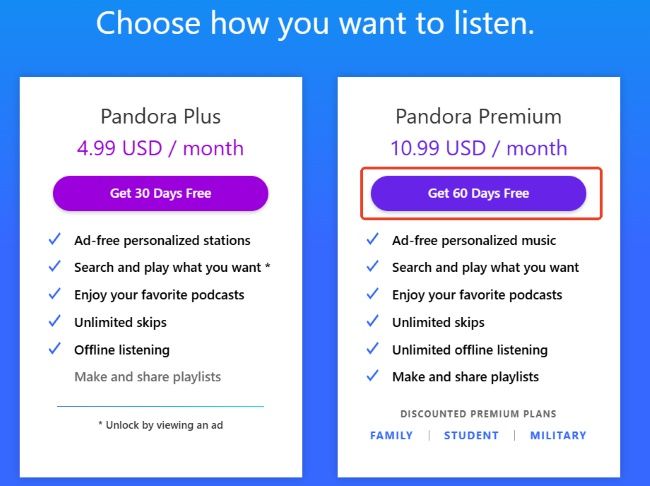
Option 1. Try Pandora Premium as a new user
Pandora advertises up to 60 days free for Premium. When you register as a new user (new email ID + valid payment details), Pandora grants you those free days before the billing kicks in.
During that free period of Pandora Premium, you can:
- search and play any track on demand
- open full albums
- add items to your collection
- build and reorder playlists freely
- download Pandora songs for offline listening
Once the free days end, the playlists freeze. They don’t vanish but just stay locked until Premium returns.
A valid payment method is required because the plan renews automatically when the free days end. You can cancel at least 24 hours before renewal. Just note the date.
Option 2. Join a Premium Family plan
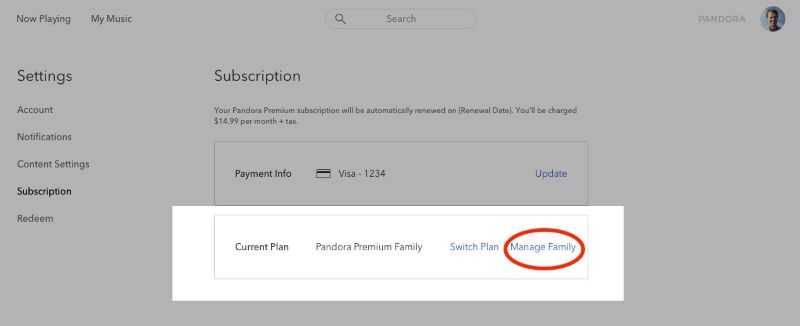
Pandora’s Family plan costs US$17.99 per month, around US$7 more than the individual Premium plan, but it covers six separate accounts under one shared bill.
So, you can ask your family member who subscribes to Pandora’s Family Plan to get a free seat with full Premium perks.
Important things to keep in mind:
- All six accounts share the same billing address.
- The organizer can remove you whenever they want. Until that happens, you keep full Premium access and your playlist tools work normally.
Option 3: Participate in Pandora Partnership
Many outside companies partner with Pandora and let you use Premium on their behalf. This is not “free” in the casual sense, but if you already use these services, the Premium access comes at no extra cost to you.
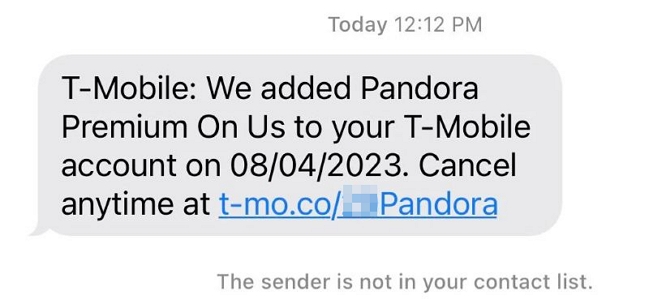
For example, T-Mobile carrier plans bundles Pandora Premium. So, you can activate the Pandora Premium access directly through them. The Premium status stays active for as long as the contract allows.
Note that these partnerships come with their own restrictions. For instance, you cannot switch carriers mid-contract. So avoid signing up for anything inconvenient just for this perk.
Make a Playlist on Pandora Phone with Premium
You can start a playlist from two different spots in the Pandora app on Android or iOS. You’re free to build as many playlists as you need. Only the size of each playlist is capped, because one can hold a maximum of 5,000 songs. So, here are the options.
Way 1. Via My Collection
This is the most simplest route when you want to build a playlist from scratch.
Step 1. Launch Pandora app. Make sure you are signed in to a Premium-enabled account.
Step 2. At the bottom bar, tap My Collection.
Step 3. Use the Filter at the top to switch to the Playlists view. Inside this section, you will see a New Playlist button. Tap it.
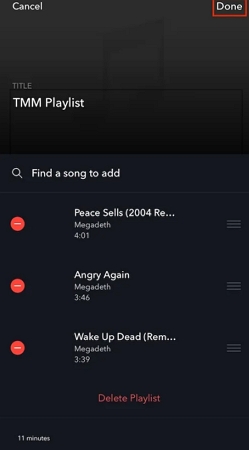
Step 4. Name your playlist and tap Next.
Step 5. A search bar will appear. Type a keyword: song name, artist name, or album name.

Step 6. Pandora will show close matches. Tap the + button next to the song you want. Tap Done. Of course, you can flood the playlist later as you explore the platform.

To revisit your playlist later: return to My Collection, switch to the Playlists filter, and your newly created playlist sitting there.

Way 2. Through Now Playing
As you explore songs, you may instantly want to add them to your created playlist. Or you may want to build a new playlist like a new Chill Mix. So, here’s how to do that:
Step 1. Open Pandora mobile, tap the small Now Playing bar at the bottom whenever you come across a song you want in your playlist.
Step 2. Tap the three dots below the banner. This will open the option sheet.
Step 3. Choose Add to Playlist.
Step 4. Choose New Playlist and assign the song to it.

Create a Playlist on Pandora Computer with Premium
The same playlist limits also apply when you’re on the desktop app or Pandora site. So, here are the two ways to start building a playlist on Pandora on your PC/Mac.
Method 1. Via My Collection Tab
The My Collection tab is where all your saved items sit. If your account has Premium access, whether through a free trial or a family seat, you will see a dedicated Playlists area inside this tab. From there, you can create one.
Step 1. Select My Collection from the top menu. Switch to the Playlists section in the bottom row.

Step 2. Choose Create playlist option.

Step 3. Enter a name for your playlist.
Step 4. Choose Find a song to add and use the search field to type a keyword.

Step 5. Let the results load. Hover over the song you want. Then, choose Add to Playlist.
Keep dropping in more tracks until the playlist feels right to you.

Method 2. Through Now Playing Screen
You can also build or update a playlist while listening to songs on Pandora.
Step 1. When a song is playing, locate the banner and tap the three-dot menu below it.
Step 2. This menu includes the Add to Playlist option if you’re on Pandora Premium. It will show all your existing playlists and a New Playlist option. Choose the option and make a new playlist to save the liked songs.

You may wonder whether you can change the playlist cover on Pandora. Unfortunately, the answer is no for now. Pandora does not offer a playlist cover editing feature like Spotify. However, there is a small trick that may affect how the Pandora playlist cover appears. You can remove the song whose artwork you want to display from the playlist and then add it back again. This may cause the playlist cover to update. However, this method is not a long-term solution.
Although you cannot directly change the Pandora playlist cover, you can still edit your playlist in other ways, such as adjusting the song order, renaming the playlist and removing tracks.

How to Keep Pandora Playlists Permanently
Keeping the Pandora playlist permanently for free is only possible when you turn those playlists into local MP3, M4A, or FLAC files. Mediaio Audio Converter allows you to do just that. With Pandora's playlists on your local computer, you can enjoy them forever without premium. Just use any free music player like Foobar2000 or MusicBee to play them.
Mediaio Audio Converter lets you download any Pandora song, playlist, or album and save it on your computer in local formats. The download process is very simple. You can sign in with your own Pandora account inside the built-in web player, add everything you want offline and export it locally with a single click.
The 30X conversion speed also makes sure that all your playlists and collections become offline very quickly. Mediaio also keeps the original order of the playlists intact.
Steps to Export Pandora Songs as Local MP3
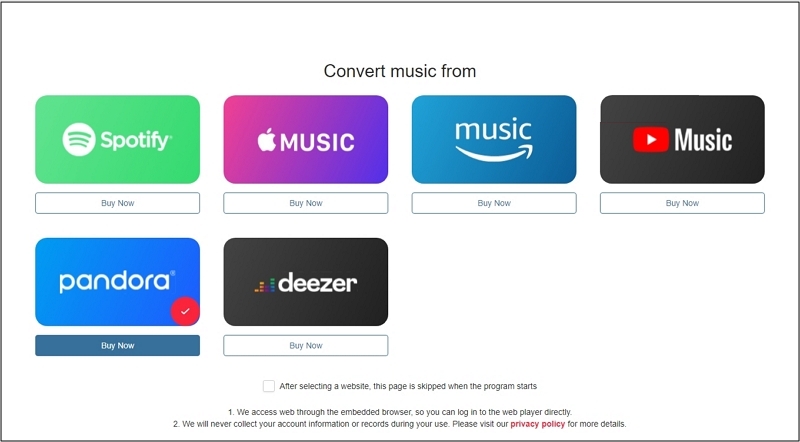
Start Mediaio Audio Converter on your Windows or Mac and choose Pandora from the main screen.
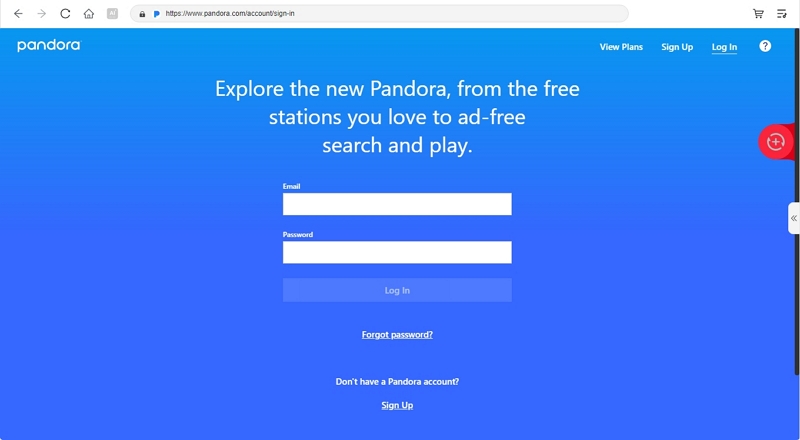
Sign in with your Pandora details—Free, Plus or Premium. Mediaio works the same across all tiers, so nothing changes here.
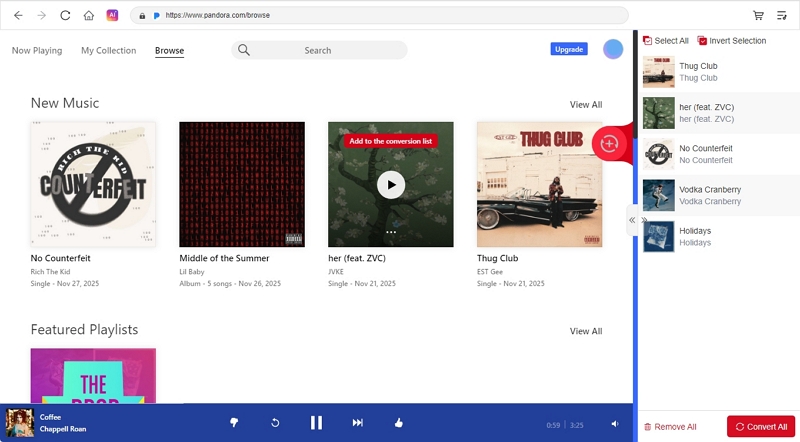
Bring the playlist or station you want into Mediaio by dragging it toward the + icon in the upper-right corner or clicking the Add to the conversion list button next to it.
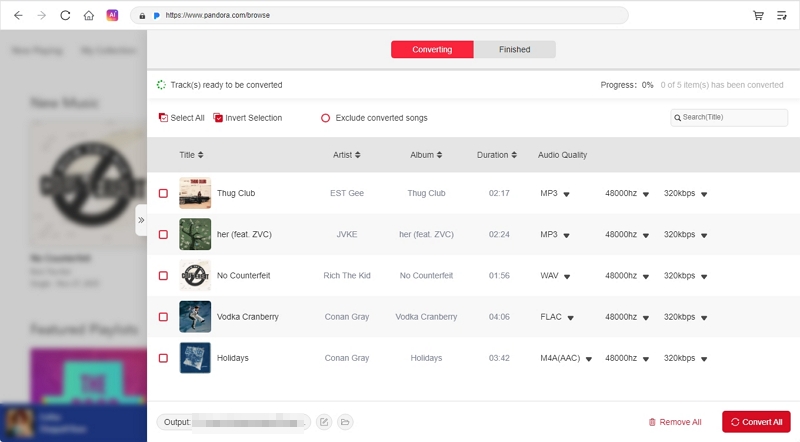
Access the conversion list by clicking the left arrow. Pick the audio format and output quality you prefer. Then, press Convert All in the lower-right corner. You’ll find the finished tracks inside its Downloads folder. You can move them to your other devices for personal usage. For example, you can save them to a USB drive and then listen to Pandora in your car using it.
FAQs
Here is more information on how Pandora handles playlists.
No, you cannot. Pandora still does not offer a batch-add feature. The flexibility is absent even in the desktop interface. You must use the earlier methods and add songs one after another. It is slow, but it is the only route.
A station on Pandora behaves just like an old-school radio stream. However, it’s algorithm-driven. The algorithm responds to your likes, your skips, your refusals. It shifts with your taste. Stations are also open to Free and Plus users, which makes them accessible to almost everyone on the platform.
A playlist feels very different. Every track is placed by you. You see the list from top to bottom. You know what comes next. You can rearrange the entire order and even remove anything that no longer fits the mood. You can also sort the list alphabetically whenever you want a cleaner view.
Conclusion
Making a playlist on Pandora is a premium feature, but we showed you how to get temporary premium access and build the playlists you want.
When you want to keep your Pandora playlists permanently without premium, Mediaio Audio Converter comes in. It lets you save your Pandora songs on your computer as MP3 or M4A files. You can keep the playlists for as long as you like and even play them on other devices you own, like your car or your home system.