

Amazon Music’s offline mode lets you enjoy your favorite tracks without using mobile data or Wi-Fi. Whether you're commuting, traveling, or conserving bandwidth, this feature ensures uninterrupted listening. Here's a quick guide to enable and manage offline mode across devices. We also discuss a reliable alternative that lets users download Amazon Music playlists as MP3s and listen to them in any media player app.
Part 1: What Is Amazon Music Offline Mode?
Offline Mode in Amazon Music allows you to listen to music without an internet connection. When Offline Mode is enabled, the app shows and plays only the songs, albums, or playlists that you’ve already downloaded to your device.
This feature is especially useful when traveling, dealing with poor network coverage, or trying to save mobile data. Offline Mode itself does not download music — it simply controls access to content that has already been saved locally.
Difference between Offline Mode and Streaming
Streaming Mode
- Requires an active internet connection
- Songs are played directly from Amazon’s servers in real time
- Gives access to the full Amazon Music library, including playlists, radio stations, and personalized recommendations
Offline Mode
- Works without an internet connection
- Plays only previously downloaded songs
- When Offline Mode is enabled, any music that hasn’t been downloaded will be hidden and unavailable
How Offline Mode Works with Downloaded Songs
Amazon Music’s Offline Mode depends entirely on downloaded content. Before you can listen offline, you must download songs, albums, or playlists to your device.
Once downloaded, the music is stored locally and can be played without Wi-Fi or mobile data. If no music has been downloaded, your library will appear empty when Offline Mode is turned on.
Part 2: Does Amazon Music Have Offline Mode?
Yes — Amazon Music does support Offline Mode, but availability depends on your subscription plan.
Amazon Music Free: Offline Mode Availability
- Amazon Music Free does not support Offline Mode
- You can stream music with ads, but downloads are not available
- Offline listening is not possible on the free plan
Amazon Prime Music Offline Mode
- Amazon Prime members get access to Prime Music
- You can download available Prime Music songs and playlists for offline listening
- The music catalog is more limited compared to Amazon Music Unlimited
Prime Music is suitable for casual offline listening, but not all songs on Amazon Music are included.
Amazon Music Unlimited Offline Mode
- Amazon Music Unlimited offers access to the full Amazon Music catalog
- Users can download any supported song, album, or playlist
- Offline Mode works across mobile devices with the most flexibility
This is the best option if you want unrestricted offline listening.
Device and Account Limitations
- Offline Mode works only on supported devices using the Amazon Music app
- You must be signed in with the same Amazon account that has Prime or Unlimited access
- Downloads are tied to your account and device — signing out may remove offline access
- Offline availability depends on device storage and Amazon’s usage policies
Part 3: How to Turn On /Off Offline Mode on Amazon Music
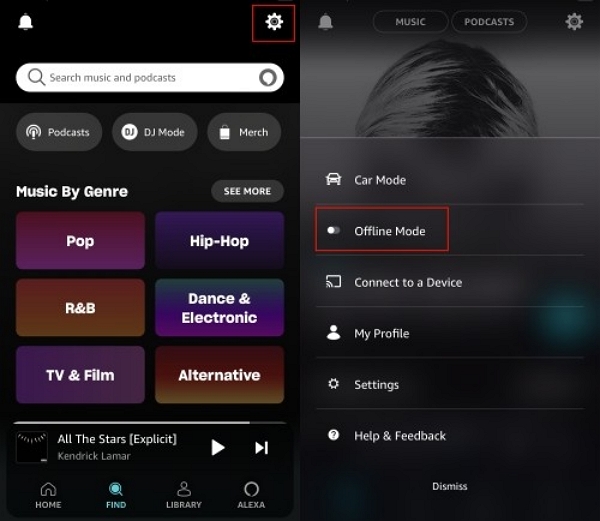
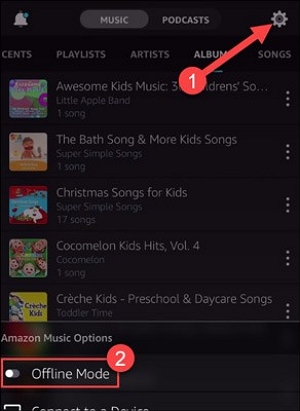
1. Turn On Offline Mode on Android
- Open the Amazon Music app on your Android device.
- Tap the Settings (gear icon) in the top-right corner.
- Find Offline Mode and toggle it ON to show only downloaded content.
- Download songs, albums, or playlists in advance to listen without an internet connection.
Turn Offline Mode OFF to access streaming content again.
2. Turn on Offline Mode on iPhone
- Launch the Amazon Music app on your iPhone.
- Tap your Profile icon, then select Settings.
- Toggle Offline Mode to ON to play downloaded music only.
- Use the Download icon next to songs, albums, or playlists to save them for offline listening.
When Offline Mode is enabled, unavailable tracks will be hidden.
3. Turn On Offline Mode on the Desktop App
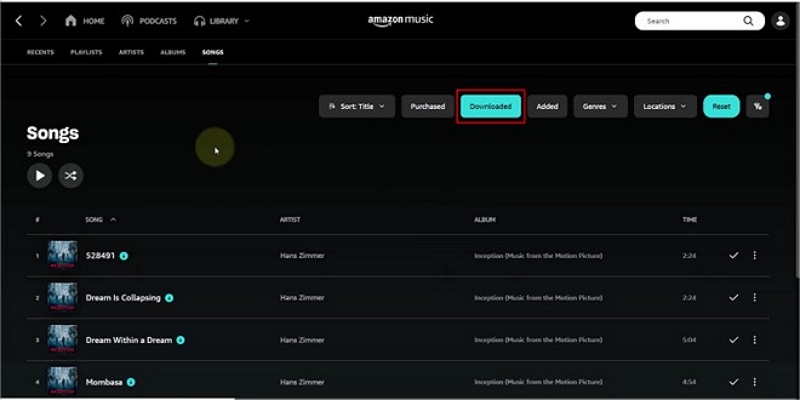
Unlike the mobile app, the desktop app doesn’t have a dedicated “Offline Mode” switch.
- Open the Amazon Music desktop app on your PC or Mac.
- Go to Library > Songs (or Albums/Playlists).
- Click the Downloaded filter to display music saved locally.
- Play any downloaded track — it will work even without an internet connection.
4. How to Turn Off Offline Mode on Amazon Music
Why Turn Off Offline Mode?
Users often disable Offline Mode to return to full online streaming features:
- Access the full Amazon Music library: Offline Mode limits playback to downloaded content only. Turning it off restores access to millions of streaming tracks.
- Discover new music: Online mode enables playlists, stations, recommendations, and newly released songs that aren’t available offline.
- Sync music updates: Playlist changes, new albums, and refreshed recommendations require an internet connection.
- Manage storage more flexibly: While turning off Offline Mode doesn’t delete downloads, switching back to streaming reduces the need to keep large files stored locally.
How to Switch Back to Online Streaming
Steps:
- Open the Amazon Music app on your device.
- Go to Settings.
- Find Offline Mode — it will be enabled if you’re currently offline.
- Toggle Offline Mode OFF.
Once disabled, the app reconnects to the internet and displays the full streaming catalog.
Part 4: Does Amazon Music Use Data in Offline Mode?
Quick Summary
- Offline Mode itself does not use data when playing downloaded music.
- Data is only used for downloads, occasional account checks, or when switching back to online streaming.
Part 5: Amazon Music Offline Mode Not Working? How to Fix It
Offline Mode Option Is Missing
If you don’t see the Offline Mode toggle in your Amazon Music app, it may be due to one of the following reasons:
- Outdated app version: You may be using an older version of the Amazon Music app. Update it from the App Store or Google Play to ensure all features are available.
- No downloaded content: Offline Mode may appear unavailable or ineffective if no songs, albums, or playlists have been downloaded. Without saved content, there’s nothing to play offline.
- Account or subscription limitations: Amazon Music Free does not support Offline Mode. Make sure you’re signed in with an Amazon Prime Music or Amazon Music Unlimited account.
Downloaded Songs Won’t Play in Offline Mode
If your downloaded music doesn’t play while Offline Mode is enabled, try the following fixes:
- Check your subscription status: Offline downloads may stop working if your Prime or Unlimited subscription has expired. Re-sign in or renew your plan if necessary.
- Re-download the music: Downloads can occasionally become corrupted. Removing the affected songs and downloading them again often resolves playback issues.
- Check storage permissions and app cache: Ensure the Amazon Music app has permission to access your device’s storage. Clearing the app cache can also fix offline playback errors.
Part 6: Limitations of Amazon Music Offline Mode
App-Only Offline Playback
- Amazon Music Offline Mode works only within the Amazon Music app.
- Downloaded songs cannot be transferred to other music players or copied outside the app.
- This design ensures that offline downloads remain linked to your Amazon account.
DRM Restrictions
- All Amazon Music offline downloads are protected by DRM.
- DRM prevents sharing, exporting, or burning downloaded tracks to CDs.
- Offline downloads are intended for personal use and remain tied to an active subscription.
Offline Access Expiration
- Offline downloads are not permanent.
- If your Prime or Amazon Music Unlimited subscription ends, offline playback will no longer be available.
- The app may periodically require an internet connection to verify your account or subscription status.
Device and Storage Limits
- Amazon Music limits the number of devices that can store offline downloads at the same time.
- If you reach the device limit, you may need to remove an existing device before downloading music on a new one.
- Available storage space on your device also determines how many songs you can keep offline.
Part 7: Alternative Way to Keep Amazon Music Offline
Saving Amazon Music as local files
You can play downloaded music tracks inside the app. If you want to keep songs as local files on your device, you must convert them to standard formats like MP3. Mediaio Audio Converter is a safe and reliable tool that lets you download Amazon Music tracks in MP3 format and play them on compatible devices outside the Amazon app.
FAQs
You may not have downloaded any songs. Your subscription plan may not support Amazon Music Offline Mode. Please ensure you’re signed in and have Prime or Unlimited access.
Yes. Downloaded songs are tied to your subscription. The songs will stop playing offline if your Prime or Unlimited plan ends.
Yes. Once you download the songs, you can play them in Offline Mode, even when your device is in airplane mode.
No. Offline Mode works only while your subscription is active. Your downloaded songs will no longer be available if your subscription expires.
Conclusion
Amazon Music’s offline Mode is handy, letting you enjoy music without an internet connection. It is best when you’re traveling, saving data, or want uninterrupted playback. It has its limitations, such as app-only use, DRM protection, and subscription requirements. However, Prime and Unlimited subscribers get flexible access.