

SoundCloud is one of the best platforms out there to discover new and upcoming artists across any genre. However, Apple Music remains one of the most preferred streaming services worldwide.
If you:
- Want to synchronize SoundCloud songs to Apple Music
- Want to import your Apple Music playlist into SoundCloud
- Want to know which platform is more suitable for you
Then this article is for you. We will cover all you need to know about synchronizing your SoundCloud library to Apple Music, importing playlists, and figuring out which is the better platform for you.
Part 1: Can You Transfer SoundCloud Songs to Apple Music?
Unfortunately, there is no official collaboration between SoundCloud and Apple Music. So, there is no option to directly download and import songs into Apple Music from SoundCloud.
Not to mention, a lot of demos and hidden gems uploaded to SoundCloud might not even be available on Apple Music. While there is no official method to transfer your library from SoundCloud to Apple Music, you can use third-party tools to transfer your collection.
Part 2: How to Add SoundCloud Songs to Apple Music (3 Working Methods)
In this section, we will go over three tried and tested methods to add SoundCloud tracks to your Apple Music library.
Method 1. Use a SoundCloud to Apple Music Converter (Fastest)
The first method is the easiest and fastest to execute, and it involves using an online music transfer tool. Most people use SongShift, TuneMyMusic, Soundiiz, or FreeYourMusic to move their playlists across streaming services.
Regardless of which service you choose, the steps are the same across the board.
Step 1: Open your online music transfer tool and create an account.
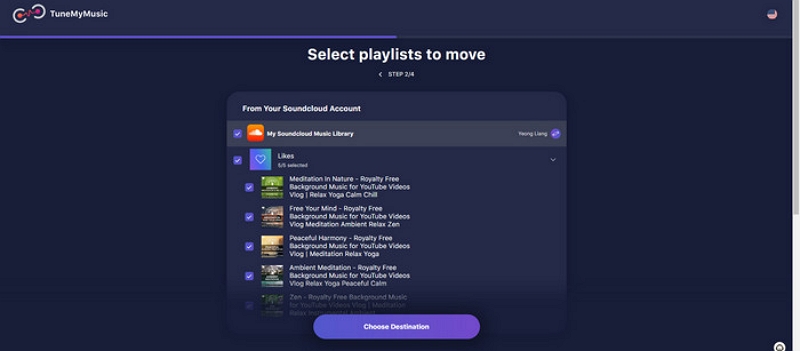
Step 2: Now, select SoundCloud as your original source and choose the playlist you want to transfer.
Step 3: Choose your destination (Apple Music in this case) and click Start Transfer after logging into your Apple Music account.
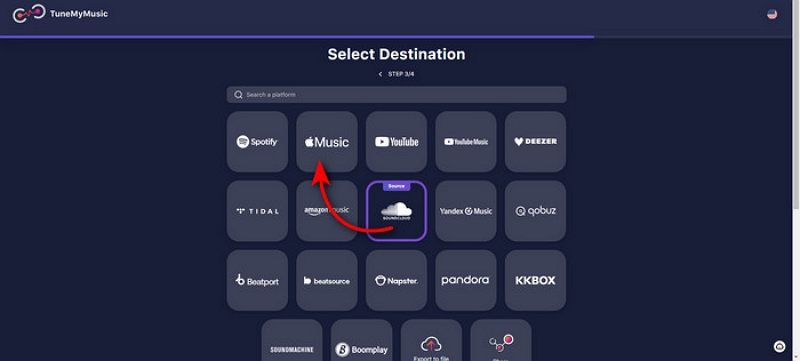
Wait till the software completes the transfer, and you should have your playlist imported into Apple Music.
Note: The playlist is transferred based on the ID of the songs across platforms. So, some songs might not show up if they are not available on Apple Music. Any transfer procedure does not affect the original playlist on SoundCloud.
Method 2. Download from SoundCloud and Upload to Apple Music (Manual)
Yet another method is to try to free download SoundCloud to Apple Music. Some SoundCloud tracks can be downloaded for free, provided the option has been enabled by the uploader. If so, you can save the file and import it into Apple Music for offline playback. Here are the steps to do so:
Step 1: Open SoundCloud and find a song you want to import into Apple Music.
Step 2: Click on More and see if there is a download option available. If yes, click and download the track.

Step 3: Open the Apple Music app on your computer and go to Library > Add Files / Folder to Library. From here, select the track you just downloaded.

Now you will be able to listen to the track you just downloaded on Apple Music via offline playback. SoundCloud allows you to download files in MP3, WAV, FLAC, ALAC, and many other file formats.
However, note that copyrighted music cannot be imported into the app this way.
Part 3: How to Transfer Apple Music to SoundCloud
While there are several ways to transfer music from SoundCloud to Apple Music, moving music in the opposite direction is much more restricted. This is mainly because Apple Music tracks are protected by DRM (Digital Rights Management) and copyright regulations. As a result, Apple Music songs cannot be uploaded directly to SoundCloud, especially for public sharing.
Apple Music content is licensed for personal listening only. Uploading copyrighted tracks to SoundCloud without proper authorization may violate copyright laws and SoundCloud’s terms of service. Use the following method only for personal backup, offline listening, or private use—not for redistribution or commercial purposes.
A Practical Solution for Personal Use
In situations where users need to listen to Apple Music tracks offline on unsupported devices or manage personal audio files, some third-party audio converters can help convert Apple Music songs into common formats such as MP3, WAV, ALAC, or FLAC. These formats are widely compatible and easier to manage for personal use.
Many users choose Mediaio Audio Converter for this purpose, as it supports multiple audio formats and offers a straightforward conversion process.
How to Convert Apple Music Songs for Offline Personal Use
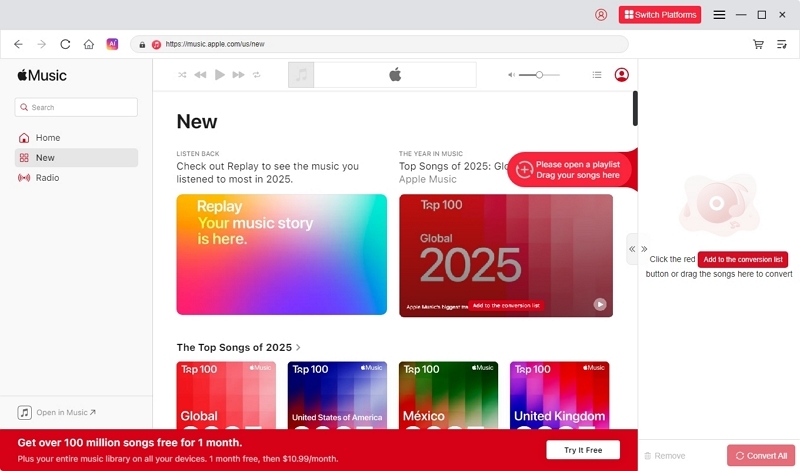
Install and launch Mediaio Audio Converter on your computer and choose Apple Music as the source. Then, log in to your Apple Music account with your credentials.
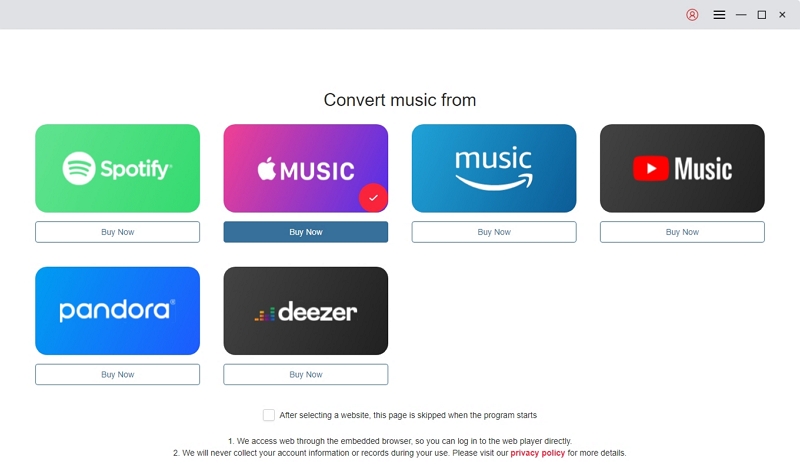
Choose the songs you want to download and add them to the queue by dragging singles or albums to the “+” icon.
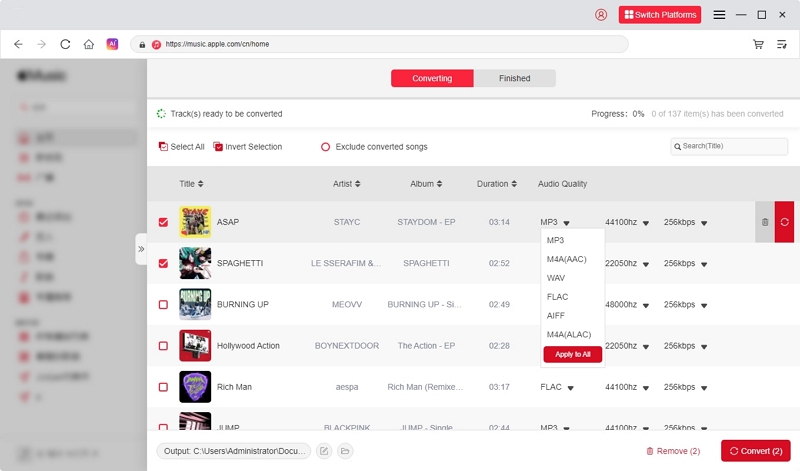
Customize the output format (WAV, FLAC, MP3, etc.), bit rate, depth, and quality according to your needs.
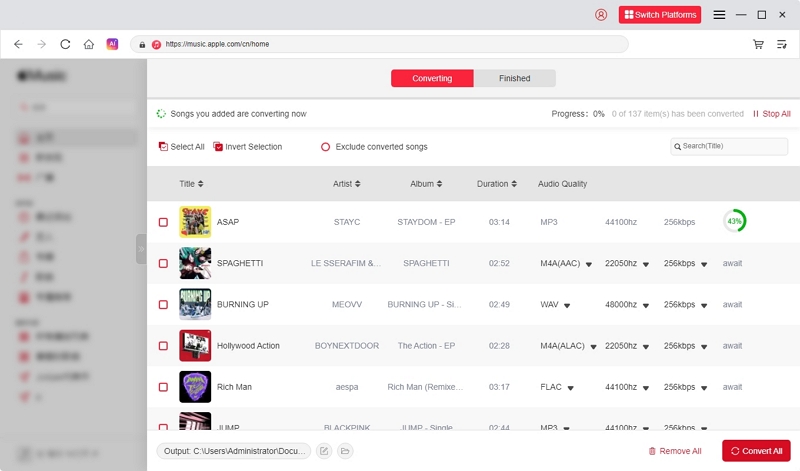
Check the list of songs in the queue, then click “Convert All” at the bottom of the screen once you’re ready.
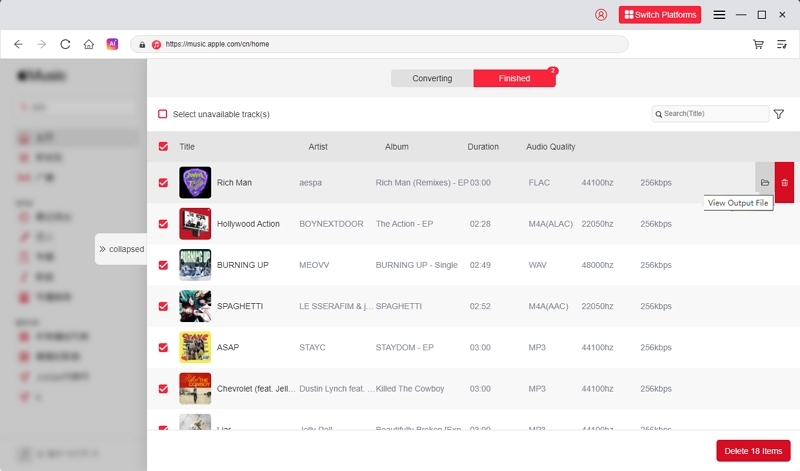
Wait for the download to complete. Once finished, the songs will appear in the Finished tab. You can also click “View Output File” to go directly to the folder where they are stored.
Part 4: SoundCloud vs. Apple Music
Which Is Better for You — SoundCloud or Apple Music?
Choosing between Apple Music and SoundCloud is a matter of taste at the end of the day. If you're planning to listen to top artists and want to access lossless quality audio, then Apple Music is the place for you.
Alternatively, if you're not willing to pay for a music subscription and want to discover upcoming artists and their deep cuts, you should try SoundCloud.
Part 5: Troubleshooting: SoundCloud to Apple Music Not Working?
Transferring music from SoundCloud to Apple Music comes with its own set of challenges. If you're running into errors trying to transfer your playlists, here are some common causes you might want to address:
- Authorization failed: The playlist shifting tool was unable to authorize your SoundCloud or Apple Music accounts. Check your credentials and try to log in again.
- Apple Music account regions are not supported: Some songs might be region-locked and unavailable in your country. If so, they cannot be imported into Apple Music as they could get removed due to copyright issues.
- SoundCloud songs cannot be synchronized without copyright: Some songs are exclusively available on SoundCloud and might not be eligible for a transfer to Apple Music. You’ll have to revisit SoundCloud to listen to the track in this case.
FAQs
Downloading SoundCloud music to Apple Music depends on whether the uploader has allowed the download option. If so, you can save the file offline and import it using the steps mentioned earlier in this guide.
Yes, you can add a SoundCloud playlist to Apple Music by using a playlist shifting tool as mentioned earlier.
Not always. Most songs on Apple Music are DRM and copyright-protected, so re-uploading them to SoundCloud may result in takedowns due to copyright infringement.
No official converter exists. However, third-party tools such as Mediaio Audio Converter can help you save songs offline and then import them into Apple Music.
Conclusion
Importing songs from SoundCloud to Apple Music can be done safely and easily by using authorized tools for personal backup or offline listening. Always ensure that you respect copyright laws and do not upload Apple Music tracks or copyrighted content to SoundCloud or other platforms without proper authorization. Following these guidelines allows you to enjoy your music legally and hassle-free.