

Apple Gift Cards are a convenient way to pay for apps, games, iCloud storage, and Apple Music subscriptions. But if you’ve tried redeeming one for Apple Music and still see “Payment method required”, you’re not alone.
This guide walks you through when and how Apple Gift Cards can be used for Apple Music, why they sometimes fail, and what practical options exist if you don’t want to rely on a credit card.
Part 1: Can You Use an Apple Gift Card for Apple Music?
Yes, but it’s not always straightforward.
Apple Gift Card vs Apple Music Gift Card
Apple Gift Card – The universal card Apple currently sells. Once redeemed, its value goes into your Apple ID balance and can be used for most Apple services, including Apple Music.
Apple Music Gift Card – Only worked for Apple Music subscriptions, but these have been discontinued.
When Apple Gift Cards Work
Once redeemed, your balance can pay for:
- Apple Music subscriptions
- Apps and games
- In-app purchases
- Movies and TV shows
- iCloud+ storage
When They Don’t Work
- The card hasn’t been redeemed yet
- Purchased in a country different from your Apple ID region
- Trying to buy something Apple doesn’t sell
Tip: Region mismatch is one of the most common causes of issues.
Part 2: What You Need Before Using an Apple Gift Card for Apple Music
Many subscription issues come from missing requirements. Before buying or redeeming a gift card, check these:
Apple ID region matches the card
Gift cards are region-locked. If your Apple ID is set to the US, a card bought in the UK won’t work.
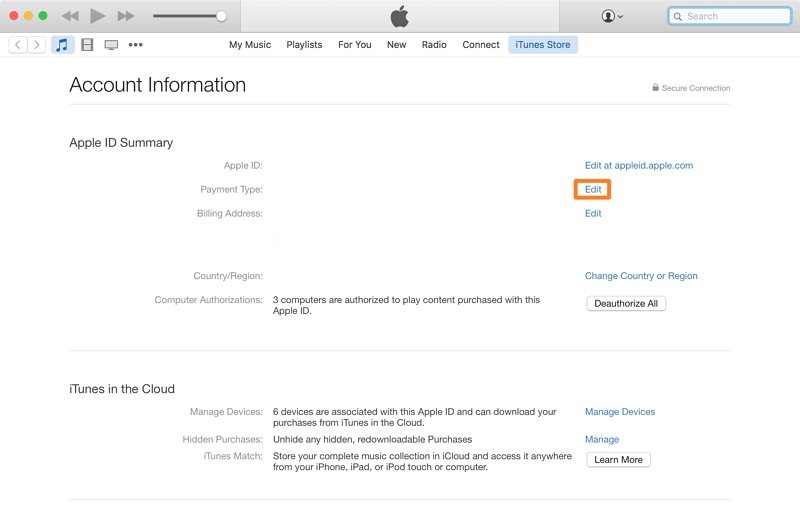
Sufficient balance
Your Apple ID balance must cover the total cost of Apple Music, including taxes. Even a small shortfall can block subscription renewal.
Backup payment method
Apple sometimes asks for a credit/debit card even with enough balance, for verification and security.
Quick check: Meeting these three conditions doesn’t guarantee no card will be requested, but it covers most common cases.
Part 3: How to Redeem an Apple Gift Card to Your Apple ID
Redeeming an Apple Gift Card is very straightforward and can be done on any device. Here, we’ve explained how to redeem an Apple Gift Card on iPhone/iPad, Mac, and Apple Store or Apple Music App.
Method 1. Redeem on iPhone / iPad
Step 1: Scratch off the label on the back of your card.
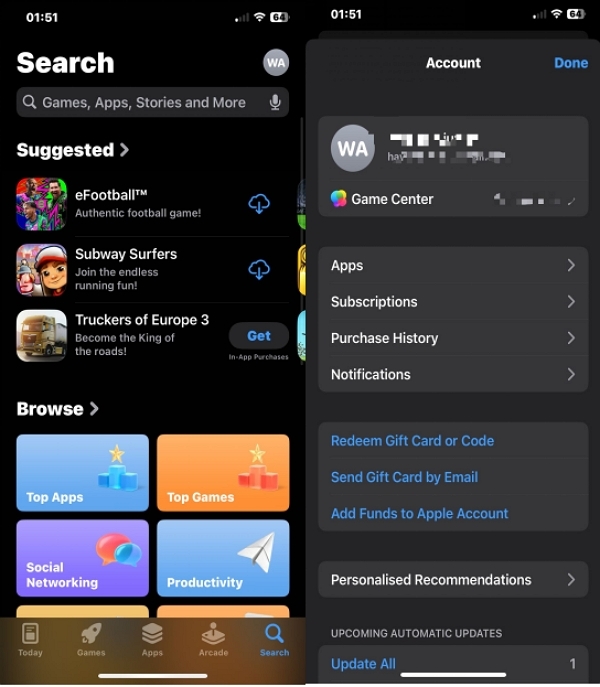
Step 2: Open App Store, tap your Profile icon.
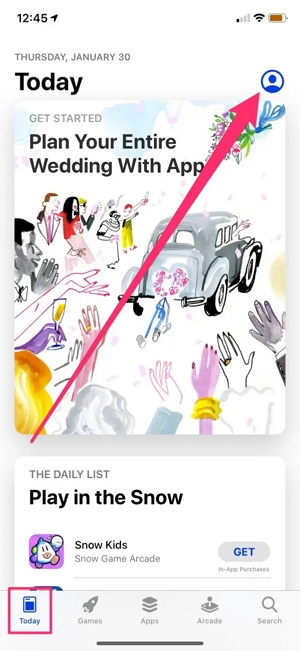
Step 3: Tap Redeem Gift Card or Code.
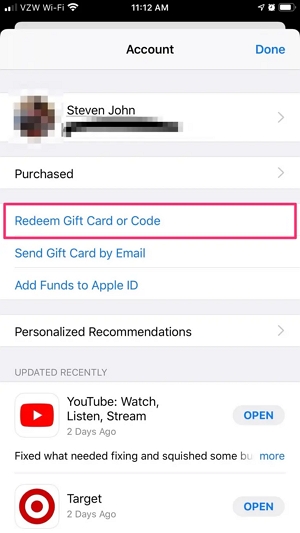
Step 4: Choose Use Camera or Enter Code Manually.
Step 5: Follow instructions and tap Redeem.
If the balance doesn’t appear immediately, try restarting your device or signing out and back in.
Method 2. Redeem on Mac
Step 1: Scratch off the label on the back of your Apple Gift Card.
Step 2: Open the “App Store” on your Mac computer.
Step 3: Click on the “Sign in” button on the right sidebar if you have not logged in to your Apple ID to access your “Account” page.
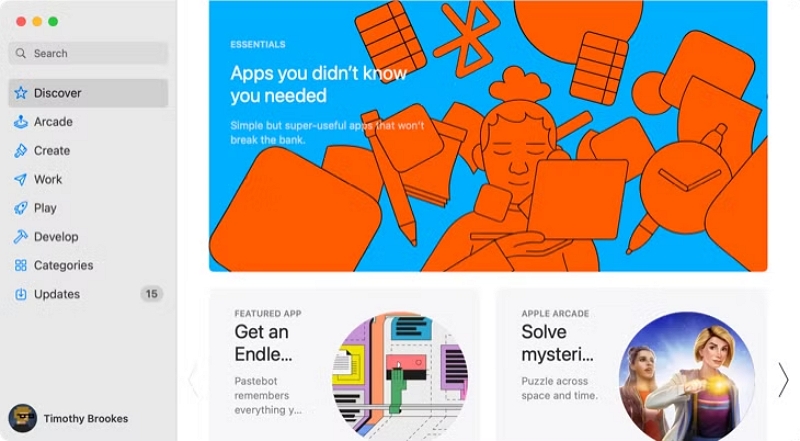
Step 4: Click on “Redeem Gift Card” in the top-right corner.
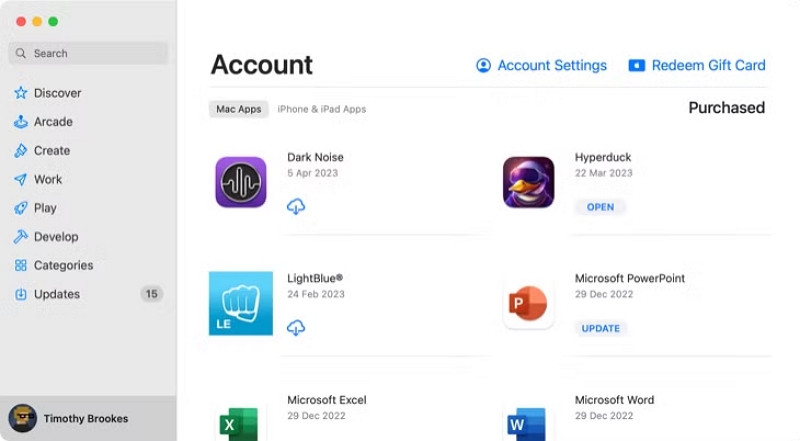
Step 5: Choose the option you’d like to use to redeem the gift card. You can either “Use Camera” or “Enter Code Manually” and follow the on-screen instructions to enter the card info.
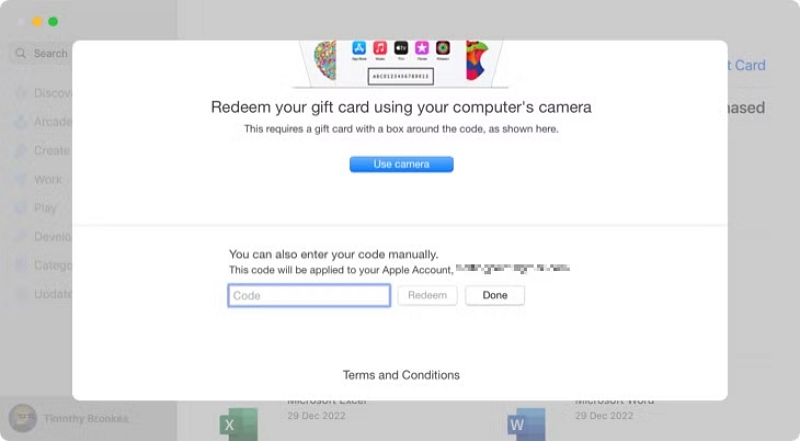
Method 3. Redeem via the Apple Music app
Step 1: Open the “Apple Music app” and click on the “For You” tab.
Step 2: Click on your “Profile icon” at the top-right corner.
Step 3: Tap on “Redeem Gift Card or Code.”
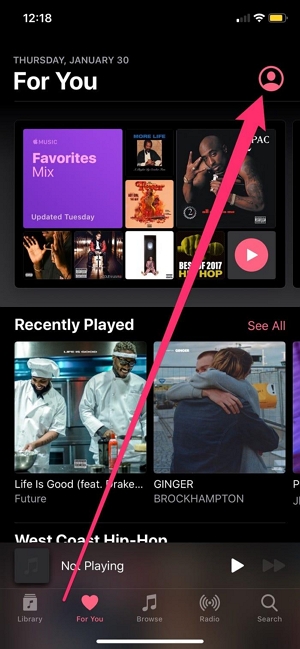
Step 4: Choose the option to redeem your gift card.
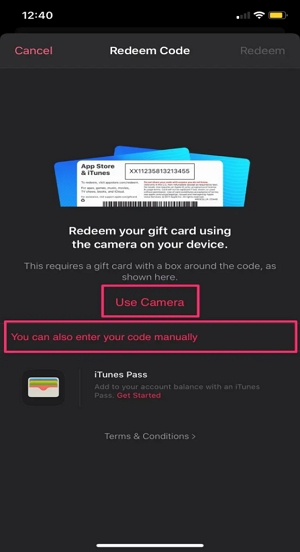
Step 5: Finally, enter your gift card details and tap “Redeem” to finish.
Troubleshooting tip: "Successful redemption, but balance not displayed."
If you’ve redeemed your Apple Gift Card, but the balance does not appear, it’s often a result of a temporary sync delay or a sign-in issue. Restart your device or sign out of your Apple ID and sign back in to fix the problem. But if the problem persists, you can contact Apple Support to verify the redemption status.
Part 4: Using Apple Gift Card Balance for Apple Music
Once redeemed, your Apple ID balance is automatically applied to Apple Music payments. Here’s how it works:
Subscribe to Apple Music using a gift card balance
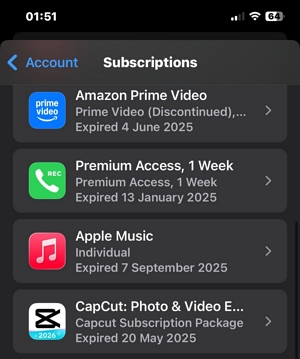
Step 1: Open App Store → tap your Profile → Subscriptions.
Step 2: Select the “Apple Music” from the list of apps.
Step 3: Tap on “See All Plans” to select a preferred plan.

Step 4: Tap on the “Renew” button and complete the verification to confirm your subscription.
What Happens if Your Balance Runs Out?
- Apple will attempt to charge the remaining amount to a linked card or PayPal.
- If no valid payment method exists, the subscription may pause.
Part 5: Common Reasons an Apple Gift Card Doesn’t Work for Apple Music
1. Balance is there but Apple Music still asks for a card
Often regional rules or subscription policies require a backup payment method.
Temporary solution: Add a credit/debit card for verification.
2. Card purchased in a different country
Region-locked cards can be redeemed but not used for subscriptions.
3. Family Sharing plans
Apple Music Family subscriptions are billed to the family organizer. Individual balances usually don’t apply.
4. Existing subscription billed to another payment method
Apple will continue charging the original card unless you manually remove it.
Part 6: Can You Use an Apple Gift Card for Apple Music Without a Credit Card?
The short answer: Sometimes yes — but often Apple still requires a backup card.
When Gift Cards Alone Work
- New subscription (not free trial conversion)
- Balance fully covers the plan + tax
- Individual plan, not Family
- No recent failed payments or account issues
- Region supports gift-card-only subscriptions
When Apple Will Ask for a Card
- Starting a free trial
- Apple Music Family plan
- Existing subscription billed to a card
- Balance may not cover future renewals
Common myths debunked:
- Removing payment methods won’t bypass Apple’s policies.
- Switching regions can break subscriptions.
- Large balance doesn’t guarantee card-free renewals.
Takeaway: Gift cards reduce cost, but do not guarantee a card-free experience.
Part 7: Alternatives If You Don’t Want a Subscription
- If ongoing Apple Music fees aren’t ideal, consider offline listening solutions: Mediaio Audio Converter allows you to keep Apple Music songs permanently, even after your subscription ends.
- Converts Apple Music to MP3, WAV, or other formats.
- Maintains metadata and playlists.
- Batch downloads at faster speed.
This is perfect if you want long-term access without paying monthly fees.
FAQs
Yes. You can redeem multiple Apple Gift Cards to your Apple ID, and their values will combine into a single Apple ID balance. Apple Music will deduct the subscription fee from this balance as long as there’s enough credit available.
Yes. Apple Music subscriptions still auto-renew even when paid with an Apple Gift Card. If your Apple ID balance is sufficient, renewal happens automatically. If the balance is insufficient, Apple may pause the subscription or attempt to charge a backup payment method if one is required on your account.
Only partially. Family Sharing subscriptions must be paid by the family organizer, and Apple usually requires the organizer to have a valid credit or debit card on file. Even if gift cards are redeemed, they typically act as a secondary payment source rather than replacing the required card.
Conclusion
Apple Gift Cards are a convenient way to pay for Apple Music, but they don’t always remove the need for a credit or debit card.
If you want temporary or partial coverage, gift cards work well.
If you want long-term, card-free listening, offline solutions like Mediaio Audio Converter provide a reliable alternative.
Understanding Apple’s policies saves you frustration and helps you make informed choices for your music subscription.