

Plex is a genuinely excellent way to build a personal music server—stream your collection from any device, get audiophile-grade playback through Plexamp, and access your library without depending on a subscription service staying online. But getting Apple Music files into Plex is more complicated than dragging a folder, and the reason is specific to which files you actually have.
This guide explains exactly what works, what doesn't, and how to get the best possible Plex music experience from your Apple Music library.
The Core Problem: Not All Apple Music Files Are the Same
iTunes Purchased Tracks vs. Apple Music Subscription Tracks
Your Apple Music library likely contains two completely different types of files, and Plex handles them differently.
iTunes Store purchases (songs you bought individually or albums you purchased) are stored as unprotected AAC files (.m4a). You own these. They're standard audio files that Plex, Plexamp, and any other media player can read directly.
Apple Music subscription downloads are encrypted with Apple's FairPlay DRM. These files exist on your device to enable offline playback within Apple's apps, but they're not files you own—they're temporarily licensed for playback. Plex cannot read them because Plex isn't an authorized Apple application.
How to tell which type you have:
- In Finder or File Explorer, check the file extension. .m4a = usually a purchased track. .m4p = Apple Music subscription track.
- In the Music app, right-click any song → Get Info → look at "Kind." "Purchased AAC audio file" = yours. "Apple Music audio file" = subscription only.
What Plex Supports
Plex's music library accepts any standard, unprotected audio format:
It cannot import DRM-protected .m4p files or encrypted subscription downloads in any format.
Method 1: Adding iTunes Purchased Tracks to Plex (Free, Works Immediately)
If your library includes purchased iTunes tracks, ripped CDs, or music files you've imported from other sources, you can add these to Plex directly—no conversion needed.
Step 1: Locate your local music files
On Mac: Your iTunes purchases are in Finder → Music → iTunes → iTunes Media → Music, organized by Artist → Album.
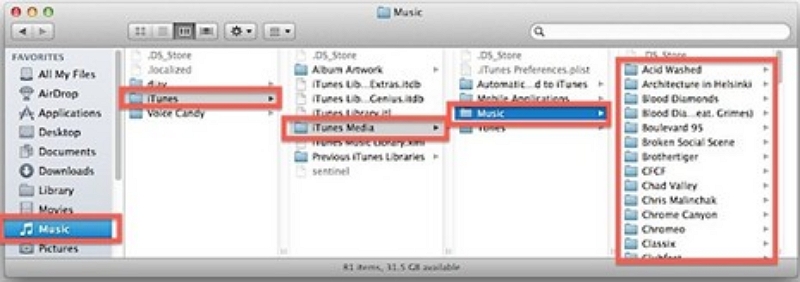
On Windows: Navigate to C:\Users\[YourName]\Music\iTunes\iTunes Media\Music.
You can also right-click any track in the Music app → Show in Finder/Explorer to jump directly to its location.
Step 2: Verify the files are unprotected
Before setting up Plex, confirm your files are .m4a (not .m4p). Right-click → Get Info → check that "Kind" says "Purchased AAC audio file." Any .m4p files won't import and can be excluded from your Plex folder.
Step 3: Use the iTunes XML export for playlists (optional)
If you want your Apple Music playlists to carry over to Plex, export them first:
In the Music app: File → Library → Export Library → save as iTunes Music Library.xml
This XML file maps your library structure—playlists, file paths, and metadata. Copy it to your Plex server machine alongside your audio files.
In Plex: Settings → Libraries → your music library → Edit → Advanced → enable "iTunes library XML file" and point it to the exported XML.
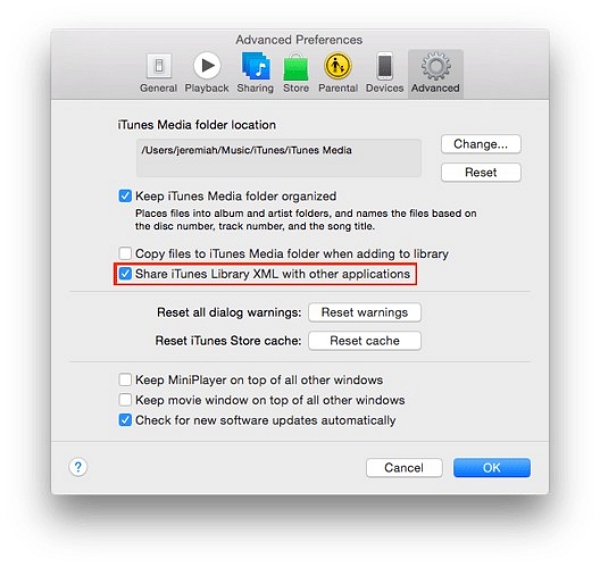
Important: This only imports playlists that reference local files you actually have. Playlists containing Apple Music subscription tracks will appear empty because those files aren't stored locally.
Method 2: Building a Plex-Compatible Library from Your Music Collection
For viewers who want to build a serious Plex music library going forward, the most reliable approach is to source music through channels that provide file ownership from the start:
iTunes Store purchases remain the simplest source of DRM-free files directly from Apple. Individual tracks and albums purchased from the iTunes Store are unprotected AAC and import into Plex without any issues.
Bandcamp is the best source for DRM-free files from independent artists. Purchases download directly as MP3, FLAC, AAC, or WAV—your choice. The file quality is excellent and the files are immediately Plex-compatible.
HDtracks and Qobuz downloads provide high-resolution lossless files (24-bit FLAC) that pair particularly well with Plex and Plexamp's audiophile playback capabilities. If sound quality is important to you, this is worth considering for music you listen to regularly.
CD ripping using software like XLD (Mac, free) or EAC (Windows, free) produces lossless FLAC files from physical media. For albums that matter to you, ripping your own CDs gives you the highest quality files with no DRM concerns.
The advantage of building your library this way is permanence: once the files are yours, your Plex library doesn't depend on any subscription remaining active.
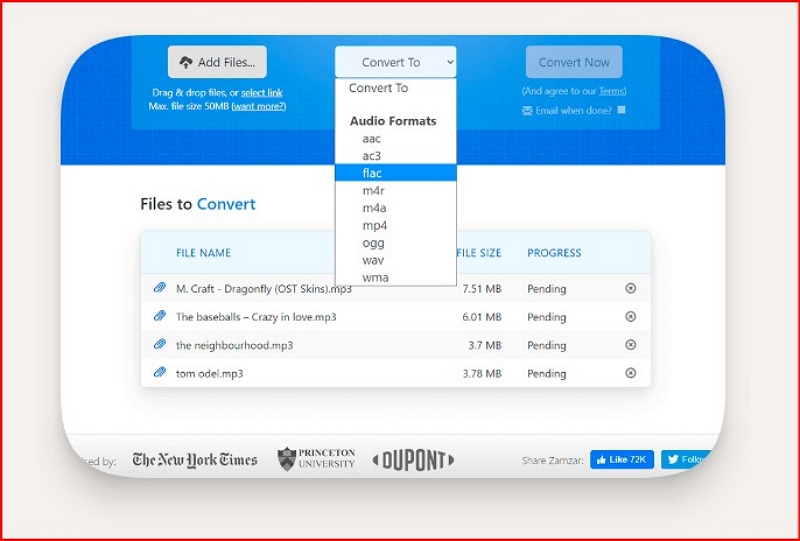
If you're working with a mixed collection—CD rips in WAV, Bandcamp downloads in multiple formats, and older MP3s you want to standardize—Mediaio Audio Converter handles batch format conversion cleanly. It converts 1000+ formats to FLAC or MP3, processes full albums in one queue, and retains ID3 tags during conversion, which means less cleanup work in Mp3tag afterward.
Setting Up Plex for Music: Complete Walkthrough
Installing Plex Media Server
- Download Plex Media Server from plex.tv/media-server-downloads and select your operating system
- Install and launch—the server runs in the background and is managed through a web browser
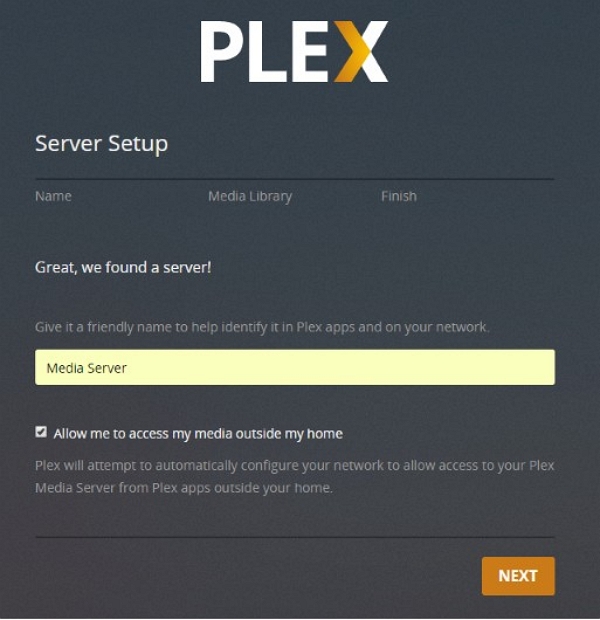
- Sign in or create a free Plex account (required for remote access and multi-device streaming)
- When prompted to add libraries, select Music as the library type
Folder Structure: The Most Important Setup Step
Plex's metadata scanner relies heavily on how your music is organized. Poor folder structure is the most common cause of wrong album art, duplicate artists, and tracks appearing under "Unknown Album."
The structure Plex prefers:
/Music/
/Artist Name/
/Album Name/
01 - Track Title.mp3
02 - Track Title.mp3
This hierarchy tells Plex's scanner exactly what it's looking at before it even reads the file tags. Consistent structure means fewer manual corrections after the scan.
Before adding your folder to Plex:
- Ensure track numbers are in the filename or ID3 tags (both is better)
- Make sure the same artist isn't stored under slightly different names ("The Beatles" vs. "Beatles, The")
- For compilations, use a dedicated /Compilations/ folder rather than storing by artist
Fixing Metadata with Mp3tag (Free, Highly Recommended)
Mp3tag (free for Windows and Mac) is the most useful tool in a Plex music setup. It batch-edits ID3 tags across your entire library and embeds album artwork directly into files.
Real experience: Running Mp3tag on a freshly converted or imported music folder before adding it to Plex saves significant time. The difference between a library where Plex scans cleanly the first time and one where you spend an evening fixing wrong artwork and duplicate artists almost always comes down to whether the tags were clean before import.
Key things to check in Mp3tag before your Plex scan:
- Artist and Album Artist fields are both filled (Plex uses Album Artist for grouping)
- Track numbers are present and formatted as 01, 02 not 1, 2
- Artwork is embedded in the files rather than stored as a separate folder.jpg
- Disc number is filled for multi-disc albums
To embed artwork: select all tracks in an album → right-click the artwork area → Add Cover → Save.
Adding Your Music Folder to Plex
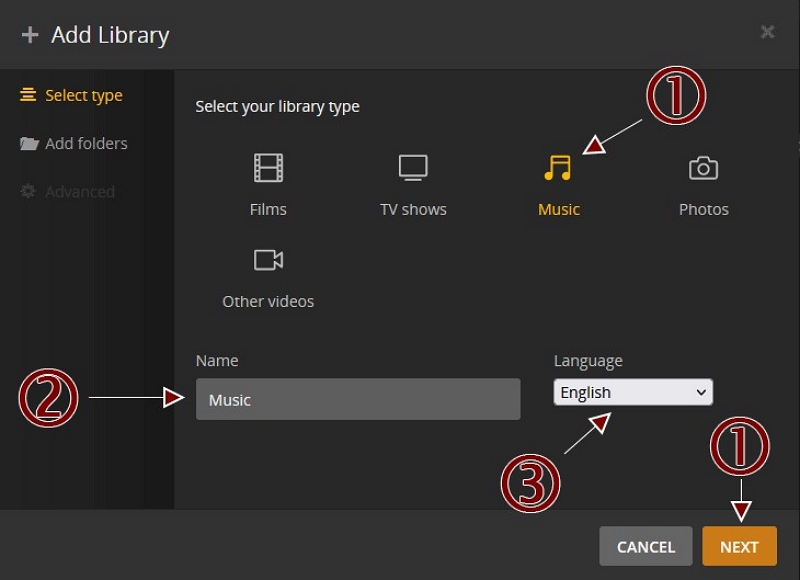
- In Plex, go to Settings → Libraries → Add Library → Music
- Click Browse for Media Folder and navigate to your organized music folder
- Click Add Library — Plex begins scanning and fetching metadata automatically
- Wait for the scan to complete, then browse your library to verify groupings and artwork look correct
If something looks wrong after scanning:
- Right-click an album or artist → Fix Incorrect Match to search manually
- Right-click → Refresh Metadata to force a fresh fetch
- If metadata is consistently wrong for an artist, fix the tags in Mp3tag and rescan
Plexamp: The Reason Plex Is Worth Using for Music
Plexamp is Plex's dedicated music player, and it's genuinely excellent. If you're using Plex just for video and treating music as an afterthought, Plexamp changes the calculus significantly.
Requires: Plex Pass subscription (~$7.99/month or $159.99 lifetime)
Available on: Windows, macOS, Linux, iOS, Android
Setting Up Plexamp
- Download Plexamp from plexamp.com
- Sign in with your Plex account — your music library loads automatically from your server
- No additional configuration needed; Plexamp reads directly from your existing Plex music library
Features That Make Plexamp Worth the Plex Pass
Sonic Sage / Library Radio: AI-generated mixes built entirely from your personal library. Unlike Spotify Radio or Apple Music stations, these mixes only play music you actually own—no filler, no tracks you've never heard. It surfaces deep cuts from your library you haven't played in years, which feels genuinely different from any streaming service's radio feature.
Gapless playback: Essential for albums where tracks flow together (live recordings, classical, concept albums). The standard Plex app doesn't do this reliably; Plexamp handles it correctly.
Crossfade: Adjustable transition between tracks. Less important than gapless but appreciated for playlist listening.
Synced lyrics: Real-time lyrics display for supported tracks.
Offline downloads (mobile): Tap ··· next to any album or playlist → Download. The downloaded files are stored locally on your device and play without a network connection. Useful for travel or areas with poor signal.
Per-network audio quality: Set original/lossless quality on home Wi-Fi and a lower bitrate on mobile data. Your FLAC files stream at full quality at home and transcode to something bandwidth-friendly when you're out.
Enabling Remote Access
For Plexamp to work on mobile data when you're away from home, your Plex server needs to be reachable externally:
Settings → Remote Access → enable and verify the connection status shows "Fully accessible outside your network."
If remote access fails: check that port 32400 is open on your router (or that Plex's UPnP/NAT-PMP automatic configuration worked), and ensure your server's firewall isn't blocking incoming connections.
Troubleshooting Common Issues
Converted or imported files aren't appearing in Plex
Confirm the folder is correctly added to your library (Settings → Libraries → your music library → Edit → Folders). Trigger a manual scan: Settings → Troubleshooting → Scan Library Files. If files still don't appear, verify they're in a format Plex supports and the folder path hasn't changed.
Album art is missing or wrong
Plex prefers embedded artwork over external image files. Embed artwork in Mp3tag before importing, then right-click the album in Plex → Refresh Metadata. If Plex keeps pulling the wrong art, temporarily enable "Prefer local metadata" in library settings, refresh, then reassess.
Tracks appearing under the wrong artist or album
Almost always a tag issue. The most common culprits: "Artist" and "Album Artist" fields don't match, compilation tracks are filed under individual artists instead of a Compilations folder, or slight naming variations ("feat." vs "ft." vs "featuring") create duplicate entries. Fix in Mp3tag, then delete and re-add the library.
Playlists from Apple Music didn't transfer
Playlists from the iTunes XML export only work if they reference local files. For subscription-only playlists, you'll need to recreate them manually in Plex. Alternatively, export playlists as .m3u files (several third-party tools can export Apple Music playlists to .m3u), place them in your music folder, and Plex will detect them on the next scan.
Plexamp can't connect when away from home
Enable Remote Access in Plex server settings and verify it shows as accessible. Check port 32400 forwarding on your router. If you're using a VPN on your server machine, it may be routing traffic in a way that blocks Plex's relay servers—try temporarily disabling it to diagnose.
Audio quality sounds compressed or lower than expected
Check your Plexamp quality settings: under Settings → Audio Quality, set "Music Quality" to "Original" for lossless FLAC files on your home network. If you're streaming remotely, set a quality level appropriate for your connection speed. Also verify the original files are actually lossless—a FLAC file transcoded from 128kbps MP3 won't sound better than the source.
Plex Free vs. Plex Pass for Music
*Mobile music playback on the free tier requires either a one-time in-app purchase on iOS or a Plex Pass subscription. Desktop and web playback are unrestricted on the free tier.
FAQ
Not directly. Apple Music subscription files are DRM-protected and Plex cannot read them. However, music you purchased from the iTunes Store is usually DRM-free and can be imported into Plex without any issues.
Partially. Playlists that reference locally stored files such as iTunes purchases can transfer using the iTunes XML export method. Playlists that contain Apple Music subscription tracks will not work because those files are not stored locally in a format Plex can read.
Your Plex library will not be affected. Any iTunes purchases you imported into Plex remain permanently available because they are stored as local files on your server. Subscription-only Apple Music tracks would simply become inaccessible, but Plex cannot read them anyway.
No, Plex Pass is not required for basic desktop or web playback. However, Plex Pass is necessary if you want to use Plexamp, enable mobile music playback without the one-time iOS purchase, download music for offline listening, or use advanced features like gapless playback.
FLAC is the best choice for long-term archival and high-quality playback, especially when using Plexamp. MP3 at 320kbps is another good option if you prioritize compatibility across different devices and players. If you're unsure, FLAC is often the safest default because it is lossless and Plex can transcode it when needed.
Yes. Plex integrates with Amazon Alexa for voice-controlled playback on smart speakers. CarPlay is supported through the Plex iOS app and Plexamp, while Android Auto support is available through the Plex app on Android devices.