

Apple Music is part of the Apple ecosystem, which has expanded to include Apple TV+ and many other services. Several users have doubts about whether subscribing to one of them automatically lets you access the other.
In this article, we will answer whether Apple Music includes Apple TV+ as well.
Quick Answer: Does Apple Music Include Apple TV+?
No. Apple Music does NOT include Apple TV+.
They are two completely separate services and require separate subscriptions.
If you want access to both music streaming and Apple TV+ originals, the only official option is Apple One, Apple’s bundled subscription plan.
Key takeaway:
Apple Music = music only
Apple TV+ = TV shows & movies only
Apple One = bundle (Music + TV+ + more)
Part 1: Apple Music vs Apple TV+ vs Apple One (Comparison Table)
Part 2:Why Do People Think Apple Music Includes Apple TV+?
This confusion is extremely common—and understandable. Here’s why:
Same brand, same ecosystem
Apple promotes Music and TV+ together across iPhone, iPad, and Apple TV.
Free trials overlap
Apple often gives free Apple TV+ trials when users buy Apple devices, making it feel bundled with Music.
Both work on Apple TV
Seeing Apple Music and Apple TV+ side by side on Apple TV devices reinforces the misconception.
Part 3:Can You Use Apple Music on a TV Without Apple TV+?
Yes.
You do not need Apple TV+ to play Apple Music on your TV.
As long as you have:
- An active Apple Music subscription
- A supported TV or streaming method
You can stream music directly to your TV speakers.
Part 4:How to Get Apple Music on Your TV (All Methods Explained)
Now, let's take a look at the different ways you can get Apple Music on various TV sets.
Method 1: Apple Music on Apple TV (tvOS)
Steps:
- Open the Music app on Apple TV
- Sign in with your Apple ID
- Browse or search and start playing
✔ No Apple TV+ subscription required
Method 2: Apple Music on Smart TVs (Samsung / LG / Sony)
To get Apple Music on your Smart TV, you first need to download the app from the device's App Store.
- Open the TV’s App Store (Samsung Apps / LG Content Store / Google Play)
- Search for Apple Music
- Download the app and sign in
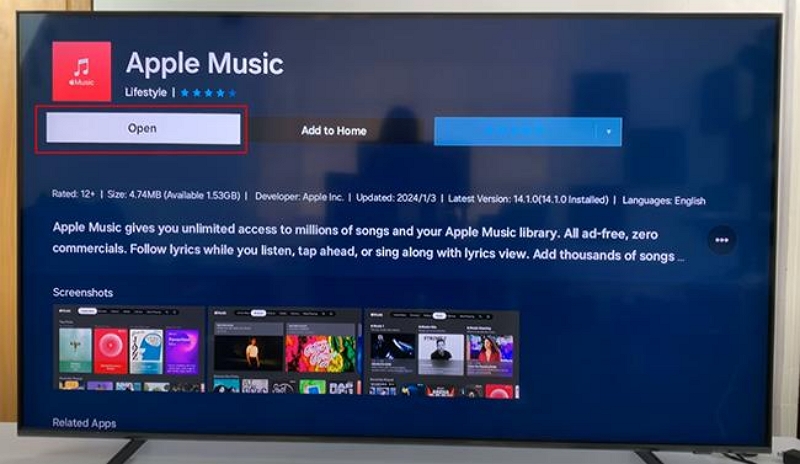
✔ Works on most 2019+ models
⚠ Availability depends on region and OS version
Method 3: Apple Music on Fire TV (Alexa Workaround)
On most Fire TV devices, Apple Music isn’t available as a native app yet.
However, Alexa integration allows streaming via voice commands.
Step 1: Open the Alexa App on your iPhone or Android device and sign in using your Amazon Account.
Step 2: Tap Skills and Games and then search for Apple Music.
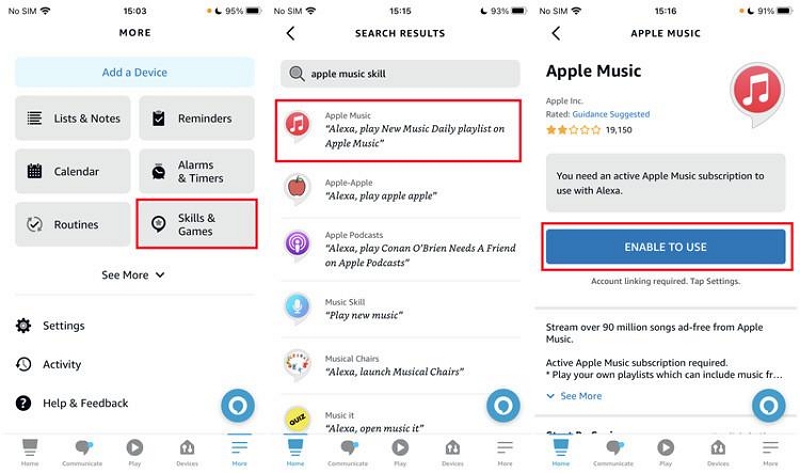
Step 3: Tap Enable to Use and then enter the Apple ID for your account.
Step 4: Tap Allow when prompted to grant Alexa permission to access your Apple Music account.
Step 5: Now, you can use voice commands to use the Apple Music app on Fire TV.
✔ Hands-free playback
⚠ Limited browsing control
Method 4: Apple Music on Roku TV
Follow the steps below to get Apple Music on Roku TV:
Step 1: Go to the Roku Store Channel and search for Apple Music.
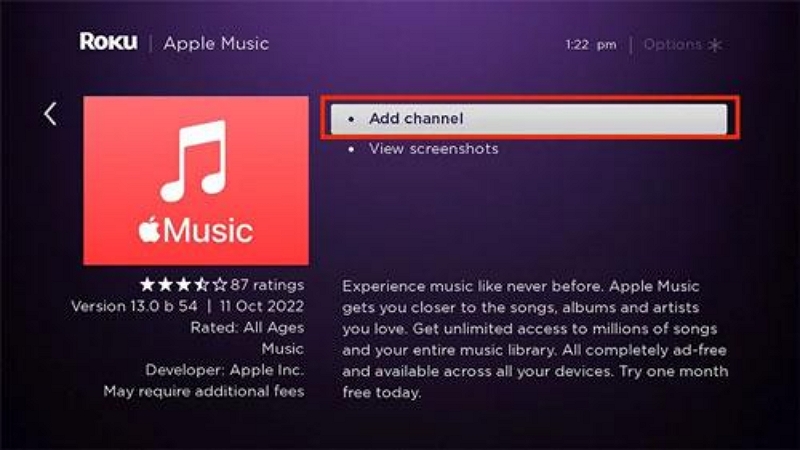
Step 2: Click add/download and then sign in using your Apple ID.
Method 5: Apple Music on TCL TV (Android / Google TV)
Newer TCL models running Android TV or Google TV support Apple Music.
Step 1: Open Google Play Store
Step 2: Search and install Apple Music
Step 3: Sign in with your Apple ID
Older TCL models may not support the app.
Part 5:Alternative Ways to Play Apple Music on Any TV
While most TV systems have provisions to download the Apple Music app, some don't. If you're dealing with such a situation, here are some alternative ways to play Apple Music on any TV.
1. AirPlay from iPhone/iPad
Step 1: Play a song on the Apple Music app on your iPhone.
Step 2: Tap the AirPlay button (triangle with concentric circles).
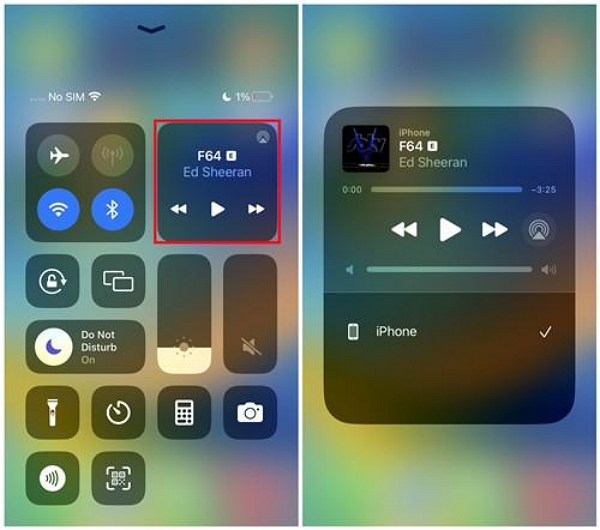
Step 3: From the list of available devices, select your Smart TV.
Step 4: Once the connection is established, the song will start playing through your TV speakers.
✔ Best for Apple users
⚠ Same Wi-Fi required
2. Bluetooth connection
You can pair your phone with:
- A Bluetooth TV
- A Bluetooth soundbar or speaker connected to the TV
✔ Simple
⚠ Audio quality may vary
3. HDMI from computer
Yet another way to play Apple Music on your TV is using an HDMI connection from your laptop or computer.
Step 1: Connect your laptop or computer to your TV using an HDMI cable. Then, change the TV input setting to HDMI.
Step 2: Open the Apple Music app and play a song.
✔ Works on any TV with HDMI
4. Play Apple Music via Local Apple Music
If you want to:
- Play Apple Music without Wi-Fi
- Use unsupported TVs
- Avoid app or region limitations
You can convert Apple Music tracks into standard audio files for personal offline playback using tools like Mediaio Audio Converter.
After conversion, you can:
- Transfer files via USB
- Play them directly on your TV as local media
This is a non-official method and intended for personal use only.
FAQs
Yes, you can get Apple Music on your TV even without Apple TV. There are different ways to get the app for various Smart TVs as discussed above.
No, you don't need Apple TV+ to use Apple Music on TV. They are separate services, and Music can be played on a TV as long as you have an active subscription for it.
You might not be able to find Apple Music on your TV for various reasons. These can include geographical restrictions or that your TV doesn't support the app.
Conclusion
Apple Music and Apple TV+ are not bundled together and require separate subscriptions. However, Apple Music can still be played on a wide range of TVs—with or without Apple TV+.
If you want both services at a discount, Apple One is the official solution. Otherwise, Apple Music works perfectly on its own across smart TVs, streaming devices, and alternative playback methods.