

There are moments when you simply need your Pandora stations offline, such as during a long flight or a quiet trip into the mountains. However, you may not want to subscribe to Pandora, as the need for offline listening is rare. So, can you download music from Pandora without Premium? That’s what this guide explores. Whether you want your Pandora songs on a computer, an iPhone, an Android device or even an old-school MP3 player, we’ll discuss all available options to download Pandora music for offline listening without a premium account.
Overview of Ways to Download Pandora Music Without Premium
Here’s a quick table comparing the best methods based on audio quality, price, ID3 tags, and supported content.
 Up to 320kbps (higher than Pandora Premium’s 192kbps)
Free 14-day trial, before you pay
Full metadata preserved (titles, artists, albums, covers, station names)
Stations, albums, playlists, individual songs
Up to 320kbps (higher than Pandora Premium’s 192kbps)
Free 14-day trial, before you pay
Full metadata preserved (titles, artists, albums, covers, station names)
Stations, albums, playlists, individual songs
 Depend on stream; usually 128–160kbps
Free
No ID3 tags (manual tagging required)
Whatever Pandora streams in-browser, mostly stations; unreliable for song-by-song
Depend on stream; usually 128–160kbps
Free
No ID3 tags (manual tagging required)
Whatever Pandora streams in-browser, mostly stations; unreliable for song-by-song
 Usually 192kbps if unlocked; varies by mod
Free
Original, but “download-feature” is only available on some mod versions.
Premium or Plus features
Usually 192kbps if unlocked; varies by mod
Free
Original, but “download-feature” is only available on some mod versions.
Premium or Plus features
 Standard Pandora quality (up to 192kbps)
US$5.99/month
Not applicable (offline stations only)
Auto-downloaded weekly: Three most-played stations + Thumbprint Radio
Standard Pandora quality (up to 192kbps)
US$5.99/month
Not applicable (offline stations only)
Auto-downloaded weekly: Three most-played stations + Thumbprint Radio
How to Download Music from Pandora Without Premium
Now that you’ve seen the four ways to download Pandora music without Premium, here’s a closer look at how each method actually works. Go through them one by one, pick what fits your situation, and get your songs on your computer or phone without any hassle.
Way 1. Use Mediaio Audio Converter [Computer & Phone]
Mediaio Audio Converter is the most convenient choice when you want to download Pandora music without Premium. With it, you can not only save Pandora music offline with a free, plus or premium account, but also convert your favorite stations, albums, playlists or even individual songs to MP3, M4A, FLAC, AIFF and WAV—up to 320kbps. Although the tool runs on both Windows and Mac, it exports music as local files, allowing you to move your local downloads to any device you want, like your phone, a USB drive, even an old MP3 player.
In addition to exporting high quality local songs, another advantage is the way Mediaio handles ID3 tags. It keeps every piece of metadata intact while downloading, including the song titles, artist names, album names, artwork covers, and even the station names. Moreover, the downloading speed is also impressive. Mediaio converts at up to 30X speed, so everything finishes without long wait times.
How to Download Pandora Songs for Free as MP3 with Mediaio
Install Mediaio Audio Converter on your Windows or Mac and launch it. On the main screen, pick the Pandora icon to begin.
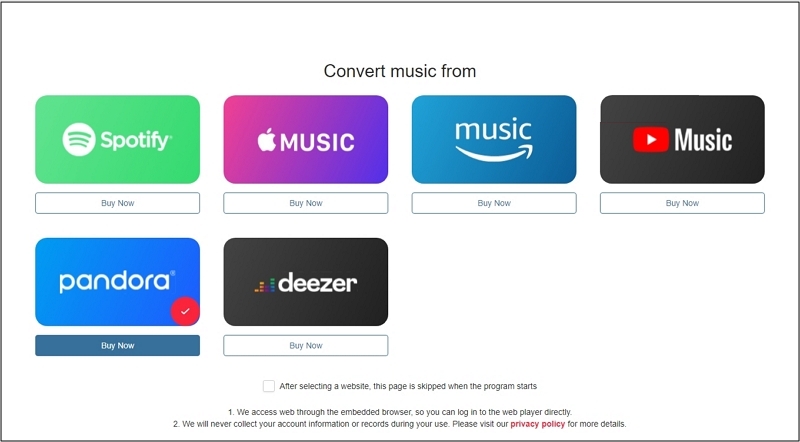
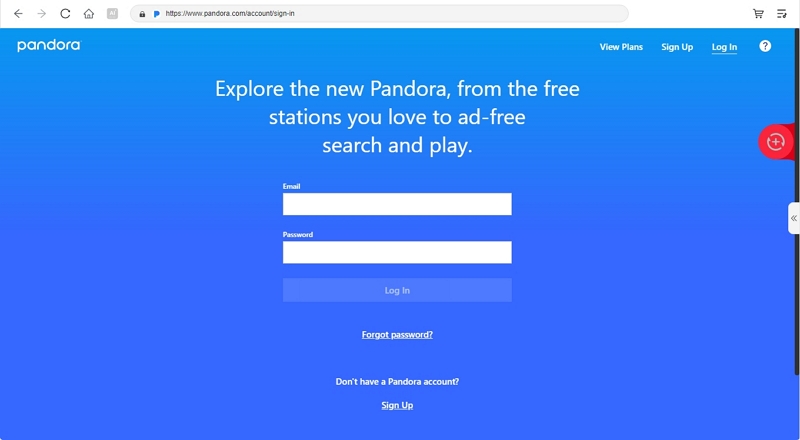
A built-in Pandora player will appear. Sign in using your regular free Pandora account.
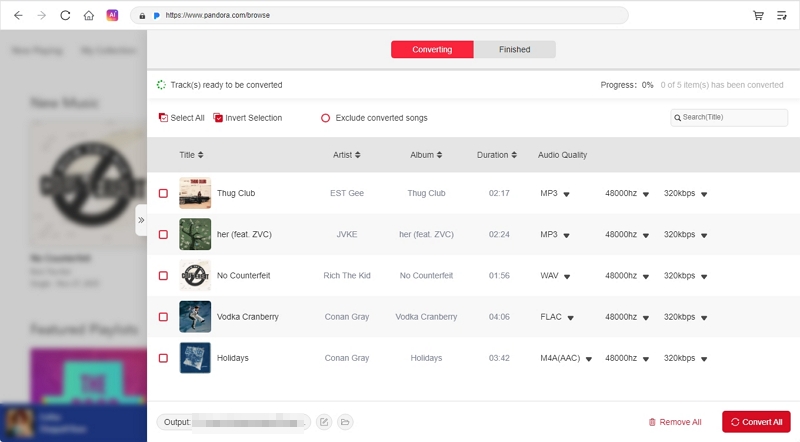
Add your playlists, albums, or stations using the + button at the top right. You can also click Add to the conversion list option to add songs.
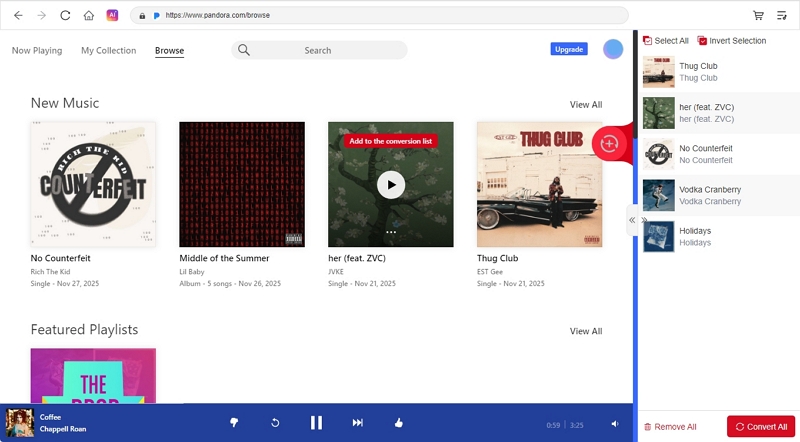
Open the Conversion menu and choose your preferred quality, output format, and folder location. Finally, click Convert All in the bottom-right corner. Mediaio will process everything automatically and save the songs as local MP3 files.
Way 2. Use CocoCut [Desktop Browser]
CocoCut is a simple browser extension available on pretty much every Chromium-based browser, such as Chrome, Brave, newer Edge builds, and many others. It is not a “Pandora downloader” in the strict sense, but is an audio-and-video catcher that sniffs any stream and lets you convert it into MP3 or MP4 formats.Because of this, it works with Pandora too, though it is not reliable for every song. Pandora has tightened its streaming encryption many times, so results vary.
Metadata is another limitation, as CocoCut does not assign ID3 tags. You will need a separate tag editor to manually name every song, pick the artists, add covers, and arrange them the way you want.
Even with these drawbacks, CocoCut still works as one of the few remaining browser-based methods to capture Pandora audio. Just don’t expect the convenience of proper converters.
How to Use CocoCut to Download Pandora Music as MP3
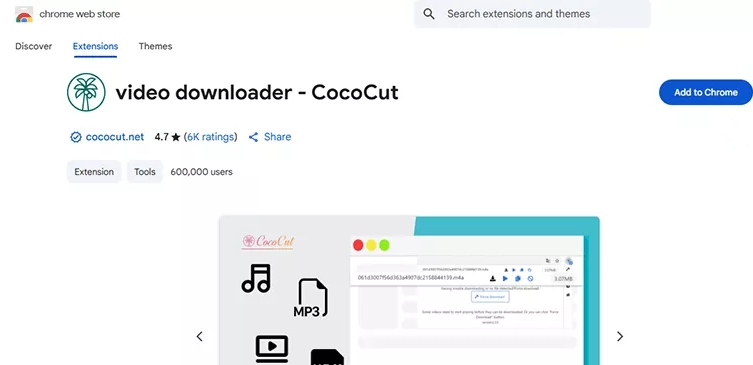
Step 1. Search for CocoCut on the Chrome Web Store. Hit Add to Chrome (or Add to Brave, depending on your browser). Pin the CocoCut icon to your toolbar.
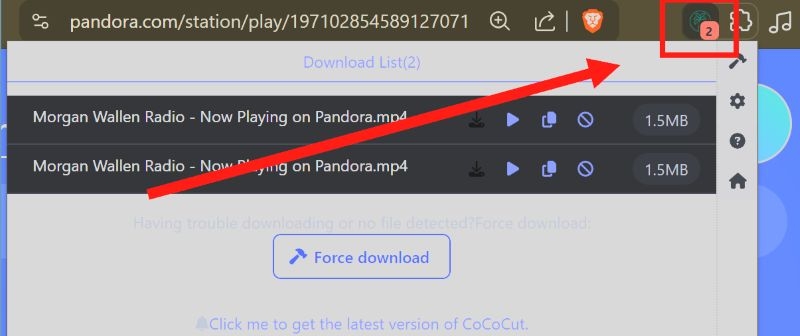
Step 2. Open Pandora and play a station. If CocoCut detects the audio, you'll see a small badge or indicator appear on its icon.
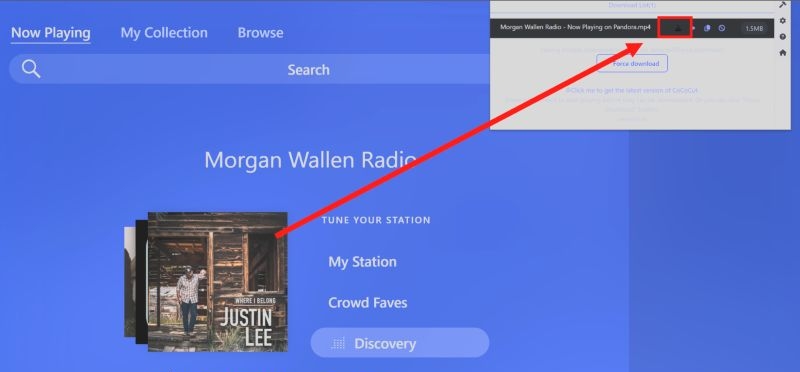
Step 3. Click the CocoCut icon. It will show the stream it has identified. Select the Download icon next to it.
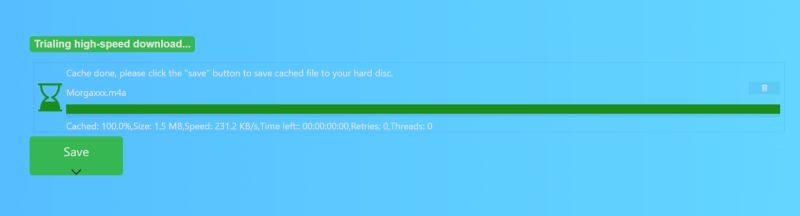
Step 4. Wait until the progress bar hits 100%. Then click Save to download the audio file.
Way 3. Use Pandora APK Mod [Android]
Pandora Mod APKs are modified builds of the official Pandora app. Developers remove or block certain internal scripts that normally check your subscription status. When those checks is blocked, Pandora’s servers can’t verify whether you’re a Free user or a paid one, so the app simply unlocks the PLUS or PREMIUM features for you. In effect, it turns your regular free account into a kind of “forever premium” profile.
However, the word “forever” is largely an exaggeration. Pandora constantly patches vulnerabilities, so these mods break often. You must keep searching for newer builds every few weeks.
Anyway, with Pandora Mod APKs, you get the usual perks: ad-free playback, unlimited skips and replays, higher audio quality (up to 192kbps), and in some variants, offline mode.
How to Download Pandora Tracks with Pandora Mod
Step 1. Search for a working Pandora Mod APK.
Most newer mods only unlock premium features, not downloads. The versions that still offer a working download button are older (from 2024) and can be found on sites like APKDone. These builds are outdated, but they are the only ones that still show the download option.
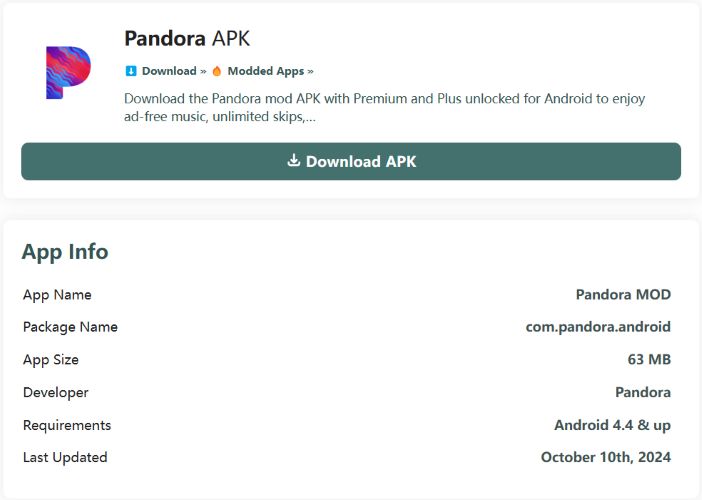
Step 2. Download the APK from your Android browser.
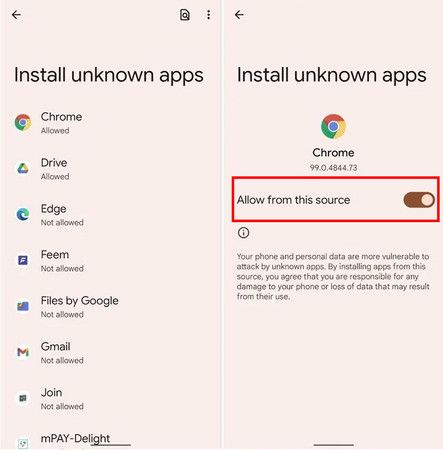
Android will block it at first, so you’ll see a warning for installing apps from unknown sources. Tap the prompt, choose Chrome, and enable Allow from this source.
Step 3. Install the APK and open the modified Pandora app.
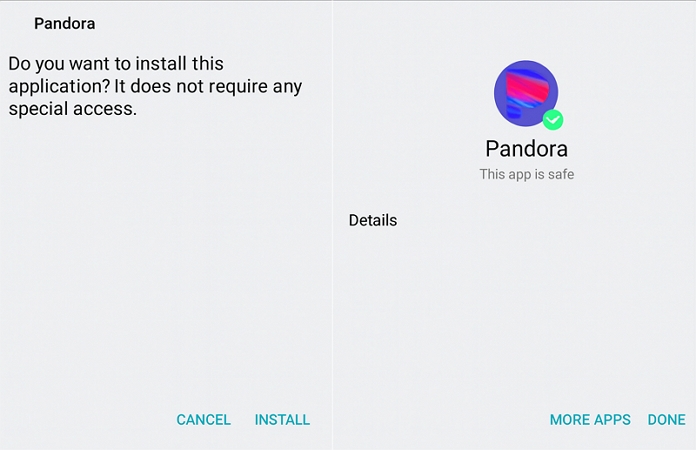
You’ll get unlimited skips and the other unlocked features immediately.
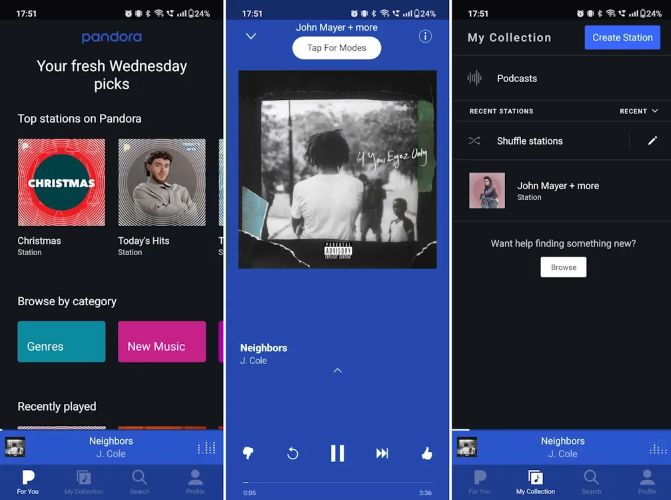
For downloading, open any song’s Now Playing screen and tap the download icon. Sometimes it works while sometimes it doesn’t, which varies with each mod build.
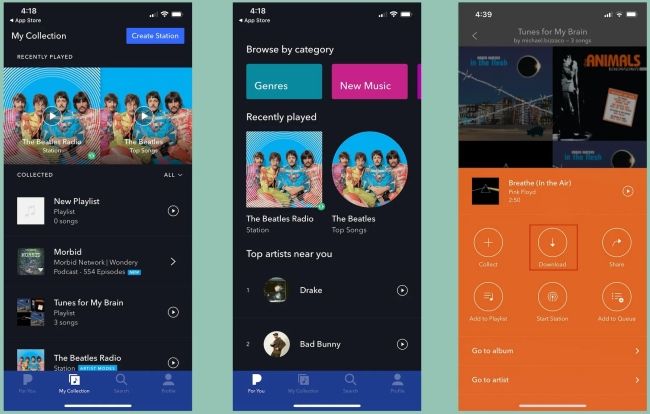
Way 4. Use Pandora Plus [iPhone/Android]
Pandora Plus works well when all you really want is something simple — your favorite stations ready without the internet. With a Plus subscription, the Pandora app automatically downloads your three most-listened stations along with your Thumbprint Radio. And everything happens inside the Pandora app itself.
Still, this isn't a “download to own forever” method like the other options above. The offline stations only stay as long as your Pandora Plus plan is active, and they refresh every week based on what you’ve been listening to. You can’t hand-pick the exact songs.
So overall, Pandora Plus makes sense when you need something straightforward on the phone, maybe for a flight or a long bus ride.
How to Download Pandora Songs for Offline Listening Using Pandora Plus
The setup is a one-time toggle. After that, Pandora will handle the downloads in the background.
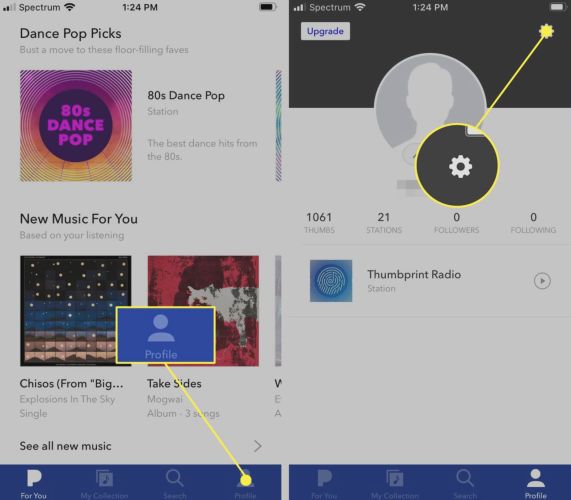
Step 1. Inside the Pandora app, head to your Profile tab and then hit the gear icon in the upper-right corner to reach Settings.
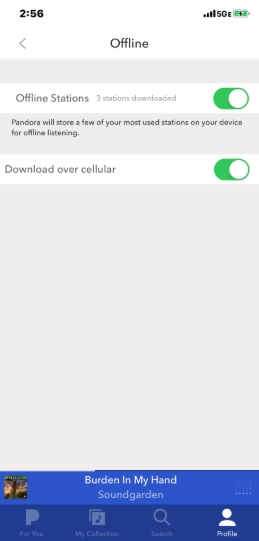
Step 2. Scroll to the bottom and select Offline.
Note: Do not confuse this with the simple “Offline Mode” switch.
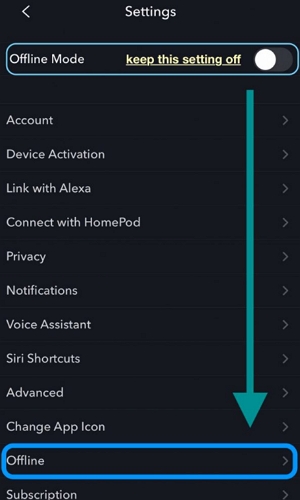
Step 3. Enable the Offline Stations toggle. Pandora will begin downloading your Thumbprint Radio plus your three most-played stations. They refresh weekly on their own.
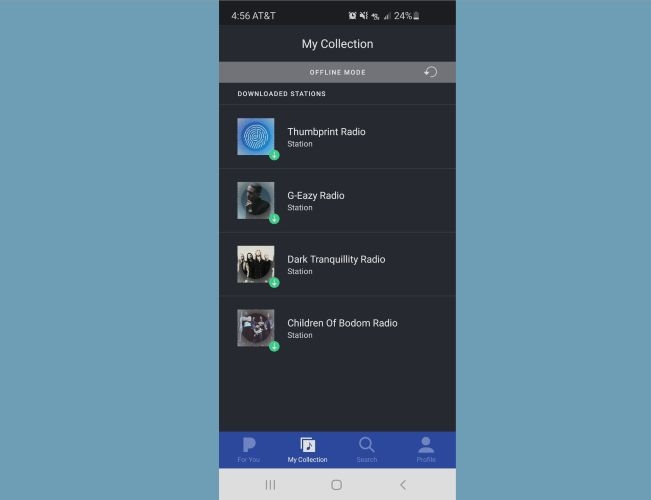
Step 4. Open the My Collection tab and switch on Offline Mode if you want to see only the downloaded stations and nothing else.
How to Download Music from Pandora with Premium for Free
Pandora Premium gives you the freedom to save individual songs, whole playlists, albums, and any station you keep in My Collection. And yes, while it normally costs US$10.99/mo, there are ways to access it for free for a limited time.
Once you have Premium active, you can download anything inside the app. Just remember that, similar to Pandora Plus, you don’t “own” any of these downloads permanently. They stay only while your Premium access stays active.
Step 1: Start Pandora Premium Free Trial
Pandora pushes Premium trials aggressively. So, it’s surprisingly easy to get on one that lasts 60 or 90 days. Here are the common ways to get Premium for free:
- When you open a Pandora account with a new email ID.
- Get added to family plan.
- Occasionally receive in-app offers for extended free trials.
If you want all the methods explained in full detail, refer to this guide: How Can I Get Pandora Premium for Free. It also discusses how to avail the free trial in detail.
Step 2: Download Pandora Music with Premium
Once your free trial is active, you can start saving anything you like. The process is straightforward because every type of content uses its own download control.
1. Download Individual Songs
- Play a song.
- Head to the Now Playing screen.
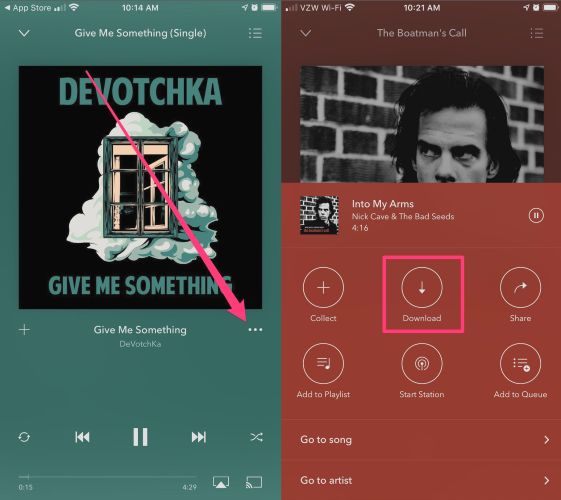
- Tap the More Options menu—the three-dot button.
- Pick the Download option.
The song is saved instantly inside the app.
2. Download Playlists, Albums or Stations
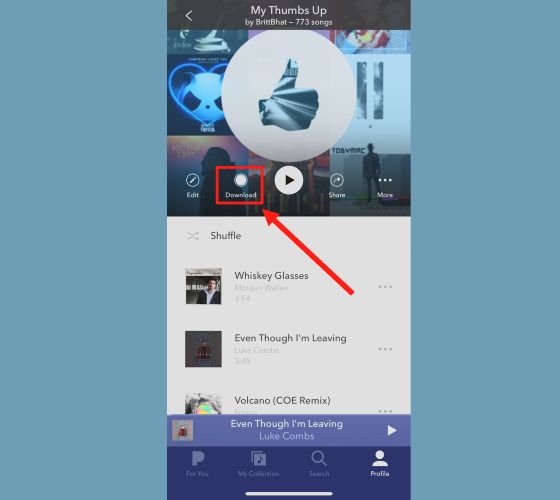
- Navigate to the playlist, album, or station inside My Collection.
- Use the Download button at the top.
Any tracks you save stay accessible only while your trial is active. After that, you’ll be back to streaming.
Conclusion
So yes, it is possible to download music from Pandora without paid Premium. We’ve shown you every working method, including the one where you can use a Pandora Premium free trial on your phone and keep offline songs for a couple of months.
However, if your goal is permanent Pandora songs without long wait times or tedious steps, then Mediaio Audio Converter is the option that actually delivers. The built-in Pandora player keeps the whole process straightforward, the downloads come in clear quality. Once saved, they stay on your device forever. You can move them to another computer, your phone, or any player you prefer.