

Quick Verdict (2026 Updated)
Is AudFree worth it in 2026?
✔ Yes — if you only need a simple Amazon Music converter and don’t mind a dated UI.
✘ No — if you want faster, more stable conversion or support for multiple streaming platforms.
Our rating: ★★★★☆ (3.8 / 5)
Best for: Amazon Music–focused users needing MP3/FLAC conversion
Not ideal for: Large playlists, Ultra HD users, people wanting multi-platform conversion
Best Alternative: Mediaio Audio Converter — modern UI, more stable, and supports Spotify, Apple Music, Amazon Music, YouTube Music, Deezer, Pandora, etc.
Part 1. What Is AudFree?
AudFree is a long-standing music-conversion toolset designed to let users download and convert tracks from various streaming platforms. The primary goal: remove DRM restrictions so you can save songs offline in flexible formats like MP3, FLAC, WAV, AAC, and M4A.
AudFree product lineup includes:
- AudFree Amazon Music Converter
- AudFree Spotify Music Converter
- AudFree Apple Music / iTunes Converter
- AudFree Tidal Music Converter
- AudFree Audio Capture (records system audio)
- AudFree Audio Converter (converts existing DRM/protected files)
AudFree uses the streaming platform’s web player for conversion, meaning no desktop app is required — but stability depends heavily on internet connection and browser environment.
Part 2. Hands-On Testing: How Good Is AudFree Amazon Music Converter in 2026?
To provide a realistic review, we performed a full test using:
- Windows 11 (i7, 16GB RAM)
- macOS Sonoma (M2 Air)
- 1Gbps Fiber Internet
- Amazon Music Unlimited + HD plan
2.1 Setup & Ease of Use
AudFree is straightforward:
Install → open integrated Amazon Music web player → log in → add songs → convert.
Even non-technical users should find it simple.
Issue noticed:
UI looks dated (Windows 8-style interface).
Web player sometimes reloads unexpectedly, especially during long conversions.
2.2 Conversion Speed: Claimed vs. Actual
AudFree claims 5× speed. Here’s what we actually measured:
Summary:
- Small playlists = smooth
- Large playlists/Ultra HD = slower + occasional failures
2.3 Output Quality Test
We compared original Amazon Music tracks with converted FLAC/MP3:
- FLAC: Quality is preserved; waveform shows no major compression.
- MP3 320kbps: Quality decent, slightly louder volume (AudFree’s audio normalization).
- Metadata: Artist/album/cover image correctly retained.
Issue: Ultra HD → FLAC occasionally converts only in 44.1kHz instead of 96kHz/192kHz
2.4 Stability & Bugs Observed
During the test, we encountered several repeatable issues:
❗ Web player refresh loop (common when converting >80 songs)
❗ “Network error” pop-up even with stable 1Gbps internet
❗ Login expiration during long conversions
❗ Mac version occasionally freezes when switching playlists
These do not make AudFree unusable, but they do make conversions less reliable compared to modern competitors.
Part 3. Real User Reviews — What People Say
Trustpilot Summary
★ 4.7 / 5 average
✔ Praise for simplicity
✔ Very responsive customer support
✘ Repeated complaints about the old interface
✘ Some users mention unexpected speed drops
✘ Refund process slower than expected
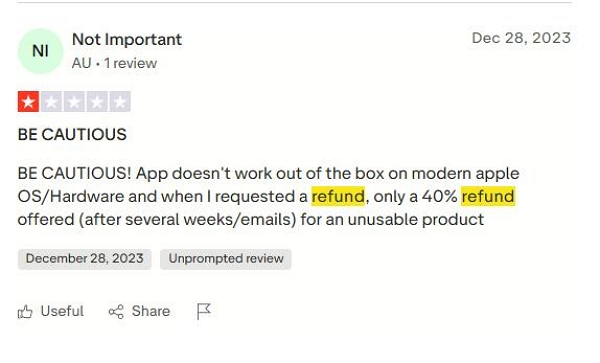
Reddit Feedback (more critical)
“Works, but I had multiple failures on large playlists.”
“UI feels 10 years old.”
“AudFree is okay, but newer tools feel smoother.”
Part 4. AudFree Audio Capture vs. AudFree Audio Converter
AudFree Audio Capture
- This application captures all audio that’s being played on your computer.
- For instance, when you’re listening to music on Spotify or viewing a video on YouTube, you can record the sound instantly.
- It maintains the original quality and allows you to select the format for saving (MP3, WAV, AAC, FLAC, etc.).
- You can edit your recordings as well: cut, divide, or combine clips.
- It’s useful for creating local copies of streaming audio or capturing sound from applications or games.
AudFree Audio Converter
- This tool operates on pre-existing audio files. Its role is to change them from one format to another.
- It accommodates formats such as MP3, WAV, AAC, FLAC, M4A, and others.
- It’s particularly beneficial when dealing with files that have DRM protection, such as Apple Music tracks or Audible audiobooks. AudFree can eliminate that restriction and transform those files into standard formats.
- During the conversion, it preserves audio quality and metadata (such as ID3 tags).
- For audiobooks, it can also divide them by chapter or duration.
Summary:
Capture = record live audio
Converter = convert existing files
Amazon Converter = convert Amazon Music content
Part 5. Is AudFree Safe & Legal?
Safety
✔ Clean installation
✔ No viruses/malware
✔ Works normally on macOS/Windows
Legality
Depends on your region.
Personal use is generally tolerated, but redistributing converted songs is illegal.
Also note: streaming platforms do not officially approve such tools.
Part 6. Best Alternative to AudFree — Mediaio Audio Converter
If you want faster, more stable, or more flexible multi-platform support, Mediaio Audio Converter is the strongest AudFree alternative in 2026.
Why Mediaio Outperforms AudFree
Part 7: Quick Comparison Table
Here’s a comparison table between AudFree and Mediaio –
Verdict — Should You Use AudFree or Mediaio?
Each tool has its advantages, making the best option reliant on your requirements.
AudFree is a reliable choice, particularly if you primarily use Amazon Music. It’s reliable, precise, and accomplishes the task with minimal effort.
In contrast, Mediaio Audio Converter provides a more contemporary experience. It’s faster, easier to use, and accommodates a broader variety of formats and functions.
For a more seamless interface, quicker performance, and greater flexibility, Mediaio Audio Converter serves as a superb, modern alternative to AudFree in 2025.