

MP3Juice is a popular music downloader, but searching for it online can be confusing because many websites use the same name and logo. The original MP3Juice is no longer available, so the sites you find today are unofficial versions or copies. Some may still work, but their safety and reliability can vary. In this article, we’ll introduce 6 working MP3Juice websites and explain how to download songs from them. We’ll also check whether these websites are safe and free to use and introduce a desktop alternative - MedVioo Audio Converter for saving music stably and safely.

MP3Juice Overview
MP3Juice is a free, web-based MP3 search engine that lets you find and download songs. You can simply type in the name of a song, artist, or any keyword, and it will show you a list of matching results that are usually pulled from platforms like YouTube.
After the results appear, you can pick the exact audio you want, like the official version, a fan upload, or even a live performance and download it directly as an audio file to your computer. The downloaded song can be played on any standard music or media player.
In practical terms, almost all versions of MP3Juice today work as basic YouTube-to-MP3 converters. They won’t let you choose the file quality or format, meaning that what you get is what the site gives. They only differ in appearance, speed, and how many ads they show.
Banner art will be missing or replaced, and the track/album names are not always accurate.
Google Play version by United Grow
“MP3Juice – Free MP3 Downloads” by Genius Inc
MP3 Juice – Free MP3 Downloader” by MJ Media.
Is MP3Juice Safe to Use?
The answer is a big NO.
We checked over 30 site versions of MP3Juice (and a few others with the same logo). Some didn’t let you download anything at all. Others pushed fake CAPTCHAs, QR codes, or redirected us to install random apps, like the “Free Movies App”.

And it’s always the same story. Even when a site shows a “Download MP3 File” button, it’s usually just a fake link that takes you somewhere else entirely.

However, leave everything aside. The real issue isn’t just the apps or the pop-ups but is the MP3 file itself. Some of these downloads come as song.mp3.exe (yes, with the “.exe” hidden at the end). And the moment you open that, you’re not listening to music. Instead, you’re running a program in the background.
One version on APKResult, listed as a “Pro” build, comes from an independent developer with only one tool to their name. It’s promoted as a modded app, likely just to boost downloads. In reality, it’s the same unclickable, ad-heavy interface — nothing more.

This is how most people get tricked. One user even shared how their phone became unusable after downloading a file that drained the battery faster and installed a fake VPN tool.
So, you’re better off not touching sites like these at all.

Is MP3Juice a Free MP3 Download tool?
Yes, that part is true. The main MP3Juice site, or whichever version still works, lets you convert and save music completely free. If any site asks you to pay, it’s fake.
Even the app versions, including the one on Google Play and others listed on CNET or LatestModAPKs, are completely free. These apps don’t really work and are filled with ads, but at least they don’t charge money or ask for a subscription.

Which MP3Juice Site Versions Still Work in 2026?
There’s no longer a single official MP3Juice site. Just a flood of lookalikes, clones, and rebranded domains. Some look nearly identical, others just borrow the logo. After testing over a dozen of them, here are the ones that actually let you download working MP3 files (yes, we scanned them with VirusTotal), and how each one behaves.
Let’s go through them:
1. mp3juices.click
Probably the most widely shared of them all. The layout is clean, and it offers three simple options: Download MP3, Download MP4, and Play. The conversion speed is slow, though. It took nearly 30 seconds to get a 3-minute-long song at 256kbps.
Caution: Files are watermarked with long random strings, which makes batch renaming harder.

2. www-mp3juices.com/converter
This one feels like a mirror of the previous one, which is possibly from the same developer. Same layout, same buttons, and same bitrate choices. Speed is equally slow, but at least it works.
Caution: Also watermark the files.

3. mp3juice.com.ph
This version swaps the blue theme for green. Most of its downloads come in 128kbps. The page is packed with aggressive ads, even clicking inside the search bar can trigger a redirect. On mobile, it’s almost unusable. On the desktop, it takes 5–6 careful clicks to finally reach your download.
Caution: Overloaded with pop-ups and redirects.

4. mp3juice.ninja
Just a copy of the .ph site above. Same setup, same ad spam, same behavior. Files usually come in 128kbps, tagged with yt.savetube.me as the metadata source.
Caution: Same issues (pop-ups, redirects).

5. v7.mp3-juice.io
This one surprised us, which is easily the best of the bunch. No fake clickables, clean layout, and full control over quality: 320kbps to 64kbps. It also gives you two server options for each download. The site even warns you upfront about ads, which is rare honesty. The interface is smooth, and the downloads worked without a hitch.
Stable: Best option tested.

6. www-mp3juices.com
Same visual layout and options. It offers download formats and bitrate control (from 320kbps to 64kbps), but results aren’t always accurate. Some queries miss common tracks entirely.
Note: Quality flexibility is nice, but the search engine feels off.

How to Download Music with MP3Juice
Most app versions of MP3Juice don’t even work. The websites are where you’ll actually get results and even that, only if you're lucky. At the time of testing, v7.mp3-juice.io gave us the most consistent results. So, we’ll show the process using that one. Still, keep in mind these tools are server-based. In other words, sometimes they work, sometimes they don’t. That said, here are the steps:
Step 1. Go to the site and type your search term in the search bar. You can type anything, such as a song name, artist, and even keywords. Press Enter or click the Search icon.

Step 2. You’ll get a list of results: official videos, lyric loops, karaoke versions, and live versions. Just like you see on YouTube. From this list, hit the Download button next to the version you want.

Step 3. Once you click download, a preview screen opens. It’ll show you two buttons: Download MP3 and Download MP4. Click on Download MP3 (or MP4 if that’s what you want).
Ignore the ad that opens in a new tab. Close that one and return to the main screen.

Step 4. You’ll now land on the final download page. It shows the video thumbnail at the top, with MP3 and MP4 toggle buttons below. Choose your preferred quality from the list — 320kbps, 256kbps, all the way down to 64kbps. Simply, click the download arrow icon in the Action column. That starts the actual file generation.

Step 5. Wait while the file is generated. You’ll see a progress bar and a note that says Status: Completed once done.

Step 6. Your file will be saved to your Downloads folder. The name will usually contain a random domain or string (in our case, it showed “crewcut.co.za” as a prefix), and the bitrate mentioned in the name (like “320 KBps”).
Results of the downloaded audio:
- The file uses the YouTube thumbnail as the cover art but not the original album artwork.
- While the tag says 320kbps, the actual audio quality falls short of a true 320kbps MP3. It appears to have been upscaled from a lower-quality source (YouTube).
- Metadata is minimal, and filenames often include watermarked prefixes.

Which Tool is Better Than MP3Juice?
When you're looking to download songs, it's better to get them from actual music services, like Spotify, Apple Music, YouTube Music, Deezer, Pandora, and Amazon Music, for security, efficiency, sound quality, etc. As you can see from the content above, MP3Juice is not a good choice.
MedVioo Audio Converter, lets you save songs directly from those platforms in formats like MP3, FLAC, WAV, M4A, and more. The audio quality of the saved songs is the original 320kbps or even lossless.
MedVioo also comes with a built-in browser for each music service it supports. You just pick the platform, log in with your own account, and choose what you want to download — single songs, whole albums, full playlists. Batch downloads are supported, and thanks to its 30x speed, everything is converted quickly.
The saved songs retain their original metadata, including the cover art, artist name, and album info with no watermarks or file name issues. If you're building a proper offline music collection, MedVioo allows you to do it in the right way.
MP3Juice vs MedVioo Audio Converter: A Clear Comparison
Here’s a straightforward table comparing MP3Juice and MedVioo Audio Converter, so you can choose the right music downloader for your needs.
*MP4 (video) available on some platforms MP3, FLAC, WAV, M4A, AAC, and others
1-month: US$59.95
Annual Plan: US$99.95
Lifetime: US$139.95
How to Save Music as 320kbps MP3
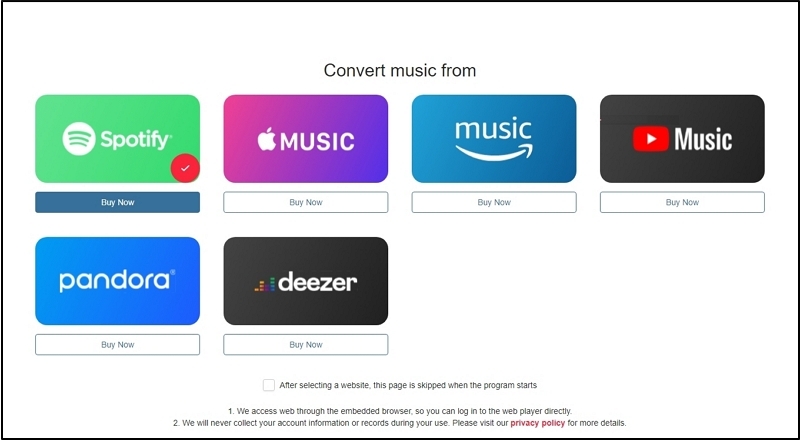
Step 1. Download and install MedVioo on your Windows or Mac computer. Once the software is opened, select the music service you want to use, such as Spotify, Apple Music, YouTube Music and Amazon Music, directly from the main interface.
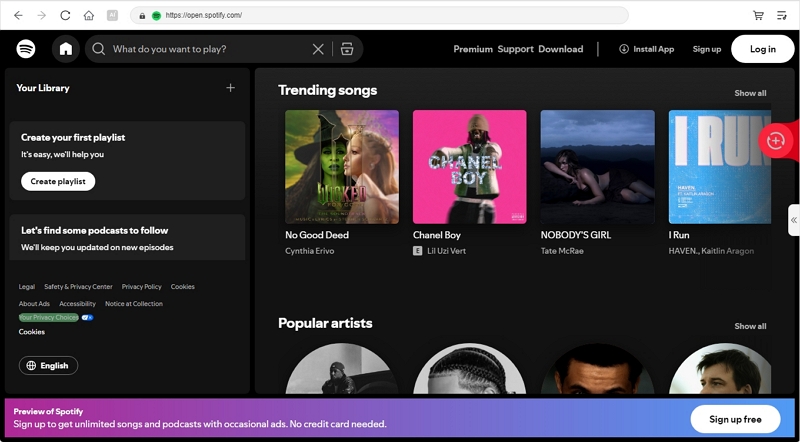
Step 2. You’ll be taken straight into that platform’s web player inside MedVioo’s built-in browser. Log in with your account as you normally would. Once logged in, your entire library is accessible: songs, albums, playlists, even your Liked Songs.
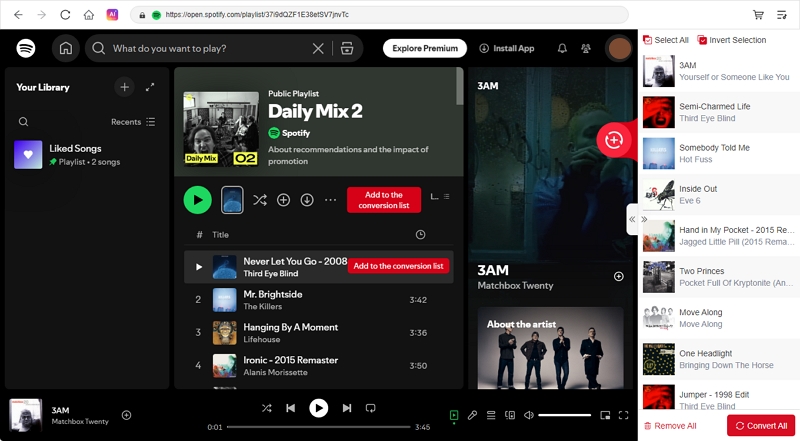
Step 3. Choose the tracks or playlists you want and drag them to the red + button on the right to add them to the conversion queue.
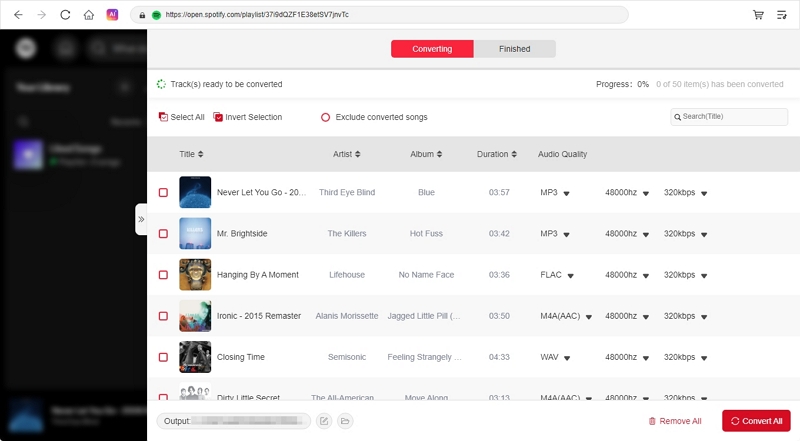
Step 4. Once your songs are added, click Convert All to directly export the selected songs as MP3. You can also expand the conversion pane to adjust the output settings like format, quality and storage destination before starting the conversion.
The files are saved to your computer in high-quality, with proper file names, real metadata, and clean album art, which are exactly how they appear on your music platform. You can play them using any media player or transfer them to other devices as needed.

Final Words
MP3Juice still works if all you want is to grab a single song quickly, but even then, expect to dodge ads, fake pop-ups, and dozens of clone sites just to find one that actually loads. And when it does, the audio quality often falls short. Try it yourself and you’ll see.
MedVioo Audio Converter, on the other hand, is built for real music conversion. It connects directly to Spotify, Apple Music, Amazon Music, Deezer, and more using its built-in browser. You can drag in full playlists, albums, or your Liked Songs and save everything offline in one go at 30x speed.